N04C-VL ENGINE CONTROL ECD SYSTEM REGISTRATION
CAUTION / NOTICE / HINT
- NOTICE:
- ·
When an injector assembly is replaced, the new injector compensation code must be input into the ECM. When the ECM is replaced, all of the existing injector compensation codes must be input into the new ECM.
·Although some injectors are marked with a 32-digit alphanumeric value, only the first 30 digits must be input.
·Injector compensation codes are unique, 30-digit, alphanumeric values printed on the head portion of each injector assembly. If an incorrect injector compensation code is input into the ECM, the engine assembly may rattle or engine idling may become rough. In addition, engine failure may occur and the life of the engine may be shortened.
·When an injector compensation code is input into the ECM, the pilot quantity learning values stored in the ECM are initialized. Also, DTC P062F is stored when the pilot quantity learning values are initialized.
PROCEDURE

 1.INPUT INJECTOR COMPENSATION CODE(S) INTO ECM
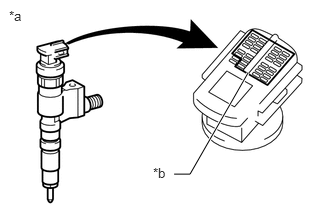
After replacing injector assembly with new one, input compensation code of the injector assembly into the ECM as follows:
- HINT:
- ·
Each injector assembly has different fuel injection characteristics. In order to optimize the fuel injections, the ECM uses the compensation codes to balance the different fuel injections between each injector assembly.
·When only one or more injector assemblies are replaced, input the injector compensation code(s), perform pilot quantity learning, and then clear the DTCs.
·When the ignition switch is turned to ON after replacing the ECM, DTC P062F is stored. This indicates that the injector compensation code(s) need to be registered. Manually clear the DTC upon completion of pilot quantity learning.
| *a | Example |
| *b | Injector Compensation Code |
Input the compensation code(s), which is/are imprinted on the head portion(s) of the new injector(s), into the GTS.
Input the new compensation code(s) into the ECM using the GTS.
Turn the GTS off and turn the ignition switch off.
Wait for at least 30 seconds.
Turn the ignition switch to ON and turn the GTS on.
Clear the DTC P062F stored in the ECM using the GTS (Click hereEngine / Hybrid System>N04C-VL (ENGINE CONTROL)>ECD SYSTEM>PROBLEM SYMPTOMS TABLE).
- HINT:
-
If the DTCs are cleared without performing pilot quantity learning, DTC P062F is stored the next time the ignition switch is turned to ON.
Register compensation codes.
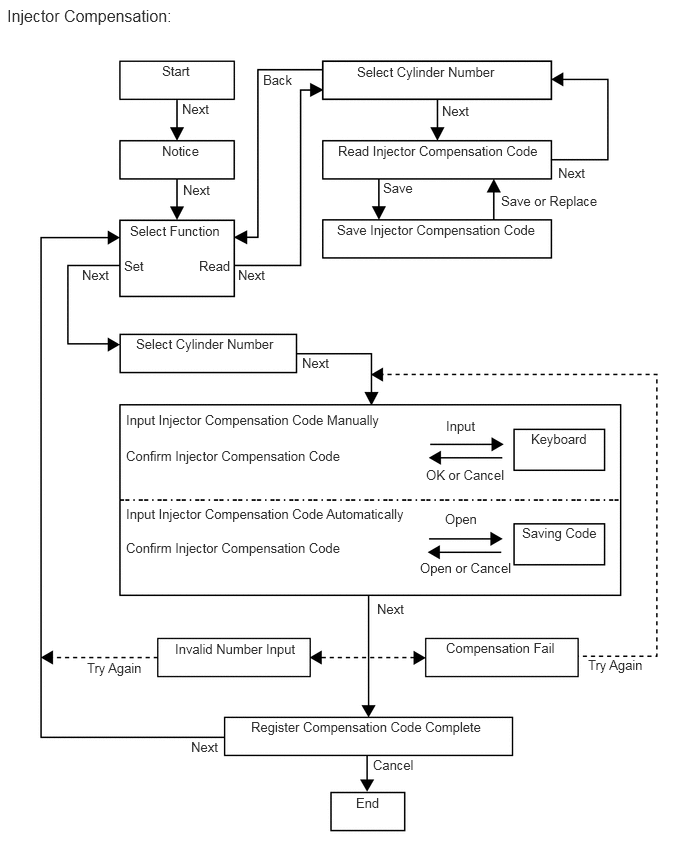
Save compensation codes.
Connect the GTS to the DLC3.
Turn the ignition switch to ON.
- NOTICE:
-
Do not start the engine.
Turn the GTS on.
Enter the following menus: Powertrain / Engine and ECT / Utility / Injector Compensation.
Press "Next".
Press "Next".
Select "Read Compensation Code".
Press "Next".
Select the number of the cylinder corresponding to the injector compensation code that you want to save. Press "Next".
Press "Next".
Press "Save".
Press "Save or Replace".
If you want to continue with other compensation code saving, press "Next". To finish the saving, press "Cancel".
Register compensation codes manually.
Connect the GTS to the DLC3.
Turn the ignition switch to ON.
- NOTICE:
-
Do not start the engine.
Turn the GTS on.
Enter the following menus: Powertrain / Engine and ECT / Utility / Injector Compensation. Press "Next".
Press "Next".
Press "Next".
Select "Set Compensation Code".
Press "Next".
Select the number of the cylinder corresponding to the injector compensation code that you want to register.
Press "Next".
Press "Input".
Manually input the cylinder compensation code using the keyboard on the GTS screen. The code is a 30-digit, alphanumeric value printed on the injector assembly head portion.
- HINT:
-
Each injector compensation code is unique. The compensation code for each selected cylinder must be input into the GTS correctly.
Confirm that the compensation code for the selected cylinder is correct, and then press "OK".
Check that the compensation code displayed on the screen is correct by comparing it with the 30-digit alphanumeric value on the head portion of the injector assembly.
- NOTICE:
-
If an incorrect injector compensation code is input into the ECM, the engine may rattle or engine idling may become rough. In addition, engine failure may occur and the life of the engine may be shortened.
- HINT:
-
If a wrong compensation code is input, return to the input value screen by pressing "Input".
Press "Next" to register the compensation code in the ECM.
- HINT:
- ·
If the registration process fails, the compensation code may be incorrect. Check the compensation code again.
·If the input compensation code fails to register even though it is input correctly, there may be a problem with the wire harness or a bad connection with the DLC3. Check the wire harness and DLC3 connection. If no problem is found with either, the ECM may be malfunctioning. Check the ECM and restart this operation.
If you want to continue with other compensation code registrations, press "Next". To finish the registration, press "Cancel".
Turn the ignition switch off, and then turn the GTS off.
Wait for at least 30 seconds.
Turn the ignition switch to ON, and then turn the GTS on.
Perform pilot quantity learning.
Clear the DTC P062F stored in the ECM using the GTS (Click hereEngine / Hybrid System>N04C-VL (ENGINE CONTROL)>ECD SYSTEM>DTC CHECK / CLEAR).
- NOTICE:
-
If the DTCs are cleared without performing pilot quantity learning, DTC P062F is stored the next time the ignition switch is turned to ON.
Register compensation codes automatically.
Connect the GTS to the DLC3.
Turn the ignition switch to ON.
- NOTICE:
-
Do not start the engine.
Turn the GTS on.
Enter the following menus: Powertrain / Engine and ECT / Utility / Injector Compensation.
Press "Next".
Press "Next".
Select "Set Compensation Code".
Press "Next".
Select the number of the cylinder corresponding to the injector compensation code that you want to register.
Press "Next".
Press "Open".
Check that the compensation code displayed on the screen is correct by comparing it with the 30-digit alphanumeric value on the head portion of the injector assembly.
- NOTICE:
-
If an incorrect injector compensation code is input into the ECM, the engine may rattle or engine idling may become rough. In addition, engine failure may occur and the life of the engine may be shortened.
- HINT:
-
The saving process may fail due to a problem with the wire harness or a bad connection with the DLC3. Check the wire harness and DLC3 connection. If no problem is found with either, the ECM may be malfunctioning. Check the ECM and repeat this operation.
Press "Next" to register the compensation code in the ECM.
- HINT:
- ·
If the registration process fails, the compensation code may be incorrect. Check the compensation code again.
·If the input compensation code fails to register even though it is input correctly, there may be a problem with the wire harness or a bad connection with the DLC3. Check the wire harness and DLC3 connection. If no problem is found with either, the ECM may be malfunctioning. Check the ECM and restart this operation.
If you want to continue with other compensation code registrations, press "Next". To finish the registration, press "Cancel".
Turn the ignition switch off, and then turn the GTS off.
Wait for at least 30 seconds.
Turn the ignition switch to ON, and then turn the GTS on.
Perform pilot quantity learning.
Clear the DTC P062F stored in the ECM using the GTS (Click hereEngine / Hybrid System>N04C-VL (ENGINE CONTROL)>ECD SYSTEM>DTC CHECK / CLEAR).
- NOTICE:
-
If the DTCs are cleared without performing pilot quantity learning, DTC P062F is stored the next time the ignition switch is turned to ON.