2AZ-FE COOLING COOLING FAN MOTOR ON-VEHICLE INSPECTION
PROCEDURE

 1.CHECK INDICATION MARK LOCATION
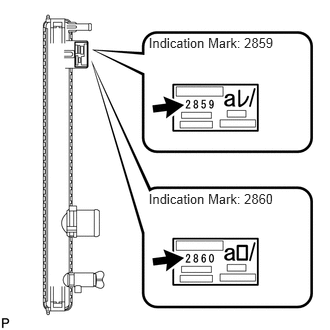
- HINT:
-
Refer to the illustration for the indication mark location on the radiator LH side.
16363
2.CHECK NO. 1 COOLING FAN MOTOR
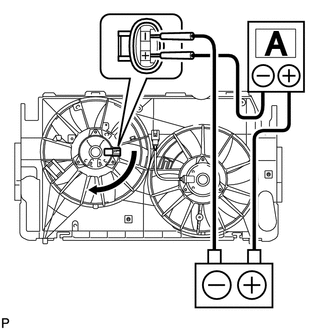
Disconnect the No. 1 fan connector.
Connect the battery and an ammeter to the No. 1 fan motor connector.
Check that the No. 1 fan rotates smoothly, and then check the reading on the ammeter.
- Standard amperage:
Indication Mark Motor Type Condition Specified Condition 2859 160 W At 20°C (68°F) 11.7 to 14.7 A 2860 200 W At 20°C (68°F) 14.7 to 18.7 A
- HINT:
-
Refer to the indication mark illustration for the indication mark location.
If the result is not as specified, replace the No. 1 cooling fan motor.
Reconnect the No. 1 fan motor connector.
16363A
3.CHECK NO. 2 COOLING FAN MOTOR
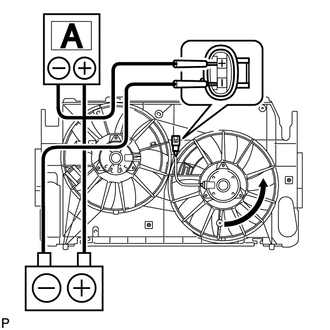
Disconnect the No. 2 fan connector.
Connect the battery and an ammeter to the No. 2 fan motor connector.
Check that the No. 2 fan rotates smoothly, and then check the reading on the ammeter.
- Standard amperage:
Indication Mark Motor Type Condition Specified Condition 2859 120 W At 20°C (68°F) 8.4 to 10.4 A 2860 200 W At 20°C (68°F) 14.7 to 18.7 A
- HINT:
-
Refer to the indication mark illustration for the indication mark location.
If the result is not as specified, replace the No. 2 cooling fan motor.
Reconnect the No. 2 fan motor connector.