RM24M0E
_58
Vehicle Interior
_059564
LIGHTING
_0291965
ACCESSORY LIGHT ASSEMBLY
G
LIGHTING ACCESSORY LIGHT ASSEMBLY INSPECTION
PROCEDURE

 8121A
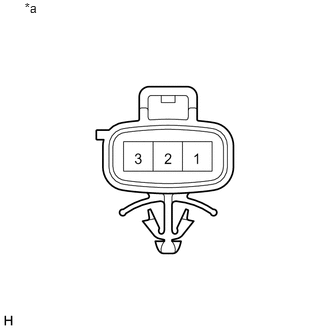
1.INSPECT LED ILLUMINATION LIGHT RH
a.
0.256,0 0.718,0.323
0.461,0.323
10
*a
Apply battery voltage to the LED illumination light RH and check that the light comes on.
- OK:
Condition Specified Condition Battery positive (+) → Terminal 2
Battery negative (-) → Terminal 3Daytime running light comes on Battery positive (+) → Terminal 1
Battery negative (-) → Terminal 3Accessory light comes on
Text in Illustration *a Component without harness connected
(LED Illumination Light RH)
If the result is not as specified, replace the LED illumination light RH.
8122A
2.INSPECT LED ILLUMINATION LIGHT LH
a.
0.256,0 0.718,0.323
0.461,0.323
10
*a
Apply battery voltage to the LED illumination light LH and check that the light comes on.
- OK:
Condition Specified Condition Battery positive (+) → Terminal 2
Battery negative (-) → Terminal 3Daytime running light comes on Battery positive (+) → Terminal 1
Battery negative (-) → Terminal 3Accessory light comes on
Text in Illustration *a Component without harness connected
(LED Illumination Light LH)
If the result is not as specified, replace the LED illumination light LH.