RM24M0E
_56
Audio / Visual / Telematics
_059566
AUDIO / VIDEO
_0291977
AUDIO AND VISUAL SYSTEM
C
AUDIO / VIDEO AUDIO AND VISUAL SYSTEM 62-41 Wrong Disc 62-42 Disc cannot be Read
DESCRIPTION
| DTC No. | DTC Detection Condition | Trouble Area |
|---|---|---|
| 62-41 | Unsuitable disc is inserted. | ·
CD ·
Radio receiver |
| 62-42 | Disc cannot be read. |
CAUTION / NOTICE / HINT
- HINT:
-
After the inspection is completed, clear the DTCs.
PROCEDURE
1.DISC CLEANING
a.
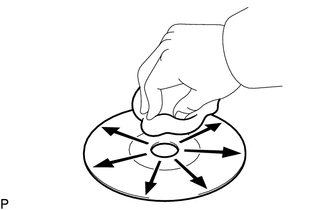
Disc cleaning
i.
If dirt is on the disc surface, wipe it with a soft cloth from the inside to the outside in a radial direction.
- NOTICE:
-
Do not use a conventional record cleaner or antistatic preservative.
NEXT
2.CHECK DISC
2.CHECK DISC
a.
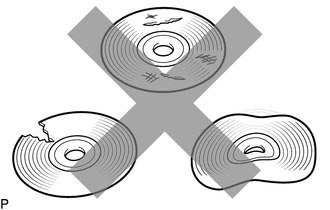
Check that the disc is not deformed or cracked.
- OK:
No deformation or cracks on the disc.
OK
3.REPLACE DISC WITH ANOTHER AND RECHECK
NG
DISC IS FAULTY
3.REPLACE DISC WITH ANOTHER AND RECHECK
a.
Replace the disc with another and recheck.
i.
Replace the disc with a normal one.
ii.
Clear the DTCs (see page Audio / Visual / Telematics>AUDIO / VIDEO>AUDIO AND VISUAL SYSTEM>DTC CHECK / CLEAR).
iii.
Recheck for DTCs and check if the same trouble occurs again.
- OK:
Malfunction disappears.
OK
END
NG
REPLACE RADIO RECEIVER ASSEMBLY