RM24M0E
_52
Drivetrain
_059578
U241E AUTOMATIC TRANSMISSION / TRANSAXLE
_0292103
SHIFT LEVER
A
U241E AUTOMATIC TRANSMISSION / TRANSAXLE SHIFT LEVER DISASSEMBLY
PROCEDURE

 35971A
1.REMOVE UPPER POSITION INDICATOR HOUSING
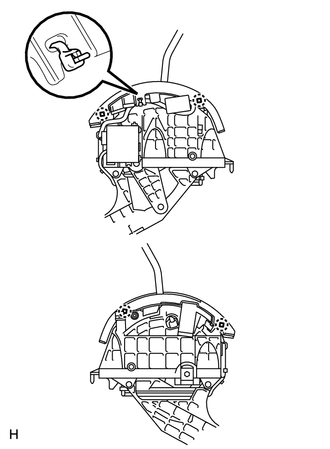
a.
Cut the cable tie.
b.
Detach the 4 claws and remove the upper housing.
35975
2.REMOVE POSITION INDICATOR SLIDE COVER WITH NO. 2 POSITION INDICATOR SLIDE COVER
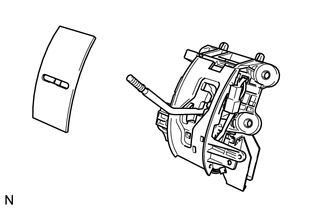
a.
Remove the slide cover with No. 2 slide cover.
b.
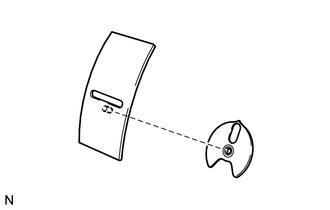
Remove the No. 2 slide cover.
35974
3.REMOVE LOWER POSITION INDICATOR HOUSING
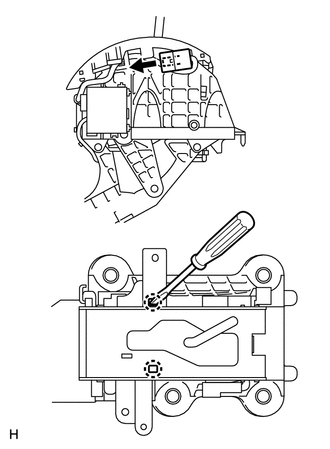
a.
Disconnect the connector.
b.
Using a screwdriver, detach the 2 claws.
c.
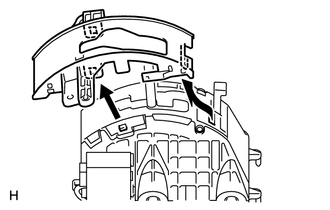
Pull up the housing in the direction indicated by the arrow in the illustration to detach the hook. Then remove the housing from the shift lock control unit assembly.