NAVIGATION / MULTI INFO DISPLAY NAVIGATION SYSTEM Does not Play even after Bluetooth Audio Mode is Selected
CAUTION / NOTICE / HINT
- NOTICE:
-
When replacing the navigation receiver assembly, perform vehicle contract setting (See page Audio / Visual / Telematics>G-BOOK>G-BOOK SYSTEM>REGISTRATION).
- HINT:
-
Even if the portable player can play audio content, it may not be able to play via the in-vehicle device. This does not necessarily indicate a malfunction of the in-vehicle device.
PROCEDURE
Check if the portable player operates normally.
- OK:
The portable player operates normally.
OK
NG
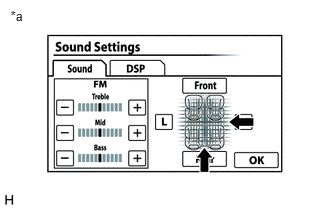
Display the "Sound Settings" screen.
Set volume, fader and balance to the initial values and check that sound is normal.
- OK:
Audio system returns to normal.
- HINT:
-
Sound quality adjustment measures vary according to the type of amplifier.
| *a | Example |
OK
NG
Check if the "Bluetooth" audio player plays normally on another "Bluetooth" audio compatible vehicle of the same model.
- OK:
"Bluetooth" audio player plays normally.
OK
(See pageAudio / Visual / Telematics>NAVIGATION / MULTI INFO DISPLAY>NAVIGATION SYSTEM>PROBLEM SYMPTOMS TABLE)
NG