DTC CHECK / CLEAR
Troubleshooting · Vehicles built from Aug 2008
| DTC CHECK (USING SST CHECK WIRE) |
Check for DTCs (Present DTC).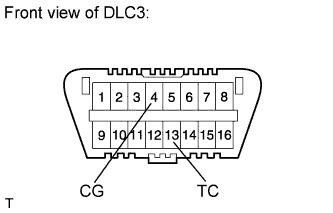

Turn the ignition switch to ON, and wait for approximately 60 seconds.
Using SST, connect terminals TC and CG of the DLC3.
- SST
- 09843-18040
- NOTICE:
- Connect the terminals to the correct positions to avoid a malfunction.
Check for DTCs (Past DTC).
Turn the ignition switch off.
Using SST, connect terminals TC and CG of the DLC3.
- SST
- 09843-18040
- NOTICE:
- Connect the terminals to the correct positions to avoid a malfunction.
Turn the ignition switch to ON, and wait for approximately 60 seconds.
Read the DTCs.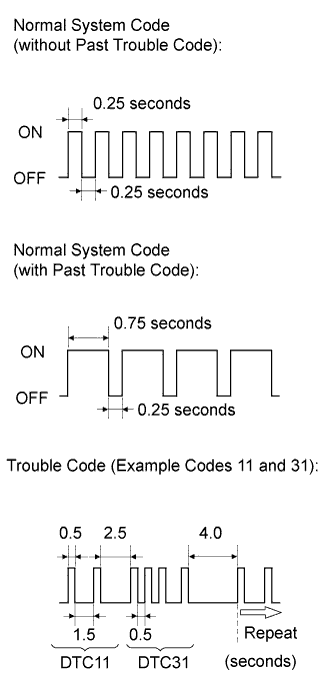
Read the blinking patterns of the DTCs. As examples, the blinking patterns for the normal system code and DTCs 11 and 31 are shown in the illustration.
- Normal system code indication (w/o past DTC)
The light blinks twice per second.
- Normal system code indication (w/ past DTC)
When the past DTC is stored in the center airbag sensor assembly, the light blinks once per second.
- DTC indication
The first blinking pattern indicates the first digit DTC. The second blinking pattern occurs after a 1.5-second pause.
- HINT:
- If 2 or more malfunctions are found, the indication begins with the lowest numbered DTC.
- If DTCs are indicated without connecting the terminals, proceed to the "TC and CG Terminal Circuit" (Click here ).
- If 2 or more malfunctions are found, the indication begins with the lowest numbered DTC.
- Normal system code indication (w/o past DTC)
| DTC CLEAR (USING SST CHECK WIRE) |
Clear the DTCs.
When the ignition switch is turned off, the DTCs are cleared.
- HINT:
- Depending on the DTCs, the DTCs may not all be cleared by turning off the ignition switch. In this case, proceed to the next operation.
Using SST, connect terminals TC and CG of the DLC3, and then turn the ignition switch on.
- SST
- 09843-18040
Disconnect terminal TC of the DLC3 within 3 to 10 seconds of the DTCs being output, and check that the SRS warning light comes on after 3 seconds.
Within 2 to 4 seconds of the SRS warning light coming on, connect terminals TC and CG of the DLC3.
The SRS warning light goes off within 2 to 4 seconds of connecting terminals TC and CG of the DLC3. Then, disconnect terminal TC within 2 to 4 seconds of the SRS warning light going off.
The SRS warning light comes on again within 2 to 4 seconds of disconnecting terminal TC. Then, reconnect terminals TC and CG within 2 to 4 seconds of the SRS warning light coming on.
Check that the SRS warning light goes off within 2 to 4 seconds of connecting terminals TC and CG of the DLC3. Also check that the normal system code is output within 1 second of the SRS warning light going off.
If DTCs are not cleared, repeat these procedures until the DTCs are cleared.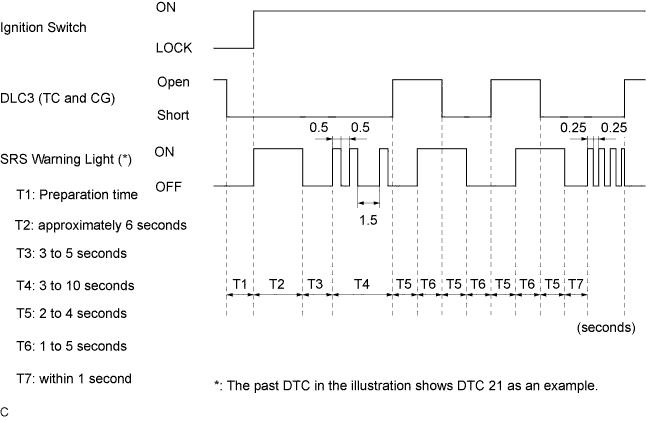
| DTC CHECK |
Check for DTCs.
Connect the intelligent tester to the DLC3.
Turn the ignition switch to ON.
Turn the tester on.
Enter the following menus: Body Electrical / SRS Airbag / Trouble Codes /
Clear DTCs.
Connect the intelligent tester to the DLC3.
Turn the ignition switch to ON.
Turn the tester on.
Enter the following menus: Body Electrical / SRS Airbag / Trouble Codes /
Erase the DTCs.