DTC CHECK / CLEAR
Troubleshooting · Vehicles built Jul 2007 – Nov 2007
Versions by build date: Jul 2007 – Nov 2007 Dec 2007 – Jul 2009 from Aug 2009
| CHECK DTC |
The tester can display pending DTCs and current DTCs. Some DTCs are not stored if the ECM does not detect a malfunction during consecutive driving cycles. However, malfunctions detected during a single driving cycle are stored as pending DTCs.
Connect the intelligent tester to the DLC3.
Turn the ignition switch to ON.
Turn the tester ON.
Enter the following menus: Powertrain / Engine and ECT / Trouble Codes.
Confirm the DTCs and freeze frame data and then write them down.
Confirm the details of the DTCs (Click here).
| CLEAR DTC |
When using a intelligent tester:
Connect the intelligent tester to the DLC3.
Turn the ignition switch to ON.
Turn the tester ON.
Enter the following menus: Powertrain / Engine and ECT / Trouble Codes.
Erase the DTCs.
When not using a intelligent tester: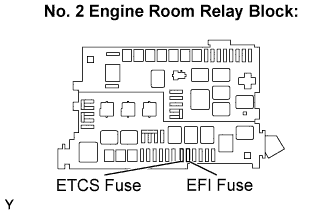

Disconnect the battery terminal or remove the EFI and ETCS fuses from the No. 2 engine room relay block for 60 seconds or more. However, if you disconnect the battery terminal, perform the "INITIALIZATION" procedure (Click here).