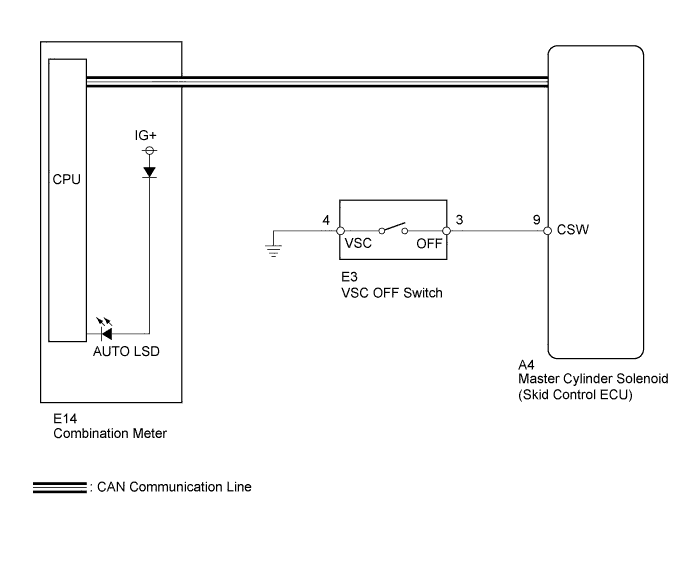
VEHICLE STABILITY CONTROL SYSTEM > AUTO LSD Indicator Light Remains ON |
| 1.CHECK CAN COMMUNICATION LINE |
Turn the ignition switch off.
Connect the Techstream to the DLC3.
Turn the ignition switch to ON.
Turn the Techstream on.
Select CAN Bus Check from the System Selection Menu screen and follow the prompts on the screen to inspect the CAN bus (Click here).
|
| ||||
| OK | |
 |
| 2.INSPECT VSC OFF SWITCH |
Remove the VSC OFF switch (Click here).
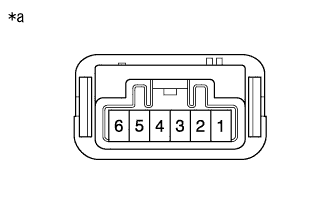 |
Measure the resistance according to the value(s) in the table below.
| Tester Connection | Switch Condition | Specified Condition |
| 3 - 4 | Switch is not pushed | 10 kΩ or higher |
| Switch is pushed | Below 1 Ω |
| *a | Component without harness connected (VSC OFF Switch) |
|
| ||||
| OK | |
|
| 3.CHECK HARNESS AND CONNECTOR (SKID CONTROL ECU - VSC OFF SWITCH) |
Disconnect the A4 skid control ECU connector.
Disconnect the E3 VSC OFF switch connector.
Measure the resistance according to the value(s) in the table below.
| Tester Connection | Condition | Specified Condition |
| A4-9 (CSW) - E3-3 | Always | Below 1 Ω |
| A4-9 (CSW) - Body ground | Always | 10 kΩ or higher |
| E3-4 - Body ground | Always | Below 1 Ω |
|
| ||||
| OK | |
|
| 4.READ VALUE USING TECHSTREAM (AUTO LSD INDICATOR LIGHT) |
Turn the ignition switch off.
Connect the Techstream to the DLC3.
Turn the ignition switch to ON.
Turn the Techstream on.
Enter the following menus: Chassis / ABS/VSC/TRAC / Data List.
According to the display on the Techstream, read the Data List.
| Tester Display | Measurement Item/Range | Normal Condition | Diagnostic Note |
| Auto LSD Indicator Light | Auto LSD indicator light/ ON or OFF | ON: Indicator light on OFF: Indicator light off | - |
| Result | Proceed to |
| Auto LSD indicator light remains on, Data Monitor is on. | A |
| Auto LSD indicator light remains on, Data Monitor is off. | B |
|
| ||||
| A | ||
 | ||
| ||
