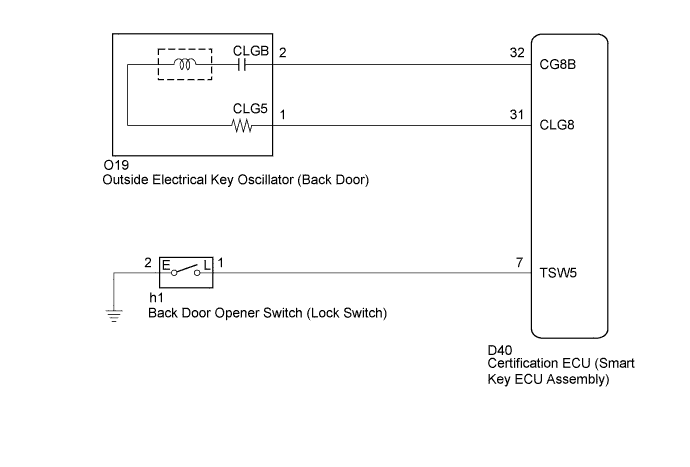
SMART KEY SYSTEM > Back Door Entry Lock Function does not Operate |
| 1.CHECK POWER DOOR LOCK OPERATION |
When the door control switch on the master switch assembly is operated, check that the locked doors unlock (Click here).
|
| ||||
| OK | |
 |
| 2.READ VALUE ON TECHSTREAM (BACK DOOR OPENER SWITCH) |
Connect Techstream to the DLC3.
Turn the engine switch on (IG).
Turn the tester on.
Enter the following menus:
Body Electrical / Smart Key / Data List.
Select Tr/B-Door Lock SW in the Data List and read the tester display.
| Tester Display | Measurement Item/Display | Normal Condition | Diagnostic Note |
| Tr/B-Door Lock SW | Back door lock switch / ON or OFF | ON: Back door lock switch is pushed | - |
| OFF: Back door lock switch is not pushed |
|
| ||||
| OK | ||
 | ||
| ||
| 3.CHECK BACK DOOR OPENER SWITCH |
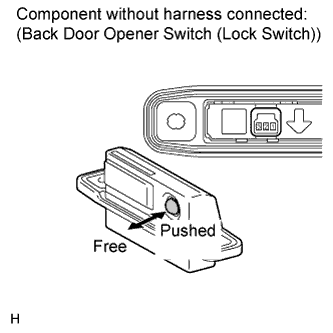 |
Remove the back door opener switch (Click here).
Measure the resistance according to the value(s) in the table below.
| Tester Connection | Condition | Specified Condition |
| 1 - 2 | Lock switch pushed | Below 1 Ω |
| 1 - 2 | Lock switch not pushed | 10 kΩ or higher |
|
| ||||
| OK | |
|
| 4.CHECK HARNESS AND CONNECTOR (CERTIFICATION ECU - BACK DOOR OPENER SWITCH) |
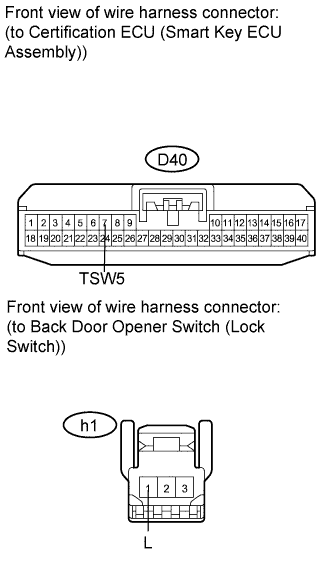 |
Disconnect the certification ECU (smart key ECU assembly) connector.
Measure the resistance according to the value(s) in the table below.
| Tester Connection | Condition | Specified Condition |
| D40-7 (TSW5) - h1-1 (L) | Always | Below 1 Ω |
| D40-7 (TSW5) - Body ground | Always | 10 kΩ or higher |
|
| ||||
| OK | |
|
| 5.CHECK HARNESS AND CONNECTOR (BACK DOOR OPENER SWITCH - BODY GROUND) |
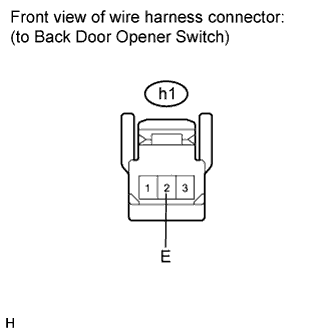 |
Measure the resistance according to the value(s) in the table below.
| Tester Connection | Condition | Specified Condition |
| h1-2 (E) - Body ground | Always | Below 1 Ω |
|
| ||||
| OK | ||
| ||
| ||

