SMART KEY SYSTEM > Power Source Mode does not Change to ON (READY) |
| HYBRID CONTROL SYSTEM FUNCTION |
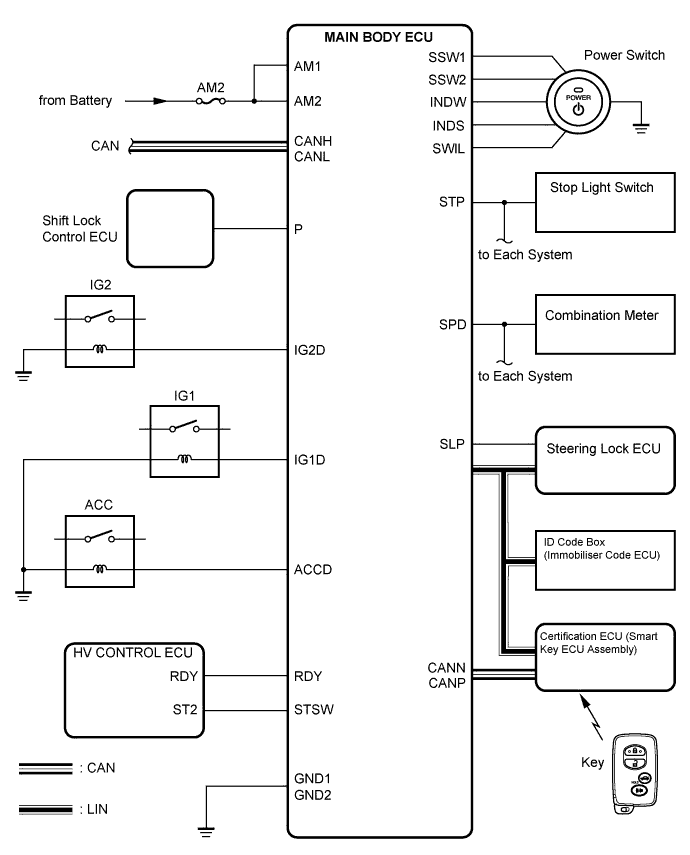
If the power switch is pressed with the shift lever is in the P or N position and the brake pedal depressed, the main body ECU (instrument panel junction block) determines that it is a hybrid control system start request.
The certification ECU (smart key ECU assembly) and other ECUs perform key verification via the LIN communication line.
The main body ECU (instrument panel junction block) activates the ACC relay.
The main body ECU (instrument panel junction block) activates the IG1 and IG2 relays.
The certification ECU (smart key ECU assembly) outputs a steering UNLOCK signal. The signal is sent to the main body ECU (instrument panel junction block) via the steering lock ECU.
The main body ECU (instrument panel junction block) sends an on (READY) request signal to the hybrid vehicle control ECU.
The hybrid vehicle control ECU sends an ACC cut request signal to the main body ECU (instrument panel junction block).
| Symbol of main body ECU | Signal | |
| STP | Stop light switch ON signal | Input |
| SSW1/SSW2 | Power switch ON signal | Input |
| ACCD | ACC relay operation signal | Output |
| SLP | Steering lock actuator position signal | Input |
| IG1D | IG1 relay operation signal | Output |
| IG2D | IG2 relay operation signal | Output |
| RDY | Hybrid control system on (READY) detection signal | Input |
| STSW | Hybrid control system on (READY) request signal | Output |
| 1.CHECK THE POWER SWITCH CONDITION |
Check the power source mode changes.
When the key is inside the vehicle and the shift lever is in the P position, check that the power source mode changes.
|
| ||||
| OK | |
 |
| 2.CHECK DTC |
Delete the DTCs (Click here).
Check for DTCs again.
Proceed to the next step based on the inspection result.
| Result | Proceed to |
| No DTC is output | A |
| Smart key system (starting function) DTCs are output | B |
| Steering lock DTCs are output | C |
| Engine immobiliser system DTCs are output | D |
| Vehicle stability control system DTCs are output | E |
|
| ||||
|
| ||||
|
| ||||
|
| ||||
| A | |
|
| 3.READ VALUE USING TECHSTREAM (S CODE) |
Connect Techstream to the DLC3.
Turn the power switch on (IG).
| Tester Display | Measurement Item/Range | Normal Condition | Diagnostic Note |
| S Code Chk | S code check / OK or NG | OK: Normal NG: Malfunction | - |
|
| ||||
| OK | |
|
| 4.READ VALUE USING TECHSTREAM (L CODE) |
Connect Techstream to the DLC3.
Turn the power switch on (IG).
| Tester Display | Measurement Item/Range | Normal Condition | Diagnostic Note |
| L Code Check | L code check / OK or NG | OK: Normal NG: Malfunction | - |
|
| ||||
| OK | |
|
| 5.READ VALUE USING TECHSTREAM (IMMOBILISER SYSTEM STATUS) |
Connect Techstream to the DLC3.
Turn the power switch on (IG).
| Tester Display | Measurement Item/Range | Normal Condition | Diagnostic Note |
| Immobiliser | Immobiliser system status / SET or UNSET | UNSET: Power switch on SET: Without key | - |
|
| ||||
| OK | ||
 | ||
| ||
| 6.REGISTER RECOGNITION CODE (ECU CODE) |
Register the recognition code (ECU code) (Click here).
| NEXT | |
|
| 7.CHECK POWER SWITCH CONDITION |
Check the power source mode changes.
When the key is inside the vehicle and the shift lever is in the P position and the brake pedal is depressed check that the power source mode changes.
|
| ||||
| OK | ||
| ||
| ||
| 8.REPLACE CERTIFICATION ECU |
Replace the certification ECU (smart key ECU assembly) (Click here).
| NEXT | |
|
| 9.KEY REGISTRATION |
Register the key (Click here).
| NEXT | |
|
| 10.CHECK POWER SWITCH CONDITION |
Check the power source mode changes.
When the key is inside the vehicle and the shift lever is in the P position and the brake pedal is depressed check that the power source mode changes.
|
| ||||
| OK | ||
| ||
| ||
| 11.REGISTER RECOGNITION CODE (ECU CODE) |
Register the recognition code (ECU code) (Click here).
| NEXT | |
|
| 12.CHECK THE POWER SWITCH CONDITION |
Check the power source mode changes.
When the key is inside the vehicle and the shift lever is in the P position and the brake pedal is depressed check that the power source mode changes.
|
| ||||
| OK | ||
| ||
| ||
| 13.REPLACE STEERING LOCK ECU |
Replace the steering lock ECU (Click here).
| NEXT | |
|
| 14.REGISTER RECOGNITION CODE (ECU CODE) |
Register the recognition code (ECU code) (Click here).
| NEXT | |
|
| 15.CHECK THE POWER SWITCH CONDITION |
Check the power source mode changes.
When the key is inside the vehicle and the shift lever is in the P position and the brake pedal is depressed check that the power source mode changes.
|
| ||||
| OK | ||
| ||
| ||
| 16.READ VALUE USING TECHSTREAM (ENGINE START REQUEST) |
Connect Techstream to the DLC3.
Turn the power switch on (IG).
| Tester Display | Measurement Item/Range | Normal Condition | Diagnostic Note |
| Starter Request Signal | Hybrid control system start request signal / ON or OFF | ON: STSW signal is ON OFF: STSW signal is OFF | - |
|
| ||||
| OK | ||
| ||
| ||

