CRUISE CONTROL DYNAMIC RADAR CRUISE CONTROL SYSTEM(for HV Model) Cruise SET Indicator Light Circuit
DESCRIPTION
The hybrid vehicle control ECU illuminates the cruise SET indicator by sending request signals to the combination meter assembly via CAN communication. The cruise SET indicator illuminates when the dynamic radar cruise control system is controlling vehicle speed. If the cruise SET indicator is not operating correctly, check for CAN communication DTCs before troubleshooting this circuit.
CAUTION / NOTICE / HINT
- CAUTION:
-
Observe the following items for safety reasons when using the GTS:
- ·
Before using the GTS, read the instruction manual.
·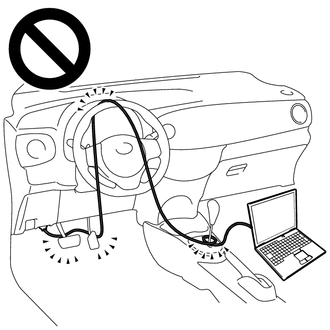
Prevent the GTS cable from being caught on the pedals, shift lever or steering wheel when driving with the GTS connected to the vehicle.
·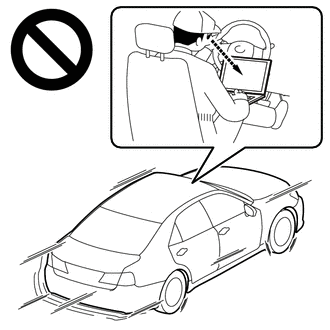
When driving the vehicle for testing purposes, 2 people are required. One person should operate the GTS while the other drives the vehicle.
- NOTICE:
- ·
Before replacing the hybrid vehicle control ECU, refer to Service Bulletin.
·When replacing the combination meter assembly, always replace it with a new one. If a combination meter assembly which was installed to another vehicle is used, the information stored in it will not match the information from the vehicle and a DTC may be stored.
PROCEDURE
Perform the Active Test according to the display on the GTS.
- Body Electrical > Combination Meter > Active Test
-
Tester Display Measurement Item Control Range Diagnostic Note Multi Display All (White) Multi-information display (White display) OFF or ON -
- Body Electrical > Combination Meter > Active Test
-
Tester Display Multi Display All (White) - 50004 409 20
- Result:
Result Proceed to The multi-information display in the combination meter assembly turns on according to the operation of the Active Test A The multi-information display in the combination meter assembly does not turn on according to the operation of the Active Test B
A
B
Click hereVehicle Interior>METER / GAUGE / DISPLAY>METER / GAUGE SYSTEM>HOW TO PROCEED WITH TROUBLESHOOTING
Turn the dynamic radar cruise control system on using the cruise control main switch.
Drive at a speed between approximately 30 km/h (20 mph) and 180 km/h (110 mph).
Read the Data List according to the display on the GTS.
- Powertrain > Radar Cruise1 > Data List
-
Tester Display Measurement Item Range Normal Condition Diagnostic Note -SET Switch -SET switch status OFF or ON OFF: -SET switch not pushed
ON: -SET switch pushed-
- Powertrain > Radar Cruise1 > Data List
-
Tester Display -SET Switch - 50003 399 22
- Result:
Result Proceed to The cruise SET indicator illuminates and turns off according to the operation of the -SET switch A The cruise SET indicator does not illuminate but the Data List item -SET Switch changes according to the operation of the -SET switch B The cruise SET indicator does not illuminate and the Data List item -SET Switch does not change according to the operation of the -SET switch C
A
B
C