RM37A0E
_56
Audio / Visual / Telematics
_086878
NAVIGATION / MULTI INFO DISPLAY
_0445272
MULTI-DISPLAY
A
NAVIGATION / MULTI INFO DISPLAY MULTI-DISPLAY REMOVAL
PROCEDURE

 55405B
1.REMOVE CENTER INSTRUMENT CLUSTER FINISH PANEL SUB-ASSEMBLY
2.REMOVE MULTI-DISPLAY WITH AIR CONDITIONING CONTROL
a.
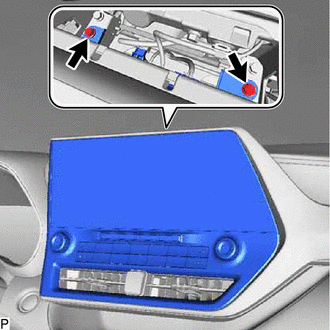
Remove the 2 bolts.
b.
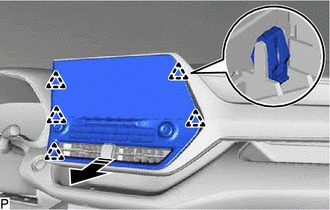
0,0 0,0
false

|
Remove in this Direction |
Pull the multi-display with air conditioning control as shown in the illustration to disengage the 5 clips.
c.
Disconnect each connector.
d.
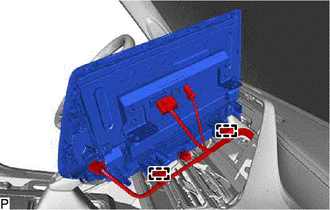
Disengage the 2 clamps to remove the multi-display with air conditioning control.
55900
3.REMOVE AIR CONDITIONING CONTROL ASSEMBLY
83950M
4.REMOVE TELLTALE LIGHT ASSEMBLY
86110B
5.REMOVE MULTI-DISPLAY ASSEMBLY