WIPER / WASHER WASHER NOZZLE(for Rear Television Camera) INSTALLATION
PROCEDURE

 867F0
1.INSTALL CAMERA CLEANER NOZZLE ASSEMBLY
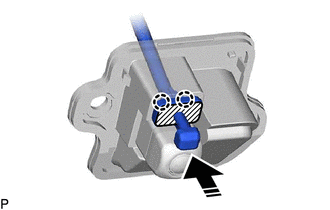

|
Push Area |

|
Install in this Direction |
Press the push area until the 2 claws engage to install the camera cleaner nozzle assembly as shown in the illustration.
- NOTICE:
- ·
Make sure to press only the push area.
·Confirm the engagement of the camera cleaner nozzle assembly and television camera assembly by listening for the click sound of the lock engaging.
867F0
2.INSTALL CAMERA CLEANER NOZZLE ASSEMBLY (w/ Digital Inner Mirror)
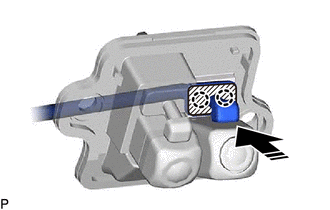
|
|
Push Area |
|
|
Install in this Direction |
Press the push area until the 2 claws engage to install the camera cleaner nozzle assembly as shown in the illustration.
- NOTICE:
- ·
Make sure to press only the push area.
·Confirm the engagement of the camera cleaner nozzle assembly and television camera assembly by listening for the click sound of the lock engaging.
3.INSTALL TELEVISION CAMERA ASSEMBLY WITH NOZZLE
w/o Digital Inner Mirror: Click hereAudio / Visual / Telematics>PARK ASSIST / MONITORING>TELEVISION CAMERA (for Rear)>INSTALLATION
w/ Digital Inner Mirror: Click hereAudio / Visual / Telematics>PARK ASSIST / MONITORING>TELEVISION CAMERA (for Rear)>INSTALLATION
64780A
4.INSTALL BACK DOOR TRIM PANEL ASSEMBLY
67848E
5.INSTALL BACK DOOR SERVICE HOLE COVER LH
67847
6.INSTALL BACK DOOR SERVICE HOLE COVER RH
- HINT:
-
Use the same procedure as for the LH side.