A25A-FXS, A25B-FXS ENGINE CONTROL SFI SYSTEM VEHICLE CONTROL HISTORY
DESCRIPTION
Vehicle Control History is a function that captures and stores ECU data when triggered by specific vehicle behavior.
The number of possible stored Freeze Frame Data sets, whether multi Freeze Frame Data is available, the number of freeze frame points, Freeze Frame Data items, the ECU internal range, etc., is different depending on the stored group.
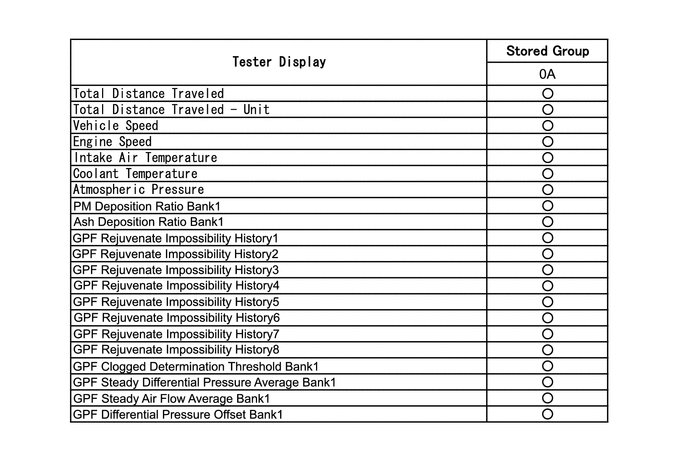
The stored data items for Vehicle Control History Freeze Frame Data are different depending on the stored group. When the value of a data item does not change across all points, only the value of the detection point will be displayed. The contents of the Freeze Frame Data is almost the same as that of the Data List.
Click hereEngine / Hybrid System>A25A-FXS, A25B-FXS (ENGINE CONTROL)>SFI SYSTEM>DATA LIST / ACTIVE TEST
PRECAUTIONS
As Vehicle Control History may be overwritten whenever the trigger conditions are met, make sure to save Vehicle Control History before performing any inspections.
As Vehicle Control History may be stored when performing an Active Test, learning, etc., make sure to clear the Vehicle Control History before returning the vehicle to the customer.
CHECK VEHICLE CONTROL HISTORY (SFI SYSTEM (w/ Differential Pressure Sensor))
Connect the GTS to the DLC3.
Turn the ignition switch to ON.
Turn the GTS on.
Enter the following menus: Powertrain / Engine / Utility / Vehicle Control History (RoB).
- Powertrain > Engine > Utility
-
Tester Display Vehicle Control History (RoB) - 50005 372 55
- HINT:
-
It is also possible to display Vehicle Control History during the Health Check, if "Store All Data" is selected.
| Code | Item | Trigger Description | Stored Group | Reference Inspection Procedure | Link |
|---|---|---|---|---|---|
| X0856 | GPF Rejuvenate Interruption | When normal PM (Particulate Matter) regeneration stops | 0A | - | - |
| X0857 | GPF Rejuvenate Run Insufficiency | The air fuel ratio conditions are met at 60 km/h (37 mph) or more, but the temperature required for PM regeneration has not been reached | 0A | - | - |
| X0858 | Particulate Filter Differential Pressure High Bank1 | When the GPF upstream exhaust pressure measured by the differential pressure sensor (GPF differential pressure calibration value) exceeds the threshold value due to the accumulation of PM or ash (metal oxide)
|
0A | Refer to the P244B00 inspection procedure | ( ) |
| X0859 | Particulate Filter Differential Pressure Too High Bank1 | When the GPF upstream exhaust pressure measured by the differential pressure sensor (GPF differential pressure calibration value) exceeds the threshold value due to further PM and ash being accumulated in the GPF after the GPF differential pressure sensor determines the pressure is high (X0858)
|
0A | Refer to the P244B00 inspection procedure | ()
|
| X085C | Over Temperature Prevention when Particulate Filter Over Accumulation | When the PM deposition ratio is at or above the specified value
|
0A | Refer to the P246300 inspection procedure | ()
|
| Stored Group | Number of Records | Number of Freeze Frame Points | Multi Freeze Frame Data Sampling Period | Note |
|---|---|---|---|---|
| 0A | 4 codes
|
1 point (multi Freeze Frame Data not available) | - | The data can be cleared by using the GTS or by disconnecting the cable from the negative (-) battery terminal. |
- HINT:
- ·
Multi Freeze Frame Data makes it possible to display the engine condition (ECU data) both before and after the trigger detection point.
·The number of available points differs depending on the stored group.
·When the value of a data item does not change across all points, only the value at the detection point will be displayed.
·Only 1 measurement point can be displayed for stored group 0A Freeze Frame Data.
CLEAR VEHICLE CONTROL HISTORY (SFI SYSTEM)
Connect the GTS to the DLC3.
Turn the ignition switch to ON.
Turn the GTS on.
Enter the following menus: Powertrain / Engine / Utility / Vehicle Control History (RoB) / Clear.
- Powertrain > Engine > Utility
-
Tester Display Vehicle Control History (RoB) - 50005 372 55
- NOTICE:
-
By performing this procedure, all stored Vehicle Control History items will be cleared.
VEHICLE CONTROL HISTORY FREEZE FRAME DATA (SFI SYSTEM (w/ Differential Pressure Sensor))
Connect the GTS to the DLC3.
Turn the ignition switch to ON.
Turn the GTS on.
Enter the following menus: Powertrain / Engine / Utility / Vehicle Control History (RoB).
- Powertrain > Engine > Utility
-
Tester Display Vehicle Control History (RoB) - 50005 372 55
Select a Vehicle Control History item to access the applicable Freeze Frame Data.
Check the Freeze Frame Data recorded with the Vehicle Control History.
VEHICLE CONTROL HISTORY (AIRBAG SYSTEM)
- HINT:
-
A part of the control history can be confirmed using the vehicle control history.
-
Click hereVehicle Interior>SUPPLEMENTAL RESTRAINT SYSTEMS>AIRBAG SYSTEM>VEHICLE CONTROL HISTORY
VEHICLE CONTROL HISTORY (HYBRID CONTROL SYSTEM)
- HINT:
-
A part of the control history can be confirmed using the vehicle control history.
-
for 4WD/AWD: Click hereEngine / Hybrid System>HYBRID / BATTERY CONTROL>HYBRID CONTROL SYSTEM (for 4WD/AWD)>VEHICLE CONTROL HISTORY
-
for 2WD: Click hereEngine / Hybrid System>HYBRID / BATTERY CONTROL>HYBRID CONTROL SYSTEM (for 2WD)>VEHICLE CONTROL HISTORY