AUDIO AND VISUAL SYSTEM (for Radio and Display Type) > DTC CHECK / CLEAR |
| START DIAGNOSTIC MODE |
Turn the ignition switch to ON.
![]() |
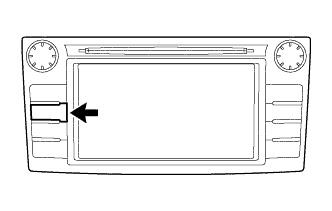
While pressing and holding the "AUDIO" switch, operate the headlight dimmer switch assembly: off → turn on → turn off → turn on → turn off → turn on → turn off.
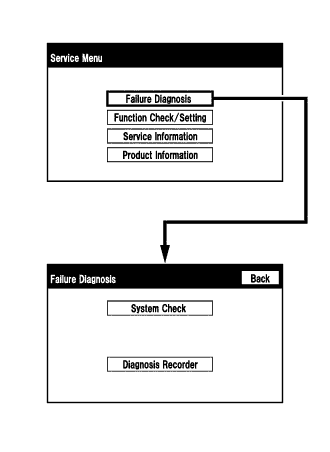
Diagnostic mode starts and the "Service Menu" screen will be displayed. Service inspection starts automatically and the result will be displayed.
| FAILURE DIAGNOSIS |
![]() |
The "Failure Diagnosis" screen will be displayed by pressing the "Failure Diagnosis" switch on the "Service Menu" screen.
| SYSTEM CHECK |
![]() |
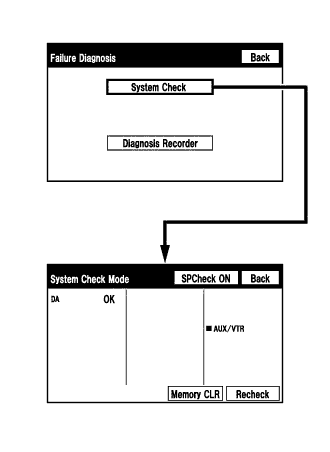
The "System Check Mode" screen will be displayed by pressing the "System Check" switch on the "Failure Diagnosis" screen.
| CHECK DTC (CHECK USING SYSTEM CHECK MODE SCREEN) |
![]() |
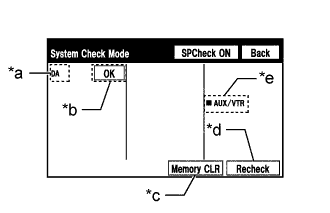
System check mode screen description
| Display | Content |
| *a: Device Name List No. 1 |
|
| *b: Check Result | Result codes for all devices are displayed |
| *c: Memory Clear |
|
| *d: Recheck |
|
| *e: Device Name List No. 2 |
|
| Name | Component | Connection Method |
| DA | Radio and display receiver assembly | - |
| Result | Meaning | Action |
| OK | The device does not respond with a DTC. | - |
| DETAIL | The device responds with a DTC. | Look up the DTC in "Unit Check Mode". |
| NCON | The device was previously present, but does not respond in diagnostic mode. | Check power supply wire harness of the device. |
| NRES | The device responds in diagnostic mode, but gives no DTC information. | Check power supply wire harness of the device. |
| Result | Meaning | Action |
| AUX/VTR | No. 1 stereo jack adapter assembly | Vehicle wire harness |
![]() |
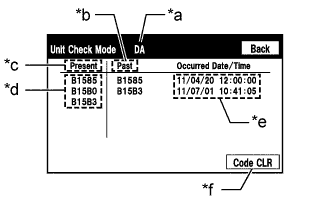
Unit check mode screen description
| Display | Meaning |
| *a: Device name | Target device |
| *b: History DTC | Diagnostic memory results and stored DTCs are displayed. |
| *c: Current DTC | DTCs output in the service check are displayed. |
| *d: DTC | DTC (Diagnostic Trouble Code) |
| *e: Timestamp | The time and date of history DTCs are displayed. (The year is displayed in 2-digit format.) |
| *f: Diagnosis clear switch | Pushing this switch for 3 seconds clears the diagnostic memory data of the target device. (Both response to diagnostic system check result and the displayed data are cleared.) |
![]() |
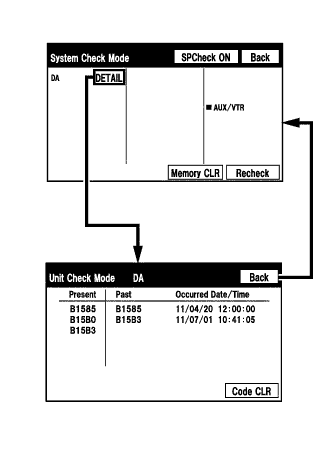
Read the system check result.
If the check result is "DETAIL", touch the displayed check result to view the results on the "Unit Check Mode" screen and record them.
Check the details of the DTC(s) (Click here).
| DTC CLEAR/RECHECK (CLEAR USING SYSTEM CHECK MODE SCREEN) |
Clear DTCs
![]() |
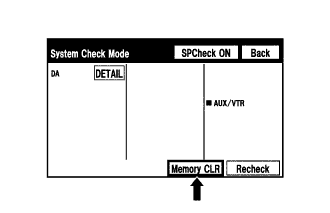
Press the "Memory CLR" switch for 3 seconds.
Confirm that the check results are cleared.
Recheck
![]() |
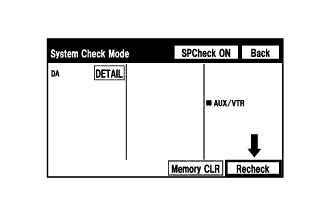
Press the "Recheck" switch.
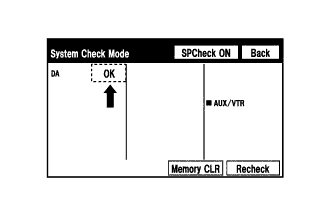
![]() |
Confirm that all diagnostic codes are "OK" when the check results are displayed. If a code other than "OK" is displayed, troubleshoot again.
| FINISH DIAGNOSTIC MODE |
There are 2 methods to end diagnostic mode. Use one of them.
Turn the ignition switch off.
Press and hold the "AUDIO" switch for 3 seconds.