The Other Caller's Voice cannot be Heard, is too Quiet, or Distorted
Circuit diagnosis · Vehicles built Aug 2012 – Jul 2013
Versions by build date: Jun 2011 – Jul 2012 Aug 2012 – Jul 2013
INSPECTION PROCEDURE
- HINT:
- For vehicles equipped with an Extension Module, refer to optional equipment's manuals.
| 1. CHECK CELLULAR PHONE |
 |
Check if the voice on the other side can be heard using the cellular phone.
- OK:
- The voice can be heard.
|
NG |
 |
|
|
|
| OK |
|
 |
|
| 2. CHECK AUDIO AND VISUAL SYSTEM |
|
Check that audio sound can be heard from the driver side speaker.
- OK:
- Audio sound can be heard.
- HINT:
- If audio sound cannot be heard, proceed to "No sound can be heard from speakers (Audio is mute)" in Problem Symptoms Table (Click here).
|
NG |
|
|
| PROCEED TO NEXT SUSPECTED AREA SHOWN IN PROBLEM SYMPTOMS TABLE (Click here)
|
|
|
| OK |
|
|
|
| 3. CHECK SETTINGS |
|
Check that the received voice level setting on the radio and display receiver assembly is not too low.
Press the "SETUP" switch.
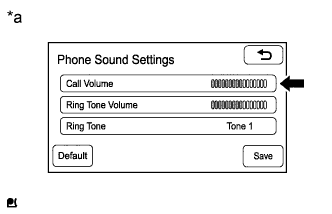
- Touch the "Telephone" button and select the "Sound settings" to display the "Phone Sound Settings" screen.
Check that the "Call Volume" level is not too low.
- OK:
- "Call Volume" level is not too low.
Text in Illustration
*a
|
Example
|
Check that the received voice level setting on the cellular phone is not too low.
- OK:
- The received voice level setting is not too low.
|
NG |
|
|
|
|
| OK |
|
 |
|
| PROCEED TO NEXT SUSPECTED AREA SHOWN IN PROBLEM SYMPTOMS TABLE (Click here)
|
|