RM1840EF
_56
Audio / Visual / Telematics
_009632
NAVIGATION / MULTI INFO DISPLAY
_0052661
NAVIGATION SYSTEM
J
NAVIGATION / MULTI INFO DISPLAY NAVIGATION SYSTEM Route cannot be Calculated
PROCEDURE
1.CHECK GPS MARK
a.
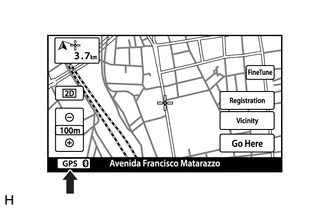
Check that the GPS mark is displayed.
- OK:
GPS mark is displayed.
- Rsult:
Proceed to OK NG
OK
2.CHECK GPS INFORMATION
NG
GO TO "GPS MARK IS NOT DISPLAYED" IN PROBLEM SYMPTOMS TABLE
Click hereAudio / Visual / Telematics>NAVIGATION / MULTI INFO DISPLAY>NAVIGATION SYSTEM>PROBLEM SYMPTOMS TABLE
2.CHECK GPS INFORMATION
a.
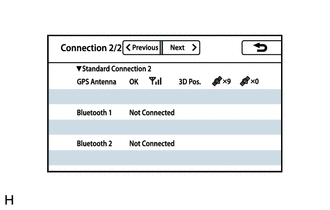
Display the "Connection Status" screen.
Click hereAudio / Visual / Telematics>NAVIGATION / MULTI INFO DISPLAY>NAVIGATION SYSTEM>OPERATION CHECK
b.
Check that all of the items related to "GPS Antenna" are normal.
- OK:
All the items related to "GPS Antenna" are normal.
- Rsult:
Result Proceed to OK A NG (w/o Blocking System) B NG (w/ Blocking System) C
A
3.SET DESTINATION
B
REPLACE NAVIGATION ANTENNA ASSEMBLY
C
REPLACE INSTRUMENT PANEL INTEGRATION ANTENNA ASSEMBLY
3.SET DESTINATION
a.
Set another destination and check if the system can calculate the route correctly.
- OK:
Route can be correctly calculated.
- Rsult:
Proceed to OK NG
OK
END
NG
PROCEED TO NEXT SUSPECTED AREA SHOWN IN PROBLEM SYMPTOMS TABLE
Click hereAudio / Visual / Telematics>NAVIGATION / MULTI INFO DISPLAY>NAVIGATION SYSTEM>PROBLEM SYMPTOMS TABLE