RM1840EF
_56
Audio / Visual / Telematics
_009632
NAVIGATION / MULTI INFO DISPLAY
_0052661
NAVIGATION SYSTEM
J
NAVIGATION / MULTI INFO DISPLAY NAVIGATION SYSTEM The Other Caller cannot Hear Your Voice, or Your Voice is too Quiet or Distorted
PROCEDURE
1.CHECK CELLULAR PHONE
a.
Check if the other side can hear your voice properly.
- OK:
Your voice can be heard correctly.
- Result:
Proceed to OK NG
OK
2.CHECK SETTINGS
NG
CELLULAR PHONE IS FAULTY
2.CHECK SETTINGS
a.
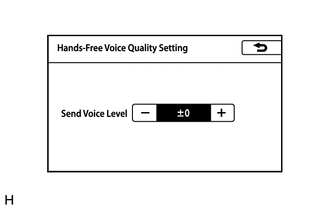
Display the "Hands-Free Voice Quality Setting" screen.
Click hereAudio / Visual / Telematics>NAVIGATION / MULTI INFO DISPLAY>NAVIGATION SYSTEM>OPERATION CHECK
b.
Adjust "Send Voice Level" and check that the other caller can hear your voice.
- HINT:
- ·
Adjusting "Send Voice Level" may deteriorate the sound quality.
·The "Send Voice Level" can be set to 10 different levels, -5 to +5.
- OK:
Malfunction disappears.
- Result:
Proceed to OK NG
OK
END
NG
PROCEED TO NEXT SUSPECTED AREA SHOWN IN PROBLEM SYMPTOMS TABLE
Click hereAudio / Visual / Telematics>NAVIGATION / MULTI INFO DISPLAY>NAVIGATION SYSTEM>PROBLEM SYMPTOMS TABLE