NAVIGATION / MULTI INFO DISPLAY NAVIGATION SYSTEM B15C0 Short in GPS Antenna B15C1 Open in GPS Antenna
DESCRIPTION
These DTCs are stored when a malfunction occurs in the navigation antenna assembly.
| DTC No. | Detection Item | DTC Detection Condition | Trouble Area |
|---|---|---|---|
| B15C0 | Short in GPS Antenna | Navigation antenna error | ·
Navigation antenna assembly ·
Navigation antenna cord sub-assembly ·
Navigation receiver assembly |
| B15C1 | Open in GPS Antenna | Error of the power source to the navigation antenna | ·
Navigation antenna assembly ·
Navigation antenna cord sub-assembly ·
Navigation receiver assembly |
WIRING DIAGRAM
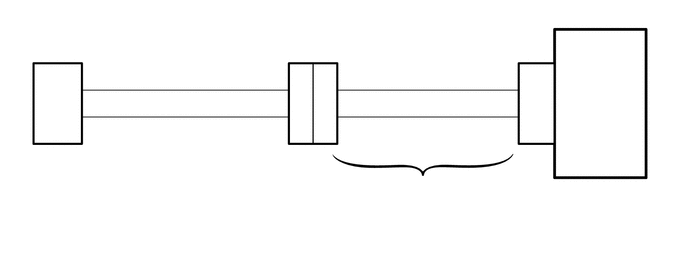
PROCEDURE
Check if the navigation antenna cord sub-assembly is securely connected to the navigation receiver assembly.
Click hereAudio / Visual / Telematics>NAVIGATION / MULTI INFO DISPLAY>NAVIGATION ANTENNA>REMOVAL
- OK:
Navigation antenna cord sub-assembly is securely connected.
- Result:
Proceed to OK NG
OK
NG
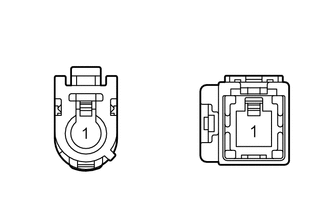
| *a | Front view of wire harness connector
(to Navigation Receiver Assembly) |
| *b | Front view of wire harness connector
(to Navigation Antenna Assembly) |
Disconnect the navigation antenna assembly connector.
Disconnect the GP navigation receiver assembly connector.
Measure the resistance according to the value(s) in the table below.
- Standard Resistance:
Tester Connection Condition Specified Condition GP-1 - 1 Always Below 1 Ω GP-2 - 2 Always Below 1 Ω GP-1 - GP-2 or 1-2 Always 10 kΩ or higher
- Result:
Proceed to OK NG
OK
NG
Replace the navigation antenna assembly with a known good one and check if the same DTC is output again.
Click hereAudio / Visual / Telematics>NAVIGATION / MULTI INFO DISPLAY>NAVIGATION ANTENNA>REMOVAL
Clear the DTCs.
Click hereAudio / Visual / Telematics>NAVIGATION / MULTI INFO DISPLAY>NAVIGATION SYSTEM>DTC CHECK / CLEAR
Recheck for DTCs and check if the same DTC is output again.
Click hereAudio / Visual / Telematics>NAVIGATION / MULTI INFO DISPLAY>NAVIGATION SYSTEM>DTC CHECK / CLEAR
- Result:
Proceed to OK NG
OK
NG