NAVIGATION / MULTI INFO DISPLAY NAVIGATION SYSTEM B15C3 Speaker Output Short
DESCRIPTION
This DTC is stored when a malfunction occurs in the speakers.
| DTC No. | Detection Item | DTC Detection Condition | Trouble Area |
|---|---|---|---|
| B15C3 | Speaker Output Short | Either condition is met:
·
A malfunction occurs in the navigation receiver assembly internal power IC. ·
A DC offset occurs in +/- speaker output. |
·
Speakers ·
Navigation receiver assembly ·
Harness or connector |
WIRING DIAGRAM
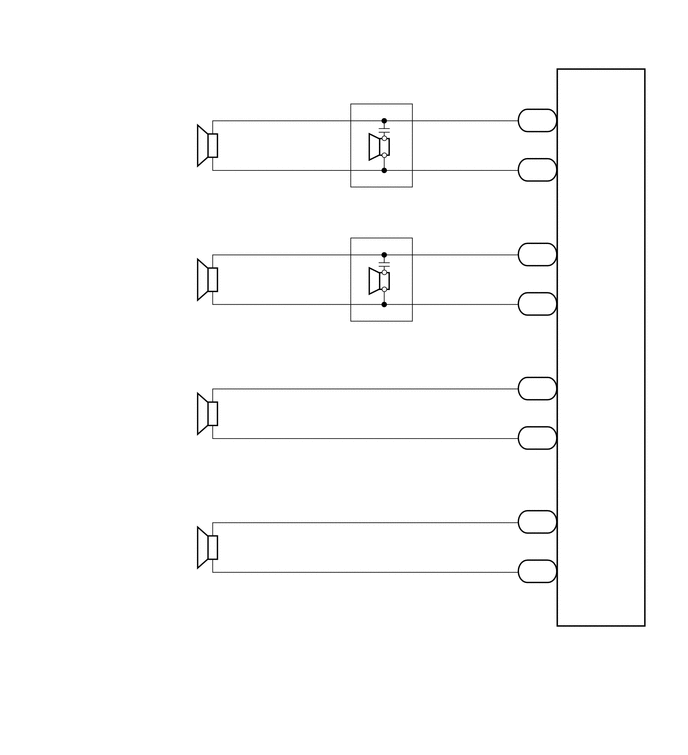
PROCEDURE
Disconnect the G105 and G104 navigation receiver assembly connectors.
Clear the DTC.
Click hereAudio / Visual / Telematics>NAVIGATION / MULTI INFO DISPLAY>NAVIGATION SYSTEM>DTC CHECK / CLEAR
Check if DTC B15C3 is output.
- Result:
Proceed to DTC B15C3 is not output DTC B15C3 is output
DTC B15C3 is not output
DTC B15C3 is output
Disconnect the G105 navigation receiver assembly connector.
Clear the DTC.
Click hereAudio / Visual / Telematics>NAVIGATION / MULTI INFO DISPLAY>NAVIGATION SYSTEM>DTC CHECK / CLEAR
Check if DTC B15C3 is output.
- Result:
Proceed to DTC B15C3 is not output DTC B15C3 is output
DTC B15C3 is not output
DTC B15C3 is output
Disconnect the G105 navigation receiver assembly connector.
Disconnect the H6*1 and/or I6*2 front No. 2 speaker assembly connector.
*1: for RH
*2: for LH
Measure the resistance according to the value(s) in the table below.
- Standard Resistance:
- for RH:
Tester Connection Condition Specified Condition G105-1 (FR+) - H6-4 (TWR+) Always Below 1 Ω G105-5 (FR-) - H6-2 (TWR-) G105-1 (FR+) - Body ground Always 10 kΩ or higher G105-5 (FR-) - Body ground
- for LH:
Tester Connection Condition Specified Condition G105-2 (FL+) - I6-4 (TWL+) Always Below 1 Ω G105-6 (FL-) - I6-2 (TWL-) G105-2 (FL+) - Body ground Always 10 kΩ or higher G105-6 (FL-) - Body ground
- Result:
Proceed to OK NG
OK
NG
*1: for RH
*2: for LH
Disconnect the H6*1 and/or I6*2 front No. 2 speaker assembly connector.
Disconnect the H4*1 and/or I1*2 front No. 1 speaker assembly connector.
Measure the resistance according to the value(s) in the table below.
- Standard Resistance:
- for RH:
Tester Connection Condition Specified Condition H6-3 (+) - H4-1 Always Below 1 Ω H6-1 (-) - H4-2 H6-3 (+) - Body ground Always 10 kΩ or higher H6-1 (-) - Body ground
- for LH:
Tester Connection Condition Specified Condition I6-3 (+) - I1-1 Always Below 1 Ω I6-1 (-) - I1-2 I6-3 (+) - Body ground Always 10 kΩ or higher I6-1 (-) - Body ground
- Result:
Proceed to OK NG
OK
NG
Disconnect the front No. 1 speaker assembly connector.
Inspect the front No. 1 speaker assembly connector.
Click hereAudio / Visual / Telematics>AUDIO / VIDEO>FRONT DOOR SPEAKER>INSPECTION
- Result:
Proceed to OK NG
OK
NG
Temporarily replace the front No. 2 speaker assembly with a new or normally functioning one.
Click hereAudio / Visual / Telematics>AUDIO / VIDEO>FRONT DOOR SPEAKER>REMOVAL
Check that the malfunction disappears.
- HINT:
- ·
Connect all the speaker connectors to the speakers.
·When there is a possibility that either the right or left speaker is defective, inspect by interchanging the right one with the left one.
- Result:
Proceed to Malfunction does not disappear Malfunction disappears
Malfunction does not disappear
Malfunction disappears
Disconnect the G104 navigation receiver assembly connector.
Disconnect the J7*1 and/or J3*2 rear speaker assembly connector.
*1: for RH
*2: for LH
Measure the resistance according to the value(s) in the table below.
- Standard Resistance:
- for RH:
Tester Connection Condition Specified Condition G104-1 (RR+) - J7-1 Always Below 1 Ω G104-3 (RR-) - J7-2 G104-1 (RR+) - Body ground Always 10 kΩ or higher G104-3 (RR-) - Body ground
- for LH:
Tester Connection Condition Specified Condition G104-2 (RL+) - J3-1 Always Below 1 Ω G104-6 (RL-) - J3-2 G104-2 (RL+) - Body ground Always 10 kΩ or higher G104-6 (RL-) - Body ground
- Result:
Proceed to OK NG
OK
NG
Disconnect the rear speaker assembly connector.
Inspect the rear speaker assembly connector.
Click hereAudio / Visual / Telematics>AUDIO / VIDEO>REAR DOOR SPEAKER>INSPECTION
- Result:
Proceed to OK NG
OK
NG