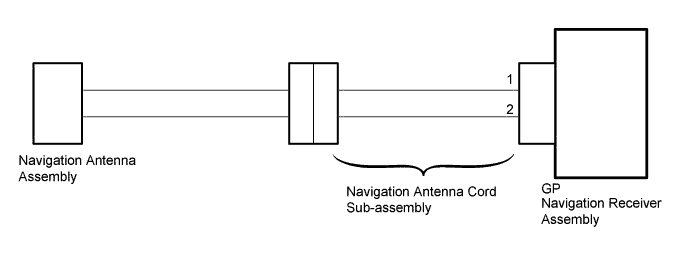
DTC B15C0 Short in GPS Antenna |
DTC B15C1 Open in GPS Antenna |
| DTC No. | DTC Detection Condition | Trouble Area |
| B15C0 | Navigation antenna error |
|
| B15C1 | Error of the power source to the navigation antenna |
| 1.CHECK CONNECTION OF NAVIGATION ANTENNA CORD SUB-ASSEMBLY |
Check if the navigation antenna cord sub-assembly is securely connected to the navigation receiver assembly (Click here).
|
| ||||
| OK | |
 |
| 2.CHECK NAVIGATION ANTENNA CORD SUB-ASSEMBLY |
 |
Disconnect the navigation antenna assembly connector.
Disconnect the GP navigation receiver assembly connector.
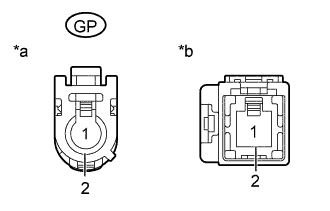
Measure the resistance according to the value(s) in the table below.
| Tester Connection | Condition | Specified Condition |
| GP-1 - 1 | Always | Below 1 Ω |
| GP-2 - 2 | Always | Below 1 Ω |
| GP-1 - GP-2 or 1-2 | Always | 10 kΩ or higher |
| *a | Front view of wire harness connector (to Navigation Receiver Assembly) |
| *b | Front view of wire harness connector (to Navigation Antenna Assembly) |
|
| ||||
| OK | |
|
| 3.CHECK NAVIGATION ANTENNA ASSEMBLY |
Replace the navigation antenna assembly with a known good one and check if the same DTC is output again (Click here).
Clear the DTCs (Click here).
Recheck for DTCs and check if the same DTC is output again (Click here).
|
| ||||
| OK | ||
 | ||
| ||
