NAVIGATION SYSTEM > USB Device or "iPod" cannot Charge |
| 1.REPLACE USB DEVICE OR "iPod" |
Disconnect the USB device or "iPod" from the stereo jack adapter.
Turn the ignition switch off.
Turn the ignition switch to ACC.
Connect a known good USB device or "iPod" to the stereo jack adapter.
|
| ||||
| OK | ||
 | ||
| ||
| 2.CHECK NAVIGATION RECEIVER ASSEMBLY |
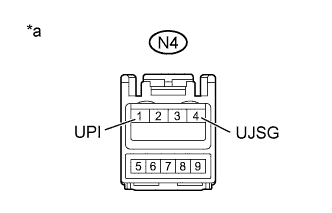 |
Disconnect the N4 No. 1 stereo jack adapter assembly connector.
Measure the voltage according to the value(s) in the table below.
| Tester Connection | Condition | Specified Condition |
| N4-1 (UPI) - N4-4 (UJSG) | Always | 4.5 to 5.5 V |
| *a | Front view of wire harness connector (to No. 1 Stereo Jack Adapter Assembly) |
|
| ||||
| OK | ||
| ||
| ||
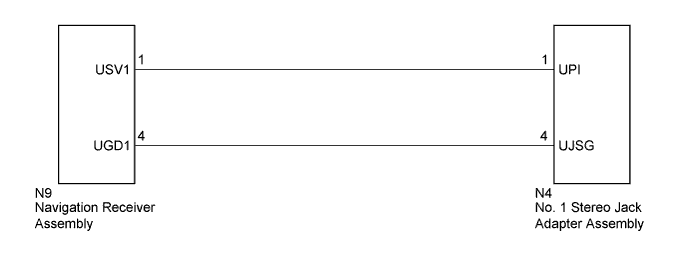
| 3.CHECK HARNESS AND CONNECTOR (NAVIGATION RECEIVER ASSEMBLY - NO. 1 STEREO JACK ADAPTER ASSEMBLY) |
Disconnect the N9 navigation receiver assembly connector.
Disconnect the N4 No. 1 stereo jack adapter assembly connector.
Measure the resistance according to the value(s) in the table below.
| Tester Connection | Condition | Specified Condition |
| N9-1 (USV1) - N4-1 (UPI) | Always | Below 1 Ω |
| N9-4 (UGD1) - N4-4 (UJSG) | Always | Below 1 Ω |
| N9-1 (USV1) - Body ground | Always | 10 kΩ or higher |
| N9-4 (UGD1) - Body ground | Always | 10 kΩ or higher |
|
| ||||
| OK | ||
| ||
| ||

