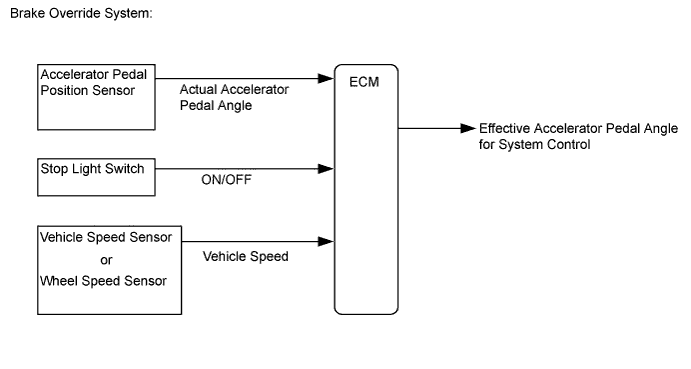
SFI SYSTEM (w/o Secondary Air Injection System) > Brake Override System |
| 1.CHECK DTC OUTPUT |
Connect the intelligent tester to the DLC3.
Turn the ignition switch to ON and turn the intelligent tester on.
Enter the following menus: Utility / All Codes.
Check DTCs.
| Result | Proceed to |
| No DTC output | A |
| DTC output | B |
|
| ||||
| A | |
 |
| 2.READ VALUE USING INTELLIGENT TESTER (STOP LIGHT SWITCH AND ST1) |
Connect the intelligent tester to the DLC3.
Turn the ignition switch to ON and turn the intelligent tester on.
Enter the following menus: Powertrain / Engine and ECT / Data List / Stop Light Switch and ST1.
Check the Data List indication when the brake pedal is depressed and released.
| Intelligent Tester Display | Condition | Specified Condition |
| Stop Light Switch | Brake pedal released | OFF |
| Brake pedal depressed | ON | |
| ST1 | Brake pedal released | OFF |
| Brake pedal depressed | ON |
|
| ||||
| OK | |
|
| 3.INSPECT BRAKE PEDAL |
Inspect and adjust the brake pedal (Click here).
|
| ||||
| OK | |
|
| 4.READ VALUE USING INTELLIGENT TESTER (ACCELERATOR PEDAL POSITION SENSOR) |
Connect the intelligent tester to the DLC3.
Turn the ignition switch to ON and turn the intelligent tester on.
Enter the following menus: Powertrain / Engine and ECT / Data List / Accel Sens. No. 1 Volt % and Accel Sens. No. 2 Volt %.
Read the value displayed on the intelligent tester.
| Intelligent Tester Display | Condition | Specified Condition |
| Accel Sens. No. 1 Volt % | Accelerator Pedal Released → Depressed → Released | Values smoothly change following accelerator pedal operation |
| Accel Sens. No. 2 Volt % |
|
| ||||
| OK | |
|
| 5.READ VALUE USING INTELLIGENT TESTER (VEHICLE SPEED) |
Connect the intelligent tester to the DLC3.
Turn the ignition switch to ON and turn the intelligent tester on.
Start the engine.
Enter the following menus: Powertrain / Engine and ECT / Data List / Vehicle Speed.
Read the value displayed on the intelligent tester.
| Intelligent Tester Display | Condition | Specified Condition |
| Vehicle Speed | Vehicle stopped, engine running | 0 km/h (0 mph) |
| Vehicle driven at constant speed between 16.1 and 64.4 km/h (10 and 40 mph) | No large fluctuations when driving at a constant speed |
|
| ||||
| OK | |
|
| 6.READ VALUE USING INTELLIGENT TESTER (FR, FL, RR, RL WHEEL SPEED) |
Connect the intelligent tester to the DLC3.
Turn the ignition switch to ON and turn the intelligent tester on.
Start the engine.
Enter the following menus: Chassis / ABS/VSC/TRC / Data List / FR Wheel Speed, FL Wheel Speed, RR Wheel Speed and RL Wheel Speed.
Read the value displayed on the intelligent tester.
| Intelligent Tester Display | Condition | Specified Condition |
| FR Wheel Speed FL Wheel Speed RR Wheel Speed RL Wheel Speed | Vehicle stopped, engine running | 0 km/h (0 mph) |
| Vehicle driven at constant speed between 16.1 and 64.4 km/h (10 and 40 mph) | No large fluctuations when driving at a constant speed |
|
| ||||
| OK | ||
 | ||
| ||
