AUDIO / VIDEO REAR DOOR SPEAKER INSTALLATION
CAUTION / NOTICE / HINT
- HINT:
- ·
Use the same procedure for the RH and LH sides.
·The procedure listed below is for the LH side.
PROCEDURE

 86160Y
1.INSTALL REAR NO. 2 SPEAKER ASSEMBLY (for 14 Speakers)
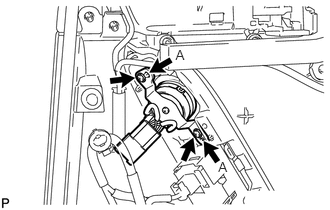
Align the speaker with the door position pins labeled A.
Install the rear No. 2 speaker with the 2 screws.
- NOTICE:
-
Do not touch the cone of the speaker.
86160C
2.INSTALL REAR SPEAKER SET
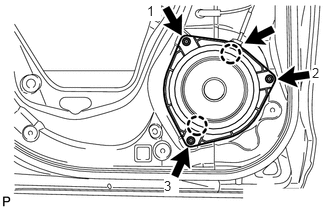
Temporarily install the speaker by attaching the 2 claws of the speaker to the door panel.
Install the rear speaker set with the 3 screws in the order shown in the illustration.
- NOTICE:
-
Do not touch the cone of the speaker.
Connect the connector.
68174A
3.INSTALL REAR DOOR INNER GLASS WEATHERSTRIP LH
67604
4.INSTALL REAR DOOR TRIM BOARD SUB-ASSEMBLY
74611C
5.INSTALL ASSIST GRIP COVER LH
69298C
6.INSTALL NO. 2 DOOR INSIDE HANDLE BEZEL LH
7.CONNECT CABLE TO NEGATIVE BATTERY TERMINAL
- NOTICE:
-
When disconnecting the cable, some systems need to be initialized after the cable is reconnected (See page General>INTRODUCTION>REPAIR INSTRUCTION>INITIALIZATION).