RM27T0E
_56
Audio / Visual / Telematics
_053720
AUDIO / VIDEO
_0260968
REAR SEAT ENTERTAINMENT SYSTEM
J
AUDIO / VIDEO REAR SEAT ENTERTAINMENT SYSTEM Television Display does not Turn ON
PROCEDURE
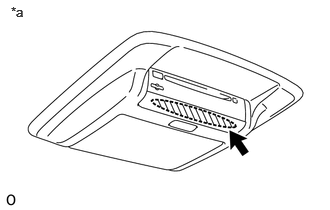
1.CLEAN INFRARED RAY RECEIVING PORTION
a.
0.115,0.042 0.427,0.24
0.313,0.198
10
false
*a
| *a | Example |
Clean the infrared ray receiving portion on the television display assembly.
b.
Check whether the same malfunction occurs.
- OK:
The function returns to normal.
- Result:
Proceed to OK NG
OK
END
NG
2.CHECK REAR SWITCH AND VOLUME ASSEMBLY (DRY-CELL BATTERY)
2.CHECK REAR SWITCH AND VOLUME ASSEMBLY (DRY-CELL BATTERY)
a.
Check that the dry-cell battery of the rear switch and volume assembly is not depleted.
- OK:
Battery is not depleted.
- Result:
Proceed to OK NG
OK
3.CHECK REAR SWITCH AND VOLUME ASSEMBLY
NG
REPLACE REAR SWITCH AND VOLUME ASSEMBLY (DRY-CELL BATTERY)
3.CHECK REAR SWITCH AND VOLUME ASSEMBLY
a.
Temporarily replace the rear switch and volume assembly with a new or known good one.
b.
Check that the television display assembly turns on.
- OK:
The television display assembly turns on.
- Result:
Proceed to OK NG
OK
END (REAR SWITCH AND VOLUME ASSEMBLY WAS DEFECTIVE)
NG
REPLACE TELEVISION DISPLAY ASSEMBLY