NAVIGATION / MULTI INFO DISPLAY NAVIGATION SYSTEM Illumination for Panel Switch does not Come on with Tail Switch ON
CAUTION / NOTICE / HINT
- HINT:
-
Depending on the parts that are replaced during vehicle inspection or maintenance, performing initialization, registration or calibration may be needed. Refer to Precaution for Navigation System.
-
Click hereAudio / Visual / Telematics>NAVIGATION / MULTI INFO DISPLAY>NAVIGATION SYSTEM>PRECAUTION
PROCEDURE
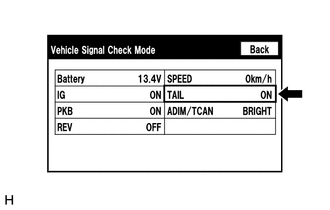
Enter the "Vehicle Signal Check Mode" screen. Refer to Check Vehicle Signal in Operation Check.
Click hereAudio / Visual / Telematics>NAVIGATION / MULTI INFO DISPLAY>NAVIGATION SYSTEM>OPERATION CHECK
Check that the display changes between ON and OFF according to the light control switch operation.
- OK:
Light Control Switch Display Tail or head ON Off or AUTO OFF
- HINT:
- ·
This display is updated once per second. As a result, it is normal for the display to lag behind the actual switch operation.
·Make sure to move the vehicle to a bright area before performing an operation check with the light control switch in the AUTO position.
- Result:
Proceed to OK NG
OK
Click hereAudio / Visual / Telematics>AUDIO / VIDEO>RADIO RECEIVER (for Radio and Display Type)>REMOVAL
NG
Click hereAudio / Visual / Telematics>NAVIGATION / MULTI INFO DISPLAY>NAVIGATION SYSTEM>PROBLEM SYMPTOMS TABLE