1GD-FTV BATTERY / CHARGING BATTERY CURRENT SENSOR INSTALLATION
PROCEDURE

 28850C
1.INSTALL BATTERY STATE SENSOR ASSEMBLY
Set the battery state sensor assembly onto the battery current sensor holder, and then attach the 3 claws to install it.
Install the battery state sensor assembly to the battery and tighten the nut.
- Torque:
- 5.4 N*m (55 kgf*cm, 48 in.*lbf)
Connect the wire harness to the battery state sensor assembly with the nut.
- Torque:
- 7.6 N*m (77 kgf*cm, 67 in.*lbf)
Attach the clamp to the battery current sensor holder.
Connect the connector to the battery state sensor assembly.
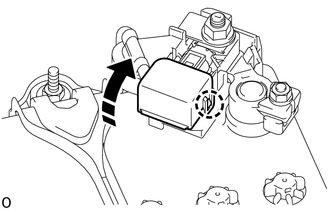
Attach the claw and close the battery current sensor holder.
2. INITIALIZATION AFTER RECONNECTING BATTERY TERMINAL
Click hereGeneral>SETUP>WHEN DISCONNECTING OR RECONNECTING BATTERY TERMINAL>WORK PROCEDURE
- HINT:
-
When disconnecting and reconnecting the battery, there is an automatic learning function that completes learning when the respective system is used.
-
Click hereGeneral>SETUP>WHEN DISCONNECTING OR RECONNECTING BATTERY TERMINAL>AUTOMATIC LEARNING CHART