NAVIGATION / MULTI INFO DISPLAY NAVIGATION ANTENNA(w/ Heated Windshield Defroster System) INSTALLATION
PROCEDURE

 86705A
1.INSTALL TELEPHONE ANTENNA CORD SUB-ASSEMBLY
Attach the 2 claws to install the telephone antenna cord sub-assembly.
86760A
2.INSTALL TELEPHONE ANTENNA ASSEMBLY
When reusing the telephone antenna assembly:
Install a new seal.
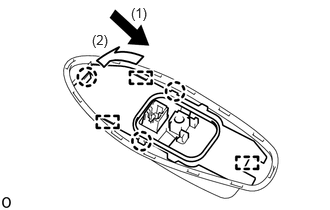
Attach the claws and guides to install the telephone antenna assembly as indicated by the arrows in the order shown in the illustration.
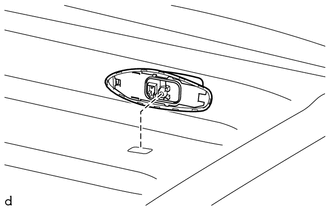
Temporarily install the telephone antenna assembly to the vehicle.
Insert the a new washer and holder to install the telephone antenna with the bolt.
- Torque:
- 9.5 N*m (97 kgf*cm, 84 in.*lbf)
Connect the connector.
63310
3.INSTALL ROOF HEADLINING ASSEMBLY
4.CONNECT CABLE TO NEGATIVE BATTERY TERMINAL
5. INITIALIZATION AFTER RECONNECTING BATTERY TERMINAL
Click hereGeneral>SETUP>WHEN DISCONNECTING OR RECONNECTING BATTERY TERMINAL>WORK PROCEDURE
- HINT:
-
When disconnecting and reconnecting the auxiliary battery, there is an automatic learning function that completes learning when the respective system is used.
-
Click hereGeneral>SETUP>WHEN DISCONNECTING OR RECONNECTING BATTERY TERMINAL>AUTOMATIC LEARNING CHART