Voice Guidance does not Function
Circuit diagnosis · Vehicles built from Jan 2012
INSPECTION PROCEDURE
| 1. CHECK NAVIGATION SETTING |

Display the "Voice Settings" screen.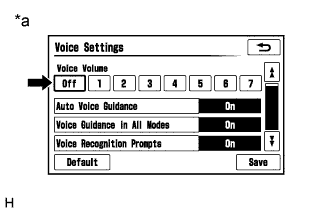

Check that "Off" is not selected.
- OK:
- "Off" is not selected.
Text in Illustration *a
Example
|
|
||||

| OK | |
 |
| 2. CHECK NAVIGATION SETTING |
Display the "Voice Settings" screen.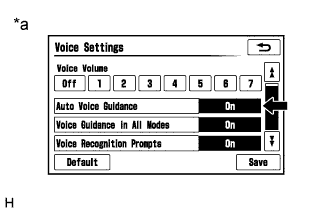
Check that "Auto Voice Guidance" is not "Off".
- OK:
- "Auto Voice Guidance" is not "Off".
Text in Illustration *a
Example
|
|
||||
| OK | |
|
| 3. CHECK NAVIGATION SETTING |
Display the "Voice Settings" screen.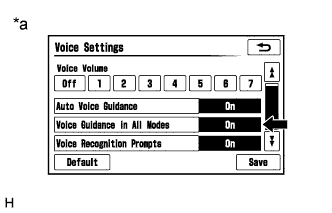
Check that "Voice Guidance in All Modes" is not "Off".
- OK:
- "Voice Guidance in All Modes" is not "Off".
Text in Illustration *a
Example
|
|
||||
| OK | |
|
| 4. CHECK AUDIO FUNCTION |
Check that sound can be heard from a front speaker.
- OK:
- Sound can be heard.
|
|
||||
| OK | ||
 |
||
| ||