ON-VEHICLE INSPECTION
Inspection · Vehicles built from Sep 2011
| INSPECT BACK DOOR GLASS (DEFOGGER WIRE) |

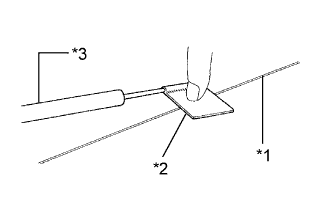  |
- NOTICE:
- When cleaning the glass, wipe the glass along the wire using a soft, dry cloth. Take care not to damage the defogger wires.
- Do not use detergents or glass cleaners that have abrasive ingredients.
- When measuring voltage, wrap a piece of tin foil around the tip of the negative (-) tester probe and press the foil against the wire with your finger as shown in the illustration.
- When cleaning the glass, wipe the glass along the wire using a soft, dry cloth. Take care not to damage the defogger wires.
| *1 |
Defogger Wire |
| *2 |
Tin Foil |
| *3 |
Tester Probe |
Turn the ignition switch to ON.
Turn the defogger switch on.
Measure the voltage at the center of each defogger wire as shown in the illustration.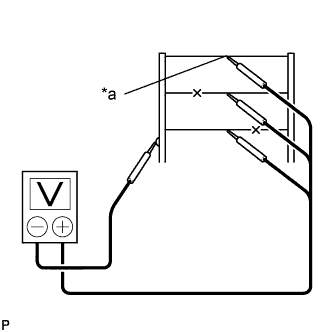
- Standard Voltage:
Voltage
Diagnosis
Approx. 5 V
Wire is not broken
Approx. 10 or 0 V
Wire is broken
Text in Illustration *a
Center
- HINT:
- If there is approximately 10 V, the wire may be faulty between the center of the wire and the wire end on the ground side. If there is no voltage, the wire may be faulty between the center of the wire and the wire end on the battery side.
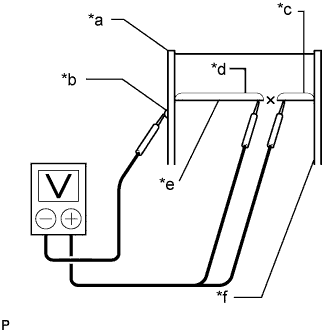
Place the voltmeter positive (+) lead against the defogger wire on the battery side.
Place the voltmeter negative (-) lead with the foil strip against the wire on the ground side.
Slide the positive (+) lead from the battery side to the ground side.
The point where the voltage drops from approximately 10 V to 0 V is where the defogger wire is broken.
- HINT:
- If the defogger wire is not broken, the voltmeter indicates 10 V at the positive (+) end of the defogger wire and gradually decreases to approximately 0 V as the meter probe moves to the other end.
Text in Illustration *a
Ground Side
*b
Foil Strip
*c
Approximately 10 V
*d
0 V
*e
Broken Wire
*f
Battery Side