REMOVAL
Removal / installation · Vehicles built from Jan 2012
Versions by build date: Sep 2011 – Dec 2011 from Jan 2012
| 1.
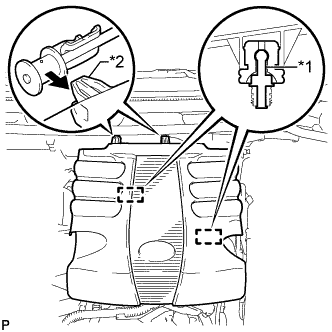
REMOVE V-BANK COVER
|
 |
- Raise the front of the V-bank cover to detach the 2 pins. Then remove the 2 V-bank cover hooks from the bracket, and remove the V-bank cover.
Text in Illustration
*1
|
Pin
|
*2
|
Hook
|
| 2.
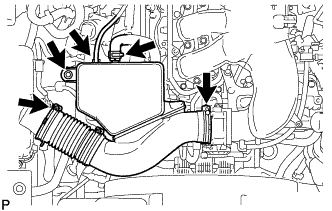
REMOVE NO. 1 AIR CLEANER HOSE
|
|
- Disconnect the No. 2 PCV hose and vacuum hose.
Remove the bolt and loosen the 2 hose clamps.
Remove the No. 1 air cleaner hose.
| 3.
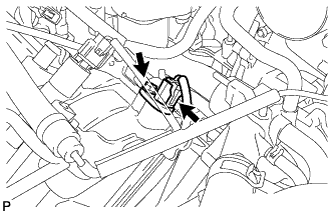
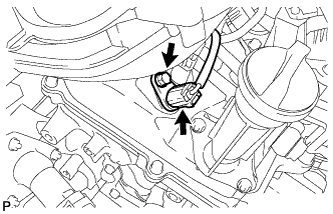
REMOVE VVT SENSOR (for Intake Side of Bank 1) |
|
- Disconnect the VVT sensor connector.
Remove the bolt and VVT sensor.
| 4.
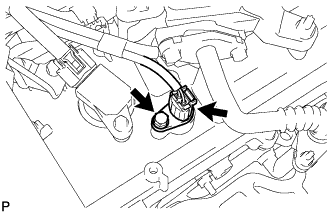
REMOVE VVT SENSOR (for Exhaust Side of Bank 1) |
|
- Disconnect the VVT sensor connector.
Remove the bolt and VVT sensor.
| 5.
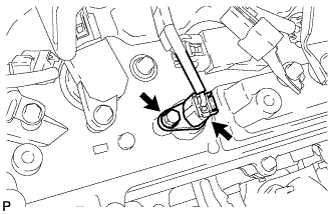
REMOVE VVT SENSOR (for Intake Side of Bank 2) |
|
- Disconnect the VVT sensor connector.
Remove the bolt and VVT sensor.
| 6.
REMOVE VVT SENSOR (for Exhaust Side of Bank 2) |
|
- Disconnect the VVT sensor connector.
Remove the bolt and VVT sensor.