NEW FEATURES [2015/08 Update] NEW FEATURES GENERAL/CONTROL/DETAILS WIRELESS CHARGING SYSTEM
GENERAL
Outline
A wireless charging system is provided instrument panel according to the vehicle specification.
The wireless charging system allows Qi-compatible* devices, such as cellular telephones and smartphones, to be charged without the use of a charging cable by placing them on the charging area of the mobile wireless charger cradle assembly.
*: The Qi standard is an international wireless charging standard set by the Wireless Power Consortium (WPC). The standard targets low power mobile devices of 5 W or less, such as cellular telephones and smartphones.
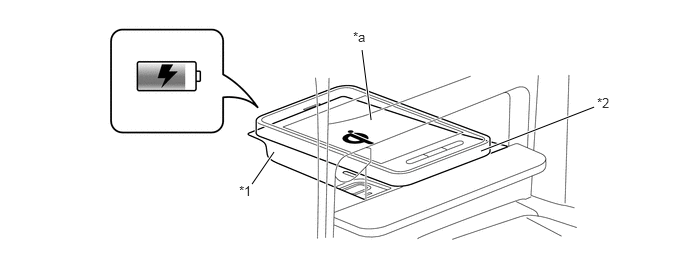
| *1 | Mobile Wireless Charger Cradle Assembly | *2 | Qi-compatible Device |
| *a | Charging Area | - | - |

|
"Qi" and the "Qi" logo are registered trademarks of theWireless Power Consortium (WPC). |
Qi-compatible devices that do not fit on the charging area cannot be used. Also, depending on the Qi-compatible device, it may not operate normally. Check the operating instructions for the Qi-compatible device to be used.
PRECAUTION
For safety, when driving the vehicle, the driver should not operate a portable device that is charging.
Anyone using an implanted pacemaker, biventricular pacing pulse generator, cardiac defibrillator or other medical electrical device should consult with their doctor before using the wireless charging system. Operation of the wireless charging system may affect the medical electrical device.
Failure to abide by the following conditions may result in burns due to the device malfunctioning, becoming damaged, generating heat or igniting.
Do not place a clip, coin or other metal object between the mobile wireless charger cradle assembly and the Qi-compatible device.
Do not attach an aluminum sticker or other metallic object to the mobile wireless charger cradle assembly.
Do not cover the mobile wireless charger cradle assembly with a cloth or other material which may become electrostatically charged.
Do not charge a Qi-incompatible portable device.
Do not disassemble, modify or remove the mobile wireless charger cradle assembly.
Do not subject the mobile wireless charger cradle assembly to an impact.
Qi-compatible devices may not charge in the following conditions:
The device is fully or nearly fully charged.
There is a clip, coin or other metal object between the mobile wireless charger cradle assembly and the Qi-compatible device.
If a Qi-incompatible case or accessory is attached to the Qi-compatible device.
The temperature of the Qi-compatible device which is being charged rises to above the usable range.
The Qi-compatible device is placed on the mobile wireless charger cradle assembly with the charging area of the device facing up.
The charging area of the Qi-compatible device is not correctly aligned with the mobile wireless charger cradle assembly.
The vehicle is in a location where strong electrical waves and noise are generated.
The Qi-compatible device is contacting or covered by a metallic object.
A wireless remote control is used nearby.
Bringing a magnetic card or magnetic storage medium close to the mobile wireless charger cradle assembly may clear any stored data. Also, do not bring a wristwatch or other precision instrument close to the mobile wireless charger cradle assembly since doing so may cause it to malfunction.
Do not use the wireless charging system when the engine is stopped, as doing so may cause the battery to become depleted.
The type of ignition switch used on this model differs depending on the specifications of the vehicle. The expressions listed in the table below are used in this section.
| Expressions | Ignition Switch (Position) | Engine Switch (Condition) |
|---|---|---|
| Ignition Switch off | LOCK | Off (LOCK) |
| Ignition Switch ACC | ACC | On (ACC) |
| Ignition Switch ON | ON | On (IG) |
| Engine Start | START | On (Start) |
SYSTEM DIAGRAM
LAYOUT OF MAIN COMPONENTS
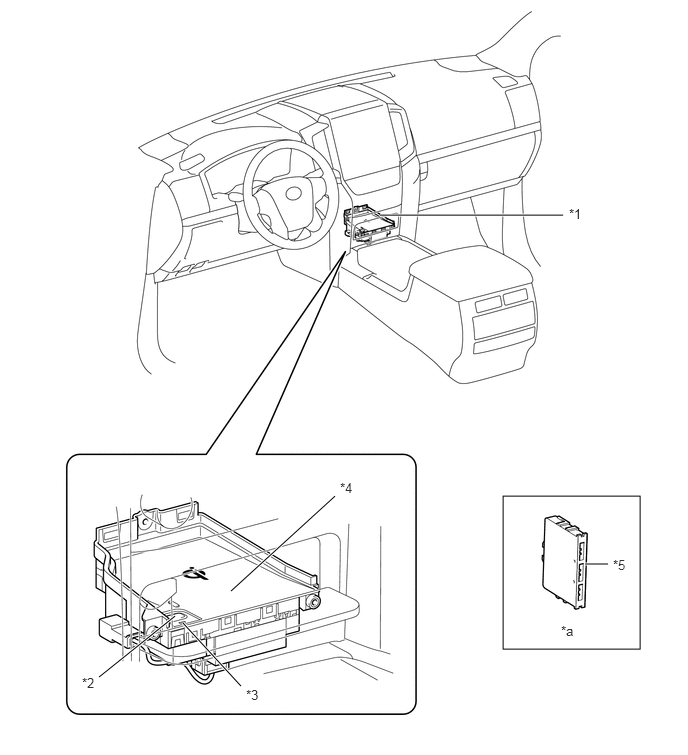
| *1 | Mobile Wireless Charger Cradle Assembly | *2 | Charging Switch |
| *3 | Charging Indicator Light | *4 | Charging Area |
| *5 | Smart Key ECU Assembly | - | - |
| *a | Refer to the Service Bulletin for the installation position of the part. | - | - |
WIRELESS CHARGING CONTROL
Function of Main Components
| Component | Function | |
|---|---|---|
| Mobile Wireless Charger Cradle Assembly | Charging Switch | Turns the wireless charging system on and off. |
| Charging Indicator Light | Displays the wireless charging system status by illuminating or blinking in different colors. | |
| Charging Area | When a Qi-compatible device is placed with the wireless charging system on, charging begins. | |
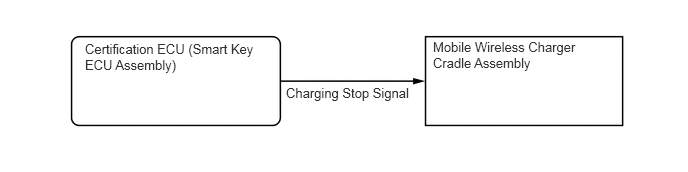
| Certification ECU (Smart Key ECU Assembly) | Outputs a charging stop signal to the mobile wireless charger cradle assembly. | |
System Control
The wireless charging system operates when all of the following conditions are met:
The engine switch is on (ACC) or on (IG).
The charging switch is on (charging indicator light is illuminated in green).
The wireless charging system temporarily stops when any of the following conditions are met:
When any of the doors is opened or closed.
When the back door opener switch assembly is pressed.
When the back door is closed.
When the engine is started.
When the electrical transmitter sub-assembly is outside the detection area.
After the Qi-compatible device fully charges and charging stops, if the device is left in place for 30 minutes, charging restarts.
After the Qi-compatible device fully charges and charging stops, if the device is moved or repositioned within the charging area, or replaced with another Qi-compatible device within 30 minutes, charging restarts.
If the Qi-compatible device is moved during charging, charging restarts at the new position.
Charging Frequency Shift Function
If there is noise in AM radio reception during charging, turn the wireless charging system power off and check if the noise is reduced. If reduced, the charging frequency can be changed to reduce the noise by holding down the charging switch on the wireless charging system for approximately 2 seconds during charging.
Charging Indicator Light
The operation status of the wireless charging system is indicated by the condition and color of the charging indicator light as follows:
| Charging Indicator Light | Operation Status |
|---|---|
|
*: Even when using a Qi-compatible device, the charging indicator light may fail to illuminate in green when charging is complete. If this occurs, check the charge condition on the device. |
|
| Off | The wireless charging system is not operating. |
| Illuminates in Green | The wireless charging system is on standby, finished charging*, or charging is temporarily stopped. |
| Illuminates in Amber | The wireless charging system detects a Qi-compatible device in the charging area and is charging. |
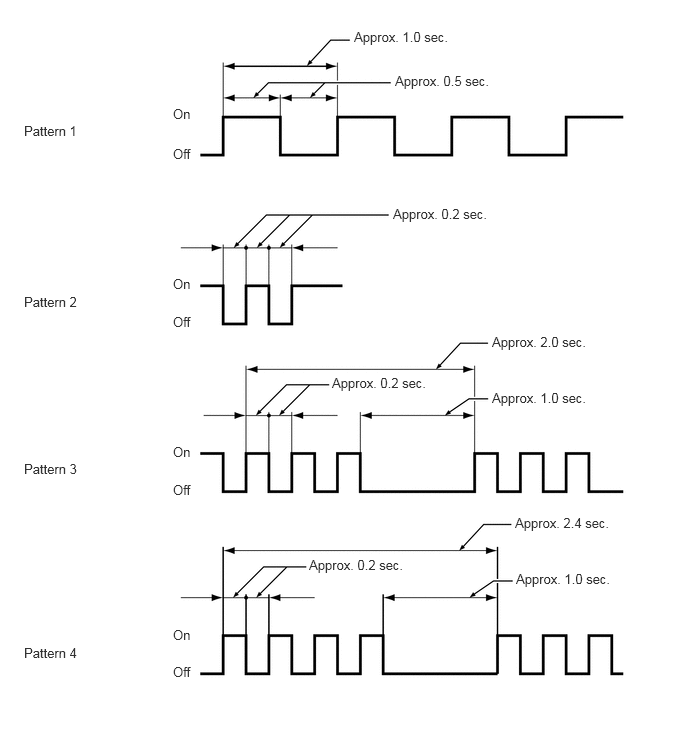
| Blinks in Amber (Pattern 1) | The wireless charging system cannot receive signals from the certification ECU. |
| Blinks in Amber (Pattern 2) | The charging frequency of the wireless charging system changed during charging. |
| Blinks in Amber (Pattern 3) | The wireless charging system detected a foreign object between the device and the charging area. |
| Blinks in Amber (Pattern 4) | The temperature of the mobile wireless charger cradle assembly is high. |