Home › General › BODY ELECTRICAL › MULTI DISPLAY
NM2660E _V1 General _054361 BODY ELECTRICAL _0272094 MULTI DISPLAY UN GENERAL/CONTROL/DETAILS F

BODY ELECTRICAL  MULTI DISPLAY  GENERAL/CONTROL/DETAILS  VOICE RECOGNITION SYSTEM  


VOICE RECOGNITION SYSTEM


a.

When the voice recognition system starts operating, the commands that the system is able to recognize are displayed on the multi display.


b.

A shortcut menu is provided on the voice recognition command screen, enabling the user to operate the system with fewer voice commands.


c.

The natural speech technology used for this voice recognition system can recognize a user's natural speech as voice recognition commands ("natural speech" refers to naturally spoken utterances that include several keywords).


d.

Natural speech technology enhances the usability because the user does not have to memorize voice recognition commands exactly.


e.

Natural speech technology uses the system's Automatic Speech Recognizer (ASR) and Natural Language Understanding (NLU) to recognize voice recognition commands.

·

The ASR extracts keywords from a user's natural speech using a phonemic sequence (the units of sound that make up a phrase or sentence).

·

The NLU analyzes these extracted keywords based on their probable meaning, interpreting the intent of the user's utterances.
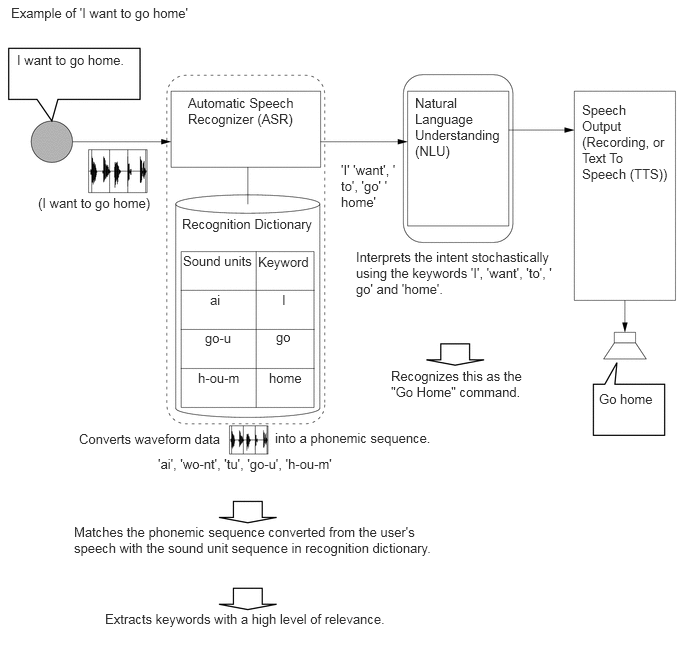

Y195902E01
0.115,0.052 2.042,0.281 1.927,0.229 10 false Example of 'I want to go home' 0.396,2.031 1.729,2.271 1.333,0.24 10 false (I want to go home) 0.177,0.542 1.385,0.938 1.208,0.396 10 false I want to go home. 1.958,0.99 3.219,1.406 1.26,0.417 10 false Automatic Speech Recognizer (ASR) 1.896,2.25 3.271,2.635 1.375,0.385 10 false Recognition Dictionary 4.323,0.99 5.208,1.75 0.885,0.76 10 false Natural Language Understanding (NLU) 6.063,1.063 6.948,2.208 0.885,1.146 10 false Speech Output (Recording, or Text To Speech (TTS)) 6.24,4.073 6.854,4.302 0.615,0.229 10 false Go home 1.094,6.365 5.865,6.563 4.771,0.198 10 false Extracts keywords with a high level of relevance. 0.823,4.49 2.302,4.708 1.479,0.219 10 false Converts waveform data 0.771,5.458 4.625,5.875 3.854,0.417 10 false Matches the phonemic sequence converted from the user's speech with the sound unit sequence in recognition dictionary. 1.906,2.635 2.656,2.969 0.75,0.333 10 false Sound units 2.802,3.854 3.208,4.188 0.406,0.333 10 false home 2.688,2.646 3.229,2.99 0.542,0.344 10 false Keyword 2.938,3.042 3.198,3.365 0.26,0.323 10 false I 2.875,3.427 3.135,3.75 0.26,0.323 10 false go 2.188,3.042 2.448,3.365 0.26,0.323 10 false ai 2.135,3.438 2.542,3.781 0.406,0.344 10 false go-u 2.063,3.854 2.552,4.177 0.49,0.323 10 false h-ou-m 2.865,4.479 4.823,4.698 1.958,0.219 10 false into a phonemic sequence. 1.646,4.75 3.813,4.958 2.167,0.208 10 false 'ai', 'wo-nt', 'tu', 'go-u', 'h-ou-m' 4.073,3.833 5.552,4.396 1.479,0.563 10 false Recognizes this as the "Go Home" command. 3.708,2.594 5.813,3.167 2.104,0.573 10 false Interprets the intent stochastically using the keywords 'I', 'want', 'to', 'go' and 'home'. 3.552,1.688 4.125,2.427 0.573,0.74 10 false 'I' 'want', 'to', 'go' 'home'


f.

In order to interpret the intent of a user's speech, the NLU unit records key words in a data table.


g.

The data table is organized by task, and the data is used to interpret the probable meaning of the user.

·

Even if the user does not say the indicated voice command ("Go Home"), speech with a similar meaning can be recognized (for example: "Let's go home" and "Take me home").

HINT:

The natural speech technology used by the voice recognition system does not function in the following cases.

·

When the key words used are not in the data table.

·

When inputting address elements such as the city name in the address input screen.

·

When a phrase includes several intentions (Ex. "Go home... actually, no. I want to call Bob.").

·

When spoken instructions are for a level that cannot be recognized by the system. (Ex. When the user attempts to carry out a task from a different level while another task is still in progress, such as trying to make a phone call while the Destination screen is being displayed after giving the 'Destination' command.)
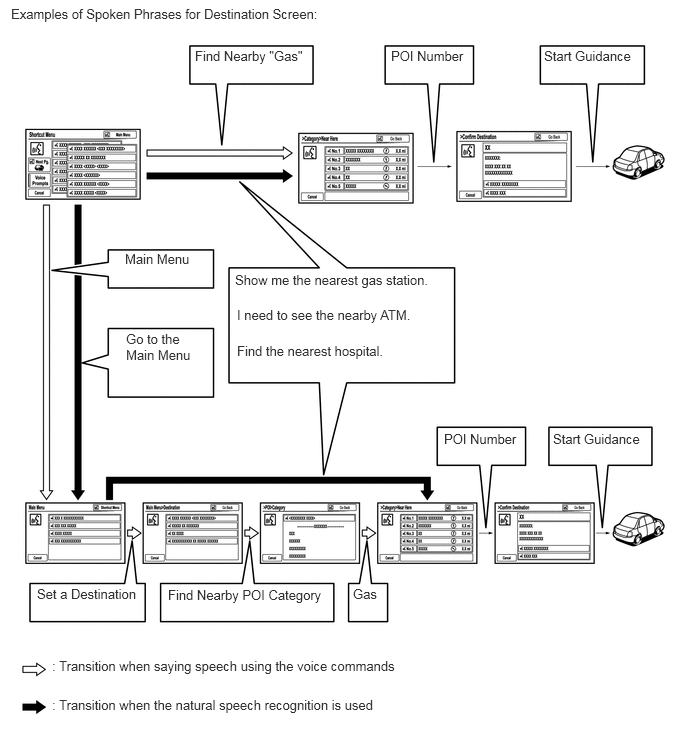


Y195903E01
0.115,0.063 3.969,0.281 3.854,0.219 10 false Examples of Spoken Phrases for Destination Screen: 2.031,0.5 3.208,0.729 1.177,0.229 10 false Find Nearby "Gas" 4.073,0.5 4.875,0.75 0.802,0.25 10 false POI Number 5.667,0.5 6.677,0.74 1.01,0.24 10 false Start Guidance 1.302,2.615 2.094,2.854 0.792,0.24 10 false Main Menu 1.313,3.448 2.031,3.917 0.719,0.469 10 false Go to the Main Menu 2.448,2.833 4.615,3.042 2.167,0.208 10 false Show me the nearest gas station. 2.469,3.198 4.635,3.406 2.167,0.208 10 false I need to see the nearby ATM. 2.469,3.573 4.635,3.781 2.167,0.208 10 false Find the nearest hospital. 0.385,6.104 1.438,6.292 1.052,0.188 10 false Set a Destination 1.75,6.115 3.448,6.344 1.698,0.229 10 false Find Nearby POI Category 3.677,6.104 4,6.333 0.323,0.229 10 false Gas 0.542,6.854 4.396,7.073 3.854,0.219 10 false : Transition when saying speech using the voice commands 0.542,7.26 4.396,7.479 3.854,0.219 10 false : Transition when the natural speech recognition is used 4.625,4.49 5.427,4.74 0.802,0.25 10 false POI Number 5.76,4.49 6.771,4.729 1.01,0.24 10 false Start Guidance

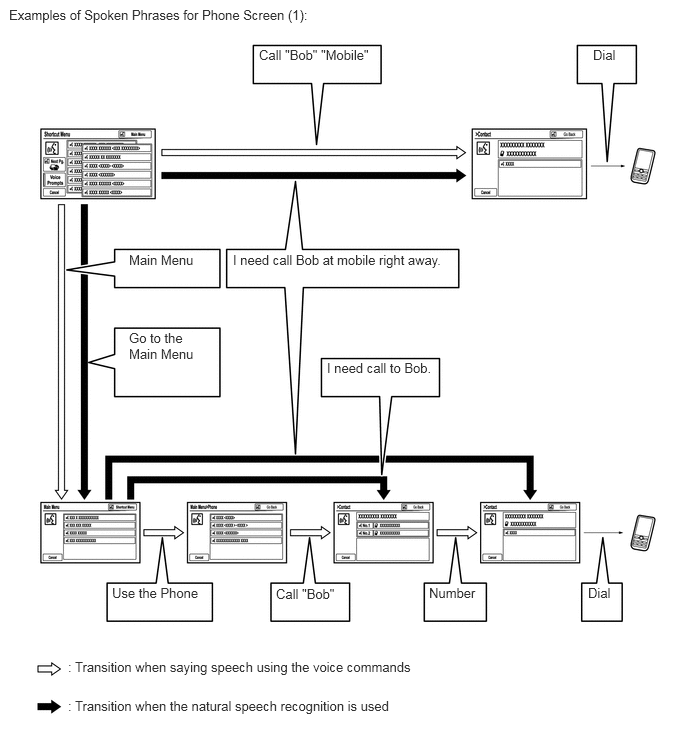
Y195904E01
0.094,0.073 3.698,0.313 3.604,0.24 10 false Examples of Spoken Phrases for Phone Screen (1): 2.698,0.49 3.917,0.698 1.219,0.208 10 false Call "Bob" "Mobile" 1.344,3.438 2.073,3.885 0.729,0.448 10 false Go to the Main Menu 3.406,3.75 4.531,4 1.125,0.25 10 false I need call to Bob. 1.344,2.625 2.146,2.896 0.802,0.271 10 false Main Menu 2.427,2.625 4.698,2.854 2.271,0.229 10 false I need call Bob at mobile right away. 1.167,6.094 2.135,6.323 0.969,0.229 10 false Use the Phone 2.875,6.104 3.563,6.344 0.688,0.24 10 false Call "Bob" 4.469,6.094 5.01,6.333 0.542,0.24 10 false Number 6.125,6.094 6.438,6.354 0.313,0.26 10 false Dial 0.708,6.865 5.188,7.104 4.479,0.24 10 false : Transition when saying speech using the voice commands 6.177,0.49 6.521,0.729 0.344,0.24 10 false Dial 0.708,7.271 5.188,7.51 4.479,0.24 10 false : Transition when the natural speech recognition is used

*: If the system cannot recognize all the utterances, it changes the screen to the voice recognition command screen that suits the recognized task.
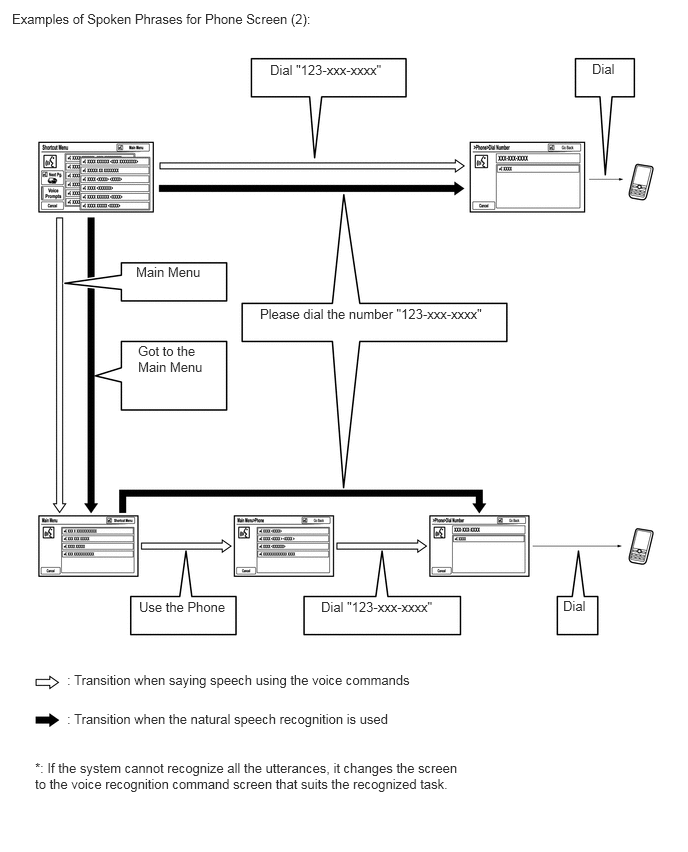

Y195905E01
0.125,0.115 3.656,0.354 3.531,0.24 10 false Examples of Spoken Phrases for Phone Screen (2): 0.698,7 5.896,7.208 5.198,0.208 10 false : Transition when saying speech using the voice commands 0.698,7.406 5.896,7.615 5.198,0.208 10 false : Transition when the natural speech recognition is used 2.813,0.646 4.115,0.875 1.302,0.229 10 false Dial "123-xxx-xxxx" 5.865,6.229 6.156,6.458 0.292,0.229 10 false Dial 1.448,6.24 2.375,6.49 0.927,0.25 10 false Use the Phone 1.417,2.75 2.219,3 0.802,0.25 10 false Main Menu 1.438,3.573 2.156,4.01 0.719,0.438 10 false Got to the Main Menu 2.708,3.188 5.146,3.438 2.438,0.25 10 false Please dial the number "123-xxx-xxxx" 6.167,0.635 6.458,0.865 0.292,0.229 10 false Dial 3.344,6.24 4.646,6.469 1.302,0.229 10 false Dial "123-xxx-xxxx" 0.365,7.917 4.938,8.354 4.573,0.438 10 false *: If the system cannot recognize all the utterances, it changes the screen to the voice recognition command screen that suits the recognized task.