AUDIO / VIDEO INSTRUMENT PANEL SPEAKER REMOVAL
CAUTION / NOTICE / HINT
- HINT:
- ·
Use the same procedures for the LH side and RH side.
·The procedures listed below are for the LH side.
PROCEDURE

 1. PRECAUTION
- NOTICE:
-
After turning the ignition switch off, waiting time may be required before disconnecting the cable from the battery terminal. Therefore, make sure to read the disconnecting the cable from the battery terminal notice before proceeding with work (See page General>INTRODUCTION>REPAIR INSTRUCTION>PRECAUTION).
2.DISCONNECT CABLE FROM NEGATIVE BATTERY TERMINAL
- NOTICE:
-
When disconnecting the cable, some systems need to be initialized after the cable is reconnected (See page General>INTRODUCTION>REPAIR INSTRUCTION>INITIALIZATION).
55510F
3.REMOVE NO. 1 SPEAKER OPENING COVER ASSEMBLY
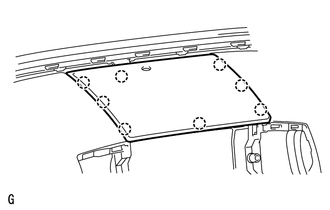
Detach the 8 claws and remove the opening cover.
86160L
4.REMOVE FRONT NO. 4 SPEAKER ASSEMBLY
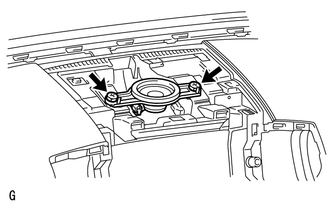
Remove the 2 bolts.
Remove the speaker and then disconnect the speaker connector.
- NOTICE:
-
Do not touch the cone part of the speaker.
74610A
5.REMOVE FRONT ASSIST GRIP SUB-ASSEMBLY
62212
6.REMOVE FRONT PILLAR GARNISH LH
55408F
7.REMOVE NO. 1 INSTRUMENT PANEL SPEAKER PANEL SUB-ASSEMBLY
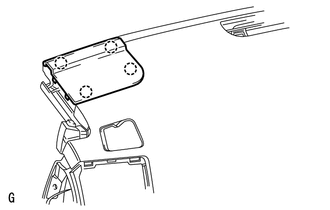
Detach the 4 claws and remove the speaker panel.
86160P
8.REMOVE FRONT NO. 2 SPEAKER ASSEMBLY
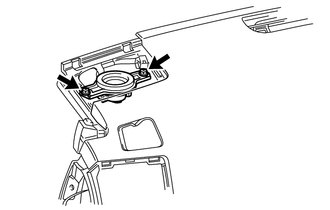
for 9 Speakers Models:
Remove the 2 bolts.
Remove the speaker and then disconnect the speaker connector.
- NOTICE:
-
Do not touch the cone part of the speaker.
except 9 Speakers Models:
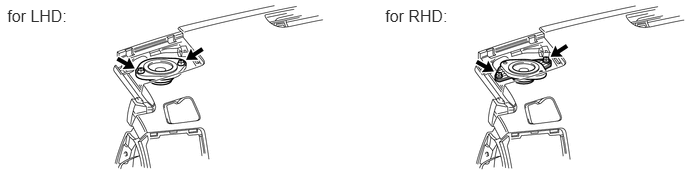
Remove the 2 bolts.
Remove the speaker and then disconnect the speaker connector.
- NOTICE:
-
Do not touch the cone part of the speaker.