RM2660E
_56
Audio / Visual / Telematics
_052828
AUDIO / VIDEO
_0255477
AUDIO AND VISUAL SYSTEM(w/o Stereo Component Amplifier)
J
AUDIO / VIDEO AUDIO AND VISUAL SYSTEM(w/o Stereo Component Amplifier) CD cannot be Inserted or is Ejected Right After Insertion
PROCEDURE
1.CHECK IF PROPER CD IS INSERTED
a.
Make sure that the CD is a normal audio CD, and that it is not deformed, flawed, stained, burred or otherwise defective.
- OK:
Normal audio CD.
- HINT:
-
Translucent or uniquely-shaped CDs cannot be played.
OK
2.CHECK THAT CD IS INSERTED PROPERLY
NG
CD IS FAULTY
2.CHECK THAT CD IS INSERTED PROPERLY
a.
Check whether or not the CD is inserted upside down.
- OK:
CD is properly inserted.
OK
3.CLEAN CD
NG
INSERT CD PROPERLY
3.CLEAN CD
a.
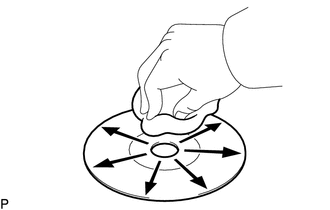
Clean the disc by wiping the CD underside radially with a soft cloth.
- OK:
Malfunction disappears.
- NOTICE:
-
Do not use a conventional record cleaner or anti-static preservative.
OK
CD WAS DIRTY
NG
4.REPLACE CD WITH ANOTHER AND RECHECK
4.REPLACE CD WITH ANOTHER AND RECHECK
a.
Replace the CD with a normal one and check if the same problem occurs again.
- OK:
Malfunction disappears.
OK
CD IS FAULTY
NG
PROCEED TO NEXT SUSPECTED AREA SHOWN IN PROBLEM SYMPTOMS TABLE