AUDIO / VIDEO TELEVISION DISPLAY INSTALLATION
PROCEDURE

 86680A
1.INSTALL TELEVISION DISPLAY ASSEMBLY
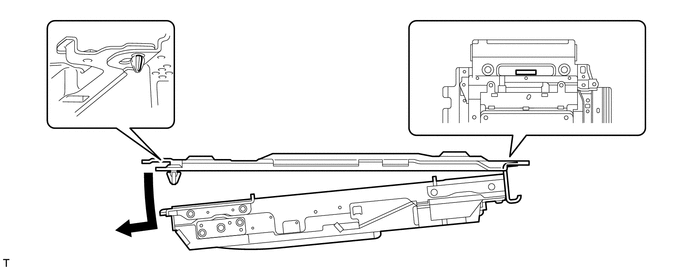
Attach the display to the claws on the front side of the bracket by moving it in the direction of the arrow in the illustration, and then attach the clips to temporarily install the display.
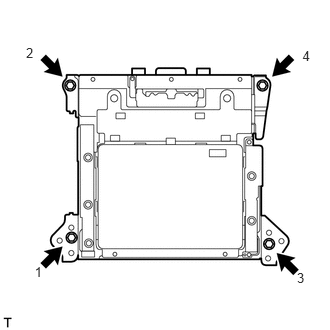
Install the television display with the 4 bolts.
- HINT:
-
Install the bolts in the order shown in the illustration.
Connect the connectors.
63650A
2.INSTALL ROOF CONSOLE BOX ASSEMBLY
Connect the connector.
Attach the 2 clips and 2 claws to install the roof console box.
Install the 2 bolts.
63662A
3.INSTALL NO. 2 ROOF LINING TRIM COVER
Attach the 4 claws to install the cover.
63661B
4.INSTALL NO. 1 ROOF LINING TRIM COVER
Attach the 4 claws to install the cover.
5.CONNECT CABLE TO NEGATIVE BATTERY TERMINAL