RM2660E
_56
Audio / Visual / Telematics
_052828
AUDIO / VIDEO
_0255480
TELEVISION DISPLAY
A
AUDIO / VIDEO TELEVISION DISPLAY REMOVAL
PROCEDURE

 1.DISCONNECT CABLE FROM NEGATIVE BATTERY TERMINAL
63661B
2.REMOVE NO. 1 ROOF LINING TRIM COVER
a.
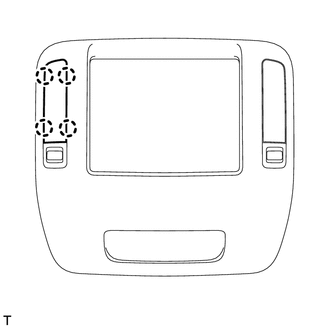
Detach the 4 claws and remove the cover.
63662A
3.REMOVE NO. 2 ROOF LINING TRIM COVER
a.
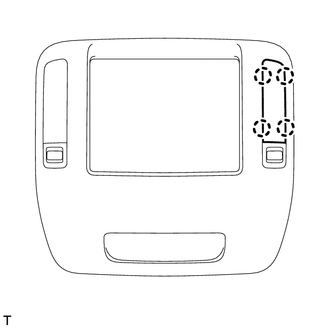
Detach the 4 claws and remove the cover.
63650A
4.REMOVE ROOF CONSOLE BOX ASSEMBLY
a.
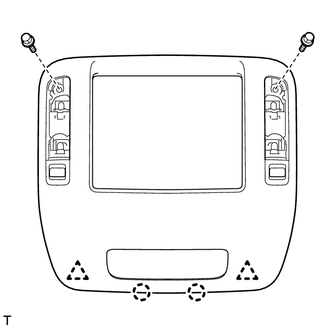
Remove the 2 bolts.
b.
Detach the 2 clips and 2 claws.
c.
Disconnect the connector and remove the roof console box.
86680A
5.REMOVE TELEVISION DISPLAY ASSEMBLY
a.
Disconnect the connectors.
b.
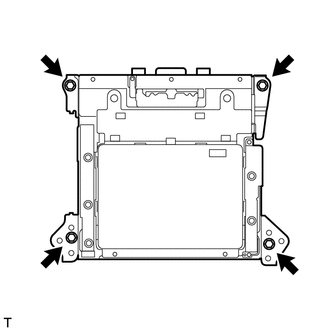
Remove the 4 bolts.
c.
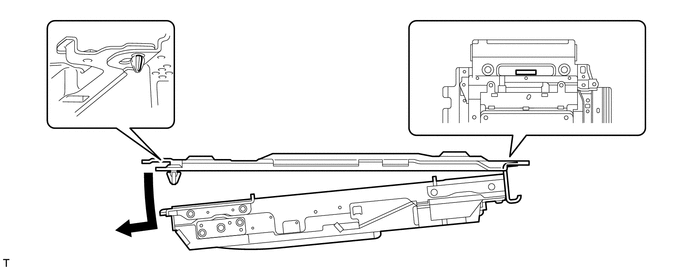
Detach the clips and claws to remove the television display as shown in the illustration.