RM2660E
_56
Audio / Visual / Telematics
_052829
NAVIGATION / MULTI INFO DISPLAY
_0255493
HARD DISK DRIVE
A
NAVIGATION / MULTI INFO DISPLAY HARD DISK DRIVE INSTALLATION
PROCEDURE

 86271L
1.INSTALL HARD DISC
a.
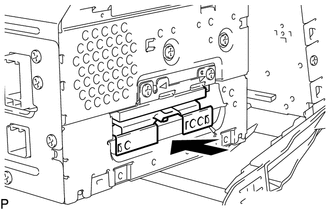
Push the hard disc in the direction of the arrow shown in the illustration to install it.
b.
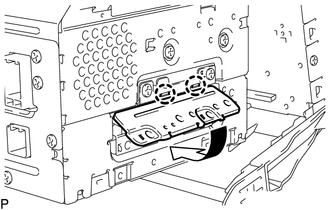
Install the cover in the direction of the arrow shown in the illustration.
c.
Install the 2 screws.
86212
2.INSTALL NO. 2 RADIO BRACKET
86130A
3.INSTALL MULTI-MEDIA MODULE RECEIVER ASSEMBLY WITH BRACKET
4.CONNECT CABLE TO NEGATIVE BATTERY TERMINAL
- NOTICE:
-
When disconnecting the cable, some systems need to be initialized after the cable is reconnected (See page General>INTRODUCTION>REPAIR INSTRUCTION>INITIALIZATION).