RM2660E
_56
Audio / Visual / Telematics
_052866
TELEMATICS
_0287901
ANTENNA DIVIDER
A
TELEMATICS ANTENNA DIVIDER REMOVAL
PROCEDURE

 53292A
1.REMOVE UPPER RADIATOR SUPPORT SEAL
2.DISCONNECT CABLE FROM NEGATIVE BATTERY TERMINAL
- NOTICE:
-
When disconnecting the cable, some systems need to be initialized after the cable is reconnected (See page General>INTRODUCTION>REPAIR INSTRUCTION>INITIALIZATION).
86719A
3.REMOVE NO. 1 TELEPHONE BRACKET
a.
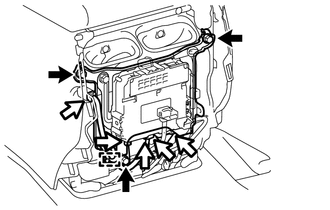
Disconnect the connectors and detach the clamp.
b.
Remove the 3 bolts and No. 1 telephone bracket.
4.REMOVE ANTENNA DIVIDER
a.
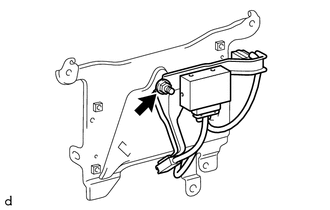
Remove the nut and antenna divider.