DOOR / HATCH POWER BACK DOOR SYSTEM B222A13 PBD Touch Sensor LH Circuit Circuit Open
DESCRIPTION
This DTC is output when the multiplex network door ECU detects a power back door sensor assembly LH touch sensor malfunction.
| DTC No. | Detection Item | DTC Detection Condition | Trouble Area | DTC Output from | Priority |
|---|---|---|---|---|---|
| B222A13 | PBD Touch Sensor LH Circuit Circuit Open | Multiplex network door ECU detects power back door sensor assembly LH touch sensor malfunction |
·
Multiplex network door ECU
·
Power back door sensor assembly LH
·
Harness or connector |
Back Door | A |
WIRING DIAGRAM
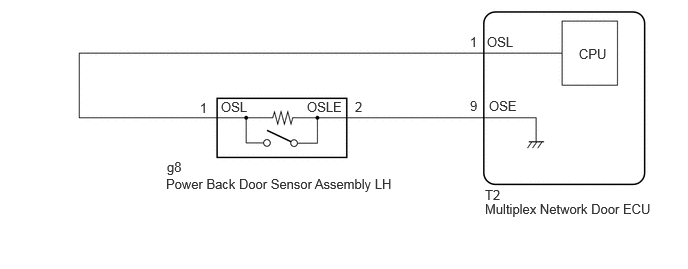
CAUTION / NOTICE / HINT
- NOTICE:
-
If the replacement, removal and installation of the multiplex network door ECU or disconnection of the connectors of the multiplex network door ECU has been performed, initialize the power back door system.
-
Click hereVehicle Exterior>DOOR / HATCH>POWER BACK DOOR SYSTEM>INITIALIZATION
PROCEDURE
Clear the DTCs.
- Body Electrical > Back Door > Clear DTCs
- 50002 489
- Result:
-
Proceed to NEXT
NEXT
Turn the ignition switch to ON and wait for at least 10 seconds.
- Body Electrical > Back Door > Trouble Codes
- 50001 489
- Result:
-
Proceed to NEXT
NEXT
Check for DTCs.
- Body Electrical > Back Door > Trouble Codes
- 50001 489
- Result:
-
Result Proceed to B222A13 is output A B222A13 is not output B
A
B
Click hereGeneral>INTRODUCTION>HOW TO TROUBLESHOOT ECU CONTROLLED SYSTEMS>HOW TO PROCEED WITH TROUBLESHOOTING
Read the Data List according to the display on the GTS.
- Body Electrical > Back Door > Data List
-
Tester Display Measurement Item Range Reference Value Diagnostic Note PBD Touch Sensor LH Power back door sensor assembly LH signal ON, OFF or Open Open: Power back door sensor assembly LH circuit open -
- Body Electrical > Back Door > Data List
-
Tester Display PBD Touch Sensor LH - 50003 489 1058
- Result:
-
Result Proceed to The value of PBD Touch Sensor LH is Open A None of the above conditions are met B
A
B
Click hereVehicle Exterior>DOOR / HATCH>POWER BACK DOOR TOUCH SENSOR>INSPECTION
- Result:
-
Proceed to OK NG
OK
NG
Pre-procedure1
Disconnect the T2 multiplex network door ECU connector.
Disconnect the g8 power back door sensor assembly LH connector.
Procedure1
Measure the resistance according to the value(s) in the table below.
- Standard Resistance:
-
Tester Connection Condition Specified Condition Click Location & Routing(T2,g8)Location & Routingewd_type=routing;type=c,c;code=T2,g8
Click Connector(T2)Body>No. 3 Floor Wire / Theft Warning Sensor Cord Sub-Assembly>Multiplex Network Door ECUewd_type=component;type=c;code=T2;pinno=1,9
Click Connector(g8)Body>No. 1 Rear Window Wire / No. 2 Back Door Wire>Power Back Door Sensor Assembly LHewd_type=component;type=c;code=g8;pinno=1,2
T2-1 (OSL) - g8-1 (OSL) Always Below 1 Ω T2-9 (OSE) - g8-2 (OSLE) Always Below 1 Ω T2-1 (OSL) or g8-1 (OSL) - Body ground Always 10 kΩ or higher T2-9 (OSE) or g8-2 (OSLE) - Body ground Always 10 kΩ or higher
- Result:
-
Proceed to OK NG
Post-procedure1
None
OK
NG
Read the Data List according to the display on the GTS.
- Body Electrical > Back Door > Data List
-
Tester Display Measurement Item Range Reference Value Diagnostic Note PBD Touch Sensor LH Power back door sensor assembly LH signal ON, OFF or Open OFF: Power back door sensor assembly LH not pressed -
- Body Electrical > Back Door > Data List
-
Tester Display PBD Touch Sensor LH - 50003 489 1058
- Result:
-
Result Proceed to The value of PBD Touch Sensor LH is OFF A None of the above conditions are met B
A
B
Read the Data List according to the display on the GTS.
- Body Electrical > Back Door > Data List
-
Tester Display Measurement Item Range Reference Value Diagnostic Note PBD Touch Sensor LH Power back door sensor assembly LH signal ON, OFF or Open ON: Power back door sensor assembly LH pressed -
- Body Electrical > Back Door > Data List
-
Tester Display PBD Touch Sensor LH - 50003 489 1058
- Result:
-
Result Proceed to The value of PBD Touch Sensor LH is ON A None of the above conditions are met B
A
B