AC60F AUTOMATIC TRANSMISSION / TRANSAXLE PARK / NEUTRAL POSITION SWITCH REMOVAL
CAUTION / NOTICE / HINT
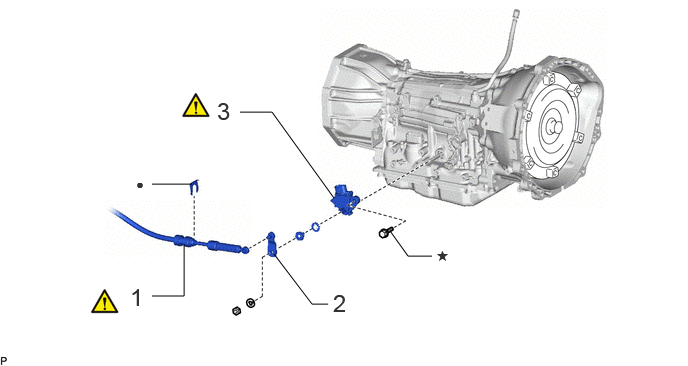
| Procedure | Part Name Code |

|

|

|
|
|---|---|---|---|---|---|
| 1 | TRANSMISSION CONTROL CABLE ASSEMBLY | 33820B | ( ) |
- | - |
| 2 | TRANSMISSION CONTROL SHAFT LEVER RH | 35572 | - | - | - |
| 3 | PARK/NEUTRAL POSITION SWITCH ASSEMBLY | 84540 | () |
- | - |
| ● | Non-reusable part | ★ | Precoated part |
PROCEDURE

 33820B 1.DISCONNECT TRANSMISSION CONTROL CABLE ASSEMBLY
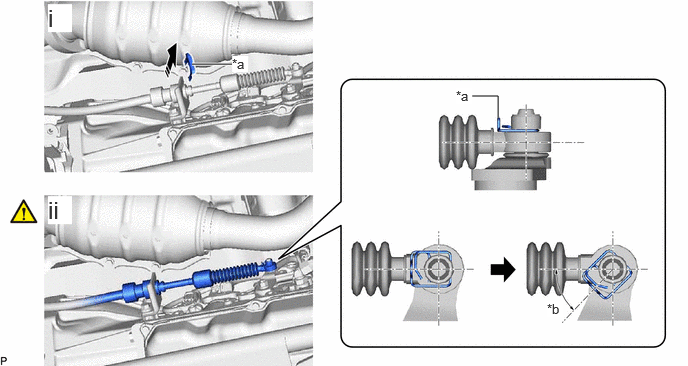
| *a | Clip | *b | 45° to 60° |

|
Remove in this Direction | - | - |
Remove the clip from the No. 1 transmission control cable bracket.
While disengaging the clip as shown in the illustration, disconnect the transmission control cable assembly from the transmission control shaft lever RH together with the clip.
35572 2.REMOVE TRANSMISSION CONTROL SHAFT LEVER RH

84540 3.REMOVE PARK/NEUTRAL POSITION SWITCH ASSEMBLY
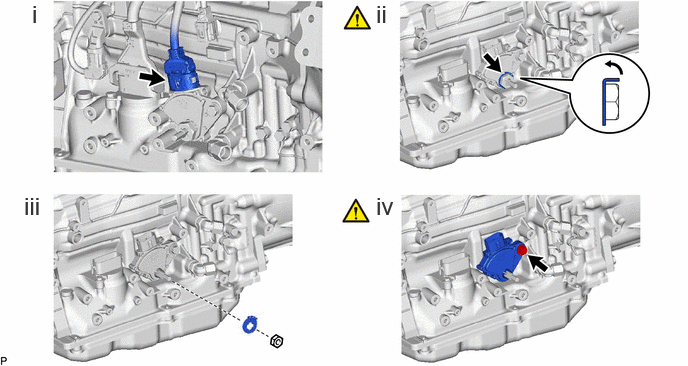
Disconnect the park/neutral position switch assembly connector.
Using a screwdriver, bend the tabs of the lock washer.
Remove the nut and lock washer.
Remove the bolt and park/neutral position switch assembly from the automatic transmission case sub-assembly.
- HINT:
-
Make sure that the manual valve lever shaft has not been rotated prior to installing the park/neutral position switch assembly as the detent spring may become detached from the manual valve lever shaft.