NAVIGATION / MULTI INFO DISPLAY NAVIGATION SYSTEM DTC CHECK / CLEAR
CHECK DTC (CHECK USING GTS)
Turn the ignition switch to ON and wait for 90 seconds.
Enter the following menus: Body Electrical / Navigation System / Trouble Codes.
- Body Electrical > Navigation System > Trouble Codes
- 50001 212
Check for DTCs, and then write them down.
Check the details of the DTC(s).
CLEAR DTC (CLEAR USING GTS)
Turn the ignition switch to ON and wait for 90 seconds.
Enter the following menus: Body Electrical / Navigation System / Clear DTCs.
- Body Electrical > Navigation System > Clear DTCs
- 50002 212
Clear the DTCs.
START DIAGNOSTIC MODE
- HINT:
-
·
Illustrations may differ from the actual vehicle screen depending on the device settings and options. Therefore, some detailed areas may not be shown exactly the same as on the actual vehicle screen.
·After the ignition switch is turned to ON, check that the map is displayed before starting diagnostic mode. Otherwise, some items cannot be checked.
·Start diagnostic mode at least 90 seconds after turning the ignition switch to ON. Otherwise, some items cannot be checked.
There are 2 methods to start diagnostic mode. Start diagnostic mode by using one of them.
Method 1
Enter the following menus: Body Electrical / Navigation System / Utility / Diagnostic Mode.
- Body Electrical > Navigation System > Utility
-
Tester Display Diagnostic Mode - 50005 212 5501
Diagnostic mode will start and the "Service Menu" screen will be displayed.
Method 2
Turn the ignition switch to ON.
Press the seek/track up panel switch 5 times and then press the seek/track down panel switch 5 times with the screen and audio turned off.
- HINT:
-
·
Diagnostic mode can only be started if the above operation is completed within 15 seconds of the first press of the seek/track up panel switch.
·If the operation is not completed within 15 seconds of the first press of the seek/track panel switch or fails, turn the screen and audio on and then off again before attempting to start diagnostic mode.
Diagnostic mode will start and the "Service Menu" screen will be displayed.
FAILURE DIAGNOSIS
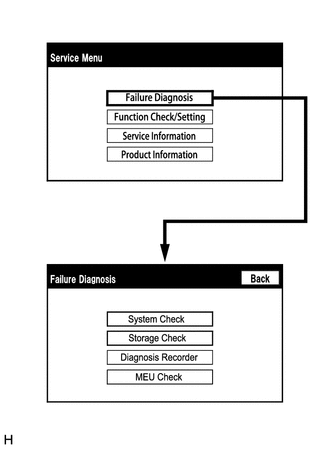
The "Failure Diagnosis" screen will be displayed by selecting "Failure Diagnosis" on the "Service Menu" screen.
SYSTEM CHECK
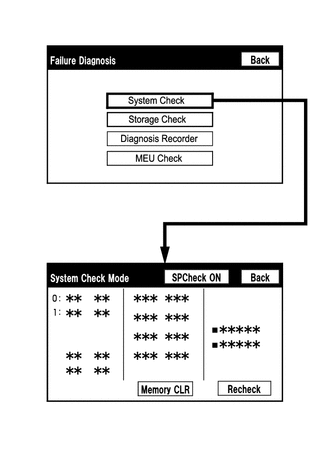
The "System Check Mode" screen will be displayed by selecting "System Check" on the "Failure Diagnosis" screen.
CHECK DTC (CHECK USING SYSTEM CHECK MODE SCREEN)
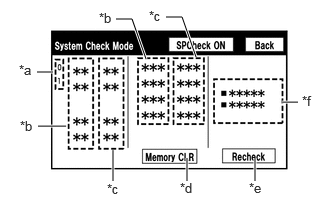
System check mode screen description
| Display | Content |
|---|---|
| *a: Node Position Number for Devices Connected to MOST Network | MOST network node position numbers are provided for devices connected to the MOST network. |
| *b: Device Name List No. 1 |
·
Device Name List No. 1 displays some of the devices that make up the navigation system.
·
The names of the components from Device Name List No. 1 are shown in the following table. |
| *c: Check Result |
·
Result codes for all devices are displayed.
·
When "MOST" is displayed for the result, select "MOST" on the multi-display to display the "MOST Line Check" screen. |
| *d: Memory Clear |
·
Present and history DTCs and registered connected device names are cleared.
·
Select "Memory CLR" for 3 seconds. |
| *e: Recheck |
·
A system check will be performed again after the memory is cleared.
·
"Recheck" will dim during a system check. |
| *f: Device Name List No. 2 |
·
Device Name List No. 2 displays some of the devices that make up the navigation system.
·
The names of the components from Device Name List No. 2 are shown in the following table. |
| Name | Component | Connection Method |
|---|---|---|
| DCU | Radio receiver assembly | - |
| AMP | Stereo component amplifier assembly | Communication line for MOST network |
| REAR*1 | Multi-display controller sub-assembly | Communication line for MOST network |
| DISP | Integration control sub-assembly | Communication line for AVC-LAN |
| MEU | Navigation ECU assembly | USB communication line |
| CAA | Rear television camera assembly*2 | CAN communication line |
| CAMERA-M | Parking assist ECU*3 | CAN communication line |
*1: w/ Rear Seat Entertainment System
*2: w/ Parking Assist Monitor System
*3: w/ Multi-terrain Monitor System
| Result | Meaning | Action |
|---|---|---|
| OK | The device does not respond with a DTC. | - |
| MOST | MOST communication error | Perform "MOST Line Check" to check the connection of each device on the MOST network. |
| DETAIL | The device responds with a DTC. | Look up the DTC in "Unit Check Mode". |
| NCON | The device was previously present, but does not respond in diagnostic mode. | - Check power supply wire harness of the device. - Check the AVC-LAN or MOST network of the device. |
| NRES | The device responds in diagnostic mode, but gives no DTC information. | - Check power supply wire harness of the device. - Check the AVC-LAN or MOST network of the device. |
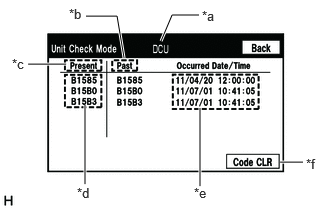
Unit check mode screen description
| Name | Component | Connection Method |
|---|---|---|
|
*: w/ Rear Seat Entertainment System |
||
| IF-BOX_ USB | Stereo jack adapter assembly | Communication line for USB |
| SB-DISP/RH* | Television display assembly RH | Communication line for AVC-LAN |
| SB-DISP/LH* | Television display assembly LH | Communication line for AVC-LAN |
| HP_JACK_1* | Headphone terminal RH | Vehicle wire harness |
| HP_JACK_2* | Headphone terminal LH | Vehicle wire harness |
- HINT:
-
·
This screen is updated once per second.
·A maximum of 6 DTCs can be displayed for history and present DTCs.
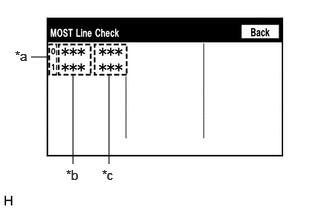
MOST line check screen description
- HINT:
-
·
The inspection will be performed at the time the screen changes from "System Check Mode" to "MOST Line Check".
·The master unit checks the connection of each device on the MOST network.
| Display | Content |
|---|---|
| *a: Node Position Number for Devices Connected to MOST Network | MOST node position numbers are provided for devices connected to the MOST network. |
| *b: Device Name List |
·
Device Name List displays some of the devices that make up the navigation system.
·
The names of the components from Device Name List are shown in the following table. |
| *c: Check Result | The master unit displays the check result on the screen based on the response information from each slave unit. |
| Name | Component |
|---|---|
|
*: w/ Rear Seat Entertainment System |
|
| DCU | Radio receiver assembly |
| AMP | Stereo component amplifier assembly |
| REAR* | Multi-display controller sub-assembly |
| Result | Meaning |
|---|---|
| OK | There was a response for the connection check during the MOST line check. |
| NCON | There was no response for the connection check during the MOST line check. |
- HINT:
-
The device name and result will not be displayed if there is no system registration record and no response for the connection check during the MOST line check even if the device is connected to the MOST network.
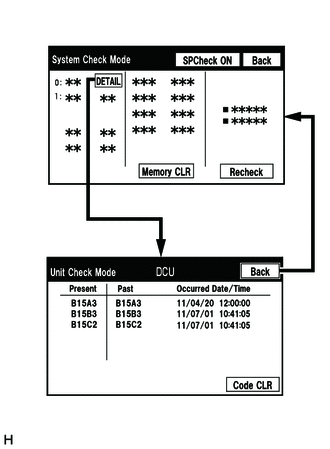
Read the system check result.
If the check result is "DETAIL", select the displayed check result to view the results on the "Unit Check Mode" screen and record them.
- NOTICE:
-
A maximum of 6 DTCs can be displayed for history and present DTCs on the "Unit Check Mode" screen. Therefore, when 6 DTCs are displayed, troubleshoot those DTCs first and then check the "Unit Check Mode" screen again to see if any other DTCs are displayed.
- HINT:
-
·
When all results are "OK", no DTCs are output.
·When proceeding to view the results of another device, select "Back" to return to the "System Check Mode" screen. Repeat the above step to view the results of other devices.
·Changing to the "MOST Line Check" screen is possible only when the MOST network is malfunctioning and "MOST" is displayed for the result.
·If the MOST network had a malfunction in the past, DTCs will be displayed in the Memory column.
·When "NCON" is displayed for all devices connected via the AVC-LAN, or when all device names are not displayed, check if there is a short circuit in the AVC-LAN or devices connected to the AVC-LAN. Repair or replace parts as necessary.
Click hereAudio / Visual / Telematics>NAVIGATION / MULTI INFO DISPLAY>NAVIGATION SYSTEM>AVC-LAN Circuit
·When proceeding to view the results of another device, select the "Back" switch to return to the "System Check Mode" screen. Repeat the above step to view the results of other devices.
Check the details of the DTC(s).
- NOTICE:
-
The navigation system outputs DTCs for the following system. When DTCs other than those in Diagnostic Trouble Code Chart for the navigation system are output, refer to Diagnostic Trouble Code Chaft for the relevant system.
-
System Proceed to *: w/ Rear Seat Entertainment System
Rear Seat Entertainment System* (  )
DTC CLEAR/RECHECK (CLEAR USING SYSTEM CHECK MODE SCREEN)
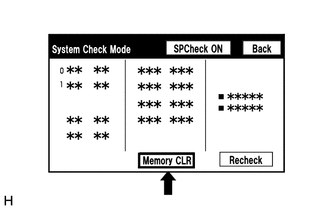
Clear the DTCs
Select "Memory CLR" for 3 seconds.
Check that the check results are cleared.
- HINT:
-
·
To clear the DTCs for a specific device, use the "Unit Check Mode" screen.
·When clearing the DTCs using the "Unit Check Mode" screen, select "Code CLR" for 3 seconds.
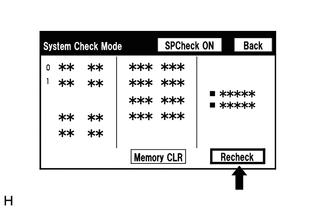
Recheck
Select "Recheck".
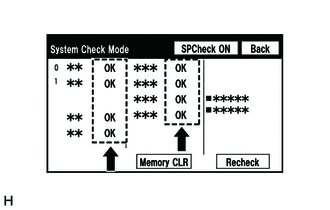
Check that all diagnostic codes are "OK" when the check results are displayed. If a result other than "OK" is displayed, perform troubleshooting again.
- HINT:
-
When the DTCs are cleared using the "Unit Check Mode" screen, select "Back" to return to the "System Check Mode" screen and perform this operation.
FINISH DIAGNOSTIC MODE
Turn the ignition switch off.