MAINTENANCE F33A-FTV AIR CLEANER FILTER ELEMENT REMOVAL
CAUTION / NOTICE / HINT
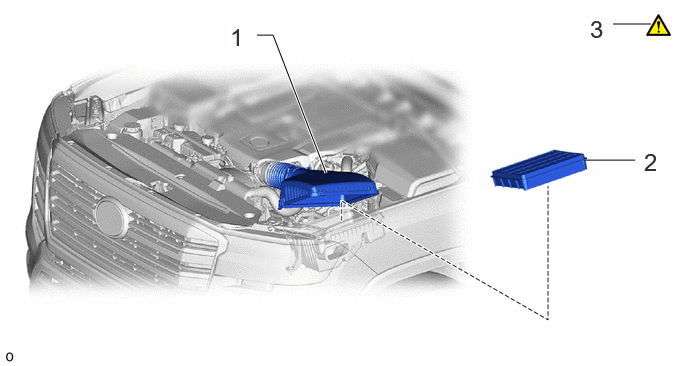
| Procedure | Part Name Code |

|

|

|
|
|---|---|---|---|---|---|
| 1 | AIR CLEANER CAP | 17735 | - | - | - |
| 2 | AIR CLEANER FILTER ELEMENT SUB-ASSEMBLY | 17801 | - | - | - |
| 3 | INSPECT AIR CLEANER FILTER ELEMENT SUB-ASSEMBLY | 17801 | ( ) |
- | - |
PROCEDURE

 17735 1.DISCONNECT AIR CLEANER CAP
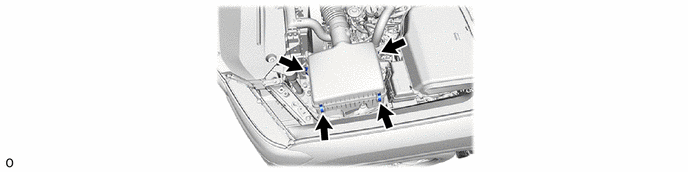
17801 2.REMOVE AIR CLEANER FILTER ELEMENT SUB-ASSEMBLY
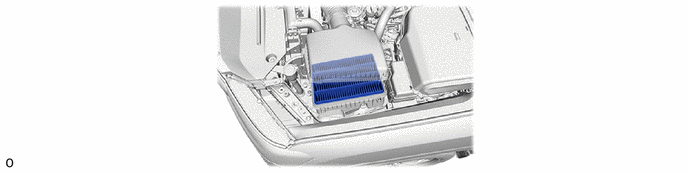
17801 3.INSPECT AIR CLEANER FILTER ELEMENT SUB-ASSEMBLY
|
|
|
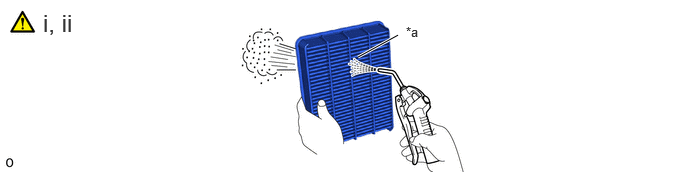
| *a | Air Cleaner Filter Element Sub-assembly Intake Downstream Side (Air Cleaner Cap Side) | - | - |
Check whether the air cleaner filter element sub-assembly is dirty or clogged.
If the air cleaner filter element sub-assembly is dirty or has foreign matter adhered to it, clean the air cleaner filter element sub-assembly with compressed air.
1. If the air cleaner filter element sub-assembly is still extremely dirty after cleaning it, replace the air cleaner filter element sub-assembly with a new one.
- NOTICE:
-
When cleaning the air cleaner filter element sub-assembly, blow the compressed air from the intake downstream side (from the air cleaner cap side).