EXTERIOR PANELS / TRIM REAR BUMPER(except Pickup) REMOVAL
PROCEDURE

 76608 1.REMOVE REAR QUARTER PANEL MUDGUARD SUB-ASSEMBLY LH (w/ Mudguard)
76607 2.REMOVE REAR QUARTER PANEL MUDGUARD SUB-ASSEMBLY RH (w/ Mudguard)
- HINT:
-
Use the same procedure described for the LH side.
61608B 3.REMOVE REAR WHEEL OPENING EXTENSION SUB-ASSEMBLY LH (for Model Code #J71 Series)
61607B 4.REMOVE REAR WHEEL OPENING EXTENSION SUB-ASSEMBLY RH (for Model Code #J71 Series)
- HINT:
-
Use the same procedure described for the LH side.
81560 5.REMOVE REAR COMBINATION LIGHT ASSEMBLY LH (w/ Rear Combination Light)
81550 6.REMOVE REAR COMBINATION LIGHT ASSEMBLY RH (w/ Rear Combination Light)
- HINT:
-
Use the same procedure described for the LH side.
52565 7.REMOVE REAR BUMPER EXTENSION FILLER RH (for Model Code #J76 Series)
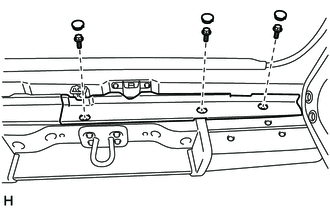
Remove the 3 hole plugs.
Remove the 3 bolts and rear bumper extension filler RH.
52566 8.REMOVE REAR BUMPER EXTENSION FILLER LH (for Model Code #J76 Series)
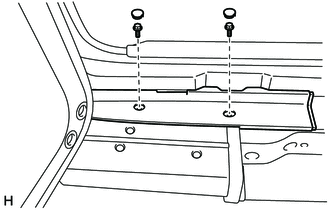
Remove the 2 hole plugs.
Remove the 2 bolts and rear bumper extension filler LH.
52350 9.REMOVE REAR BUMPER STEP ASSEMBLY
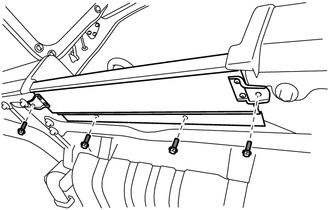
Remove the 4 bolts and rear bumper step assembly.
52303A 10.REMOVE REAR BUMPER STEP SUB-ASSEMBLY LH (w/ Pintle Hook)
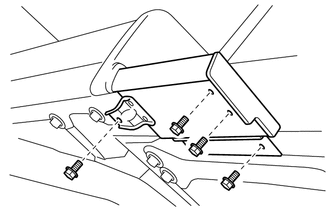
Remove the 4 bolts and rear bumper step sub-assembly LH.
52302A 11.REMOVE REAR BUMPER STEP SUB-ASSEMBLY (w/ Pintle Hook)
- HINT:
-
Use the same procedure described for the LH side.
52153B 12.REMOVE REAR BUMPER EXTENSION LH
for Model Code #J76 Series:
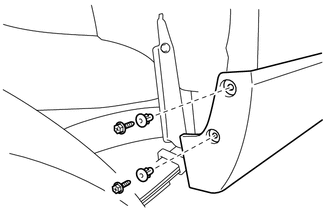
Remove the 2 screws.
Remove the 2 grommets.
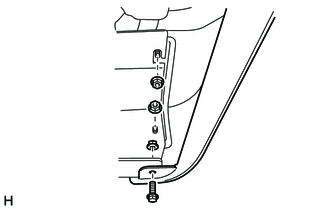
Remove the 3 nuts, bolt and rear bumper extension LH.
except Model Code #J76 Series:
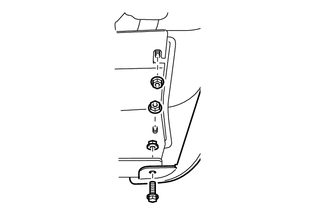
Remove the 3 nuts and bolt.
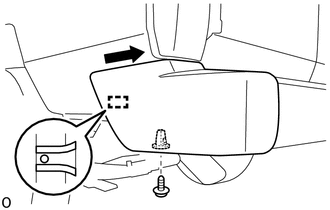
Remove the screw.
Detach the guide and remove the rear bumper extension LH as shown in the illustration.
52152B 13.REMOVE REAR BUMPER EXTENSION RH
- HINT:
-
Use the same procedure described for the LH side.
52069 14.REMOVE REAR BUMPER BAR SUB-ASSEMBLY LH
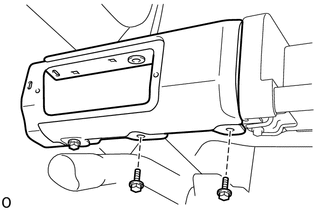
Remove the 2 bolts.
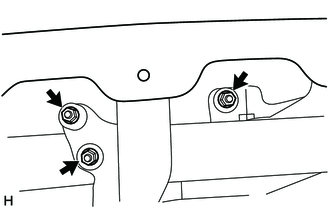
Remove the 3 nuts and rear bumper bar sub-assembly LH.
52019A 15.REMOVE REAR BUMPER BAR SUB-ASSEMBLY RH
- HINT:
-
Use the same procedure described for the LH side.
81920 16.REMOVE REFLEX REFLECTOR ASSEMBLY LH
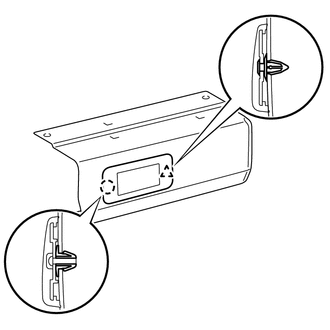
Detach the clip and claw and remove the reflex reflector assembly LH.
81910 17.REMOVE REFLEX REFLECTOR ASSEMBLY RH
- HINT:
-
Use the same procedure described for the LH side.
52359 18.REMOVE REAR BUMPER STEP COVER LH (w/ Cover, w/ Rear Combination Light)
- HINT:
-
When removing the rear bumper step cover LH, heat the rear bumper step cover LH using a heat light.
- Standard:
-
Item Temperature Rear Bumper Step Cover LH 20 to 30°C (68 to 86°F)
- NOTICE:
-
Do not heat the rear bumper step cover LH excessively.
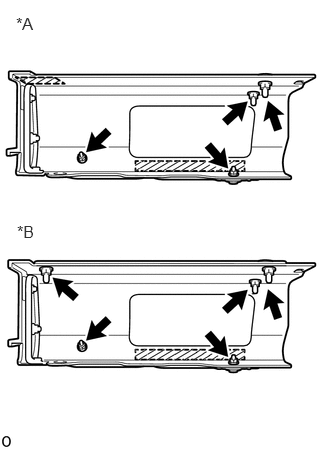
| *A | for Model Code #J76 Series |
| *B | except Model Code #J76 Series |

|
Double-sided Tape |
for Model Code #J76 Series:
Remove the 4 nuts.
except Model Code #J76 Series:
Remove the 5 nuts.
Remove the double-sided tape and rear bumper step cover LH.
52358B 19.REMOVE REAR BUMPER STEP COVER RH (w/ Cover, w/ Rear Combination Light)
- HINT:
-
Use the same procedure described for the LH side.
52553 20.REMOVE REAR BUMPER FILLER LH
for Model Code #J76 Series:
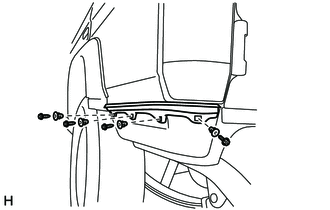
Remove the 4 screws.
Using a clip remover, remove the 4 grommets and rear bumper filler LH.
except Model Code #J76 Series:
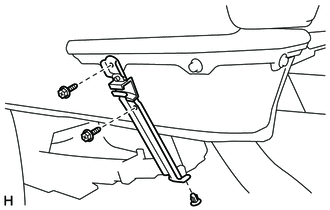
Remove the 2 screws and rear bumper arm mounting bracket LH.
Remove the grommet.
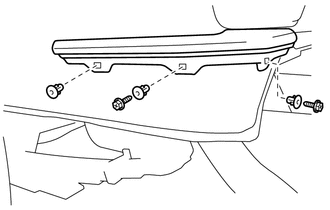
Remove the 2 screws.
Using a clip remover, remove the 3 grommets.
52552 21.REMOVE REAR BUMPER FILLER RH
- HINT:
-
Use the same procedure described for the LH side.
52176A 22.REMOVE REAR BUMPER ARM MOUNTING BRACKET LH (for Model Code #J76 Series)
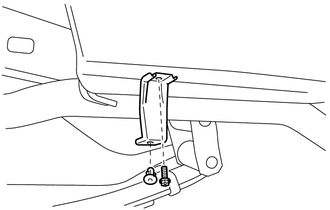
Remove the screw and rear bumper arm mounting bracket LH.
Remove the grommet.
52175 23.REMOVE REAR BUMPER ARM MOUNTING BRACKET (for Model Code #J76 Series)
- HINT:
-
Use the same procedure described for the LH side.
52174E 24.REMOVE REAR BUMPER BAR BRACKET LH
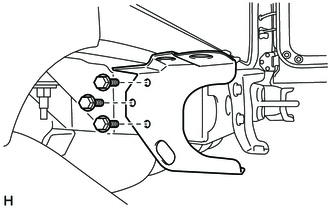
Remove the 3 bolts and rear bumper bar bracket LH.
52173E 25.REMOVE REAR BUMPER BAR BRACKET RH
- HINT:
-
Use the same procedure described for the LH side.
52186B 26.REMOVE REAR BUMPER SIDE MOUNTING BRACKET LH
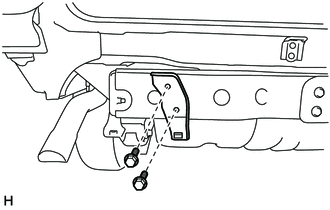
Remove the 2 bolts and rear bumper side mounting bracket LH.
52185B 27.REMOVE REAR BUMPER SIDE MOUNTING BRACKET RH
- HINT:
-
Use the same procedure described for the LH side.
52109A 28.REMOVE REAR SIDE BUMPER SUB-ASSEMBLY LH
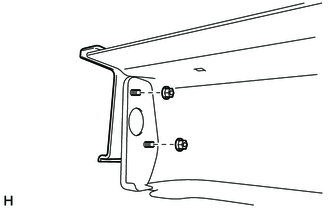
Remove the 2 nuts and rear side bumper sub-assembly LH.
52108B 29.REMOVE REAR BUMPER SIDE EXTENSION SUB-ASSEMBLY RH
- HINT:
-
Use the same procedure described for the rear side bumper sub-assembly LH.