MAINTENANCE AIR CLEANER FILTER ELEMENT INSTALLATION
CAUTION / NOTICE / HINT
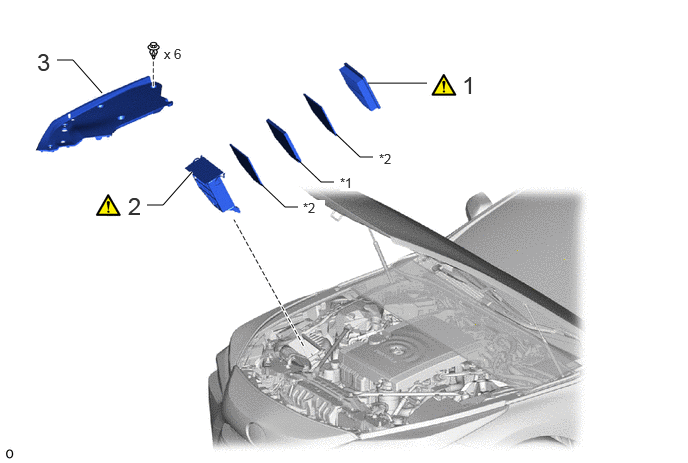
| Procedure | Part Name Code | 
|

|

|
|
|---|---|---|---|---|---|
| 1 | AIR CLEANER FILTER ELEMENT SUB-ASSEMBLY | 17801C | ( ) |
- | - |
| 2 | AIR CLEANER CAP SUB-ASSEMBLY | 17705A | ()
|
- | - |
| 3 | RADIATOR COVER PLATE | 53291B | - | - | - |
| *1 | AIR CLEANER FILTER | *2 | PREFILTER |
PROCEDURE

 17801C
1.INSTALL AIR CLEANER FILTER ELEMENT SUB-ASSEMBLY
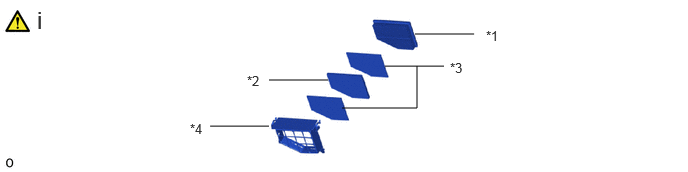
| *1 | Air Cleaner Filter Element Sub-assembly | *2 | Air Cleaner Filter |
| *3 | Prefilter | *4 | Air Cleaner Cap Sub-assembly |
Install the air cleaner filter element sub-assembly, air cleaner filter and 2 prefilters to the air cleaner cap sub-assembly as shown in the illustration.
- NOTICE:
-
When installing the air cleaner filter, push it in horizontally and take care not to remove the sponge on the surrounding area.
17705A
2.INSTALL AIR CLEANER CAP SUB-ASSEMBLY
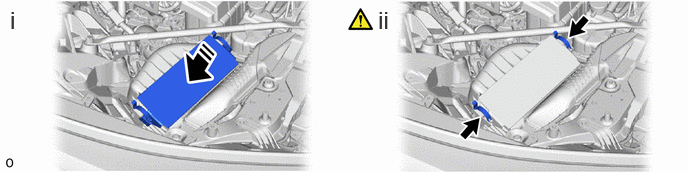
Install the air cleaner cap sub-assembly to the air cleaner case sub-assembly.
Attach the 2 air cleaner cap clamps.
- NOTICE:
- ·
Make sure to push in the air cleaner cap sub-assembly as far as it will go and attach the clamp.
·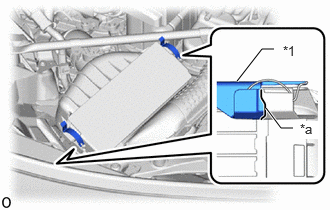 2.771,1.125 2.927,1.333 2.927,1.333 3.052,1.333 true 2.469,0.844 2.729,0.51 2.729,0.51 2.854,0.51 true 2.948,0.448 3.26,0.604 0.313,0.156 10 false *1 3.125,1.26 3.323,1.448 0.198,0.188 10 true *a
*1 Air Cleaner Cap Sub-assembly *a Contact Surfaces
After installation, check that the contact surfaces are contacting each other without any misalignment or gaps as shown in the illustration.
53291B
3.INSTALL RADIATOR COVER PLATE