DOOR LOCK REAR DOOR LOCK INSTALLATION
CAUTION / NOTICE / HINT
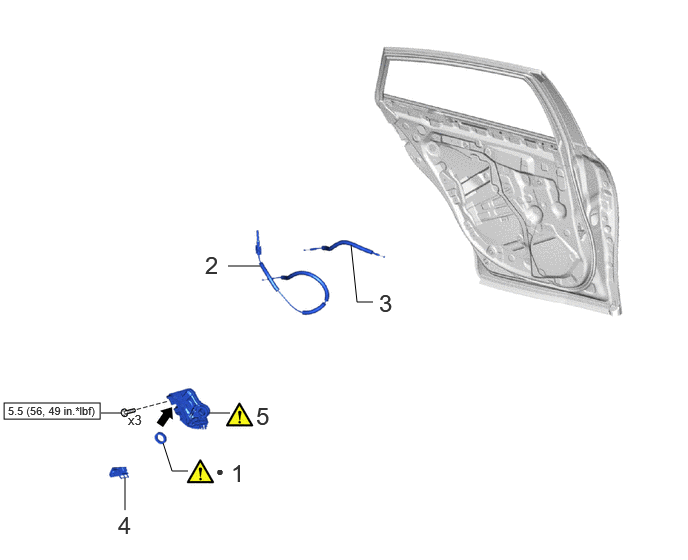
| Procedure | Part Name Code | 
|

|

|
|
|---|---|---|---|---|---|
| 1 | DOOR LOCK WIRING HARNESS SEAL | 69318D | ( ) |
- | - |
| 2 | REAR DOOR INSIDE LOCK/UNLOCK KNOB LOCKING CABLE | 69780E | - | - | - |
| 3 | REAR DOOR LOCK OPEN LEVER REMOTE CONTROL CABLE | 69740E | - | - | - |
| 4 | REAR DOOR LOCK COVER SUB-ASSEMBLY | 69038A | - | - | - |
| 5 | REAR DOOR WITH MOTOR LOCK ASSEMBLY | 69060A | ()
|
- | - |

|
N*m (kgf*cm, ft.*lbf): Specified torque | ● | Non-reusable part |

|
MP grease | - | - |
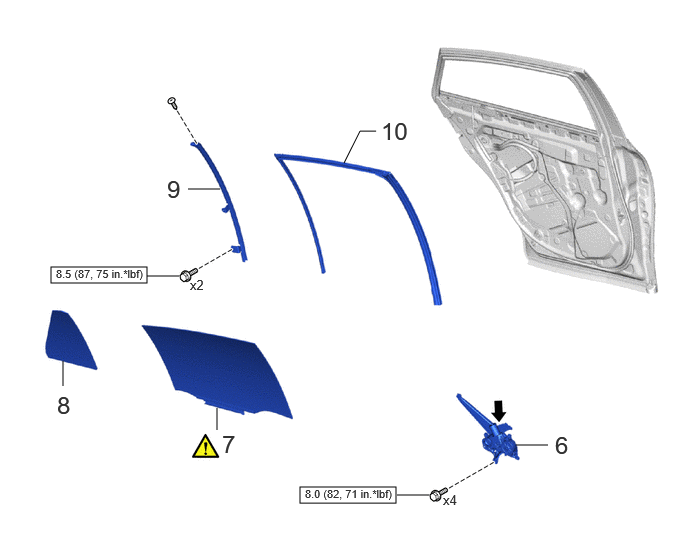
| Procedure | Part Name Code |
|
|
|
|
|---|---|---|---|---|---|
| 6 | REAR DOOR WINDOW REGULATOR SUB-ASSEMBLY | 69804 | - | - | - |
| 7 | REAR DOOR GLASS SUB-ASSEMBLY | 68104 | ()
|
- | - |
| 8 | REAR DOOR QUARTER WINDOW GLASS | 68124B | ()
|
- | - |
| 9 | REAR DOOR WINDOW DIVISION BAR SUB-ASSEMBLY | 67408E | - | - | - |
| 10 | REAR DOOR GLASS RUN | 68152C | - | - | - |
|
|
N*m (kgf*cm, ft.*lbf): Specified torque |
|
MP grease |
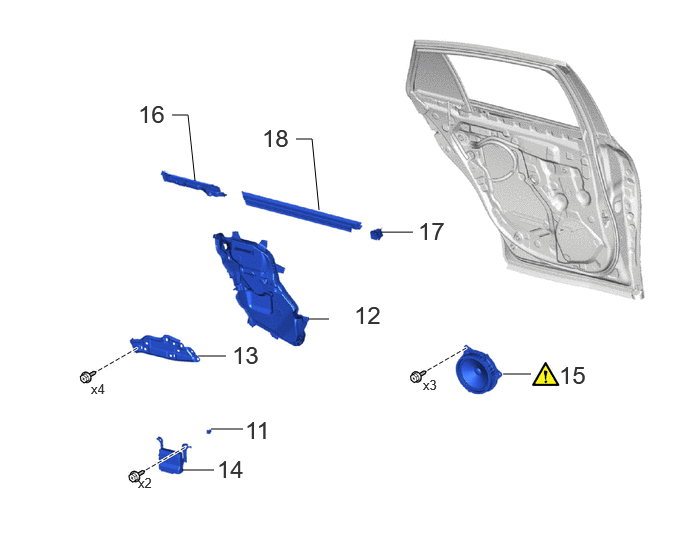
| Procedure | Part Name Code |
|
|
|
|
|---|---|---|---|---|---|
| 11 | HOLE PLUG | - | - | - | - |
| 12 | REAR DOOR SERVICE HOLE COVER | 67842E | ()
|
- | - |
| 13 | REAR DOOR ARMREST SET BRACKET | 67646A | - | - | - |
| 14 | MULTIPLEX NETWORK DOOR ECU REAR | 89225 | - | - | - |
| 15 | REAR SPEAKER ASSEMBLY | 86160B | ()
|
- | - |
| 16 | REAR DOOR BELT REAR SEAL | 68199 | - | - | - |
| 17 | REAR DOOR BELT FRONT SEAL | 68197A | - | - | - |
| 18 | REAR DOOR GLASS INNER WEATHERSTRIP | 68174A | - | - | - |
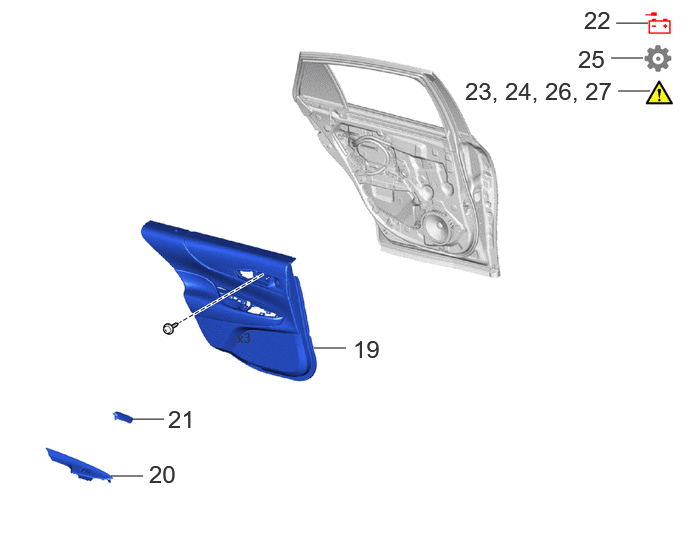
| Procedure | Part Name Code |
|
|
|
|
|---|---|---|---|---|---|
| 19 | REAR DOOR TRIM BOARD SUB-ASSEMBLY | 67604 | - | - | - |
| 20 | REAR POWER WINDOW REGULATOR SWITCH ASSEMBLY WITH REAR DOOR ARMREST BASE PANEL | - | - | - | - |
| 21 | REAR DOOR INSIDE HANDLE BEZEL PLUG | 69284D | - | - | - |
| 22 | CONNECT CABLE TO NEGATIVE CONNECTOR AUXILIARY BATTERY TERMINAL | - | - | - | - |
| 23 | INITIALIZATION AFTER RECONNECTING AUXILIARY BATTERY TERMINAL | ()
|
- | - | - |
| 24 | CHECK FOR SRS WARNING LIGHT | ()
|
- | - | - |
| 25 | INITIALIZE POWER WINDOW SYSTEM | - | - | - | ()
|
| 26 | CHECK FOR POWER WINDOW OPERATION | ()
|
- | - | - |
| 27 | CHECK FOR DOOR LOCK OPERATION | ()
|
- | - | - |
CAUTION / NOTICE / HINT
- HINT:
- ·
Use the same procedure for RHD and LHD vehicles.
·The procedure listed below is for LHD vehicles.
·Use the same procedure for the RH and LH sides.
·The procedure listed below is for the LH side.
PROCEDURE

 69318D
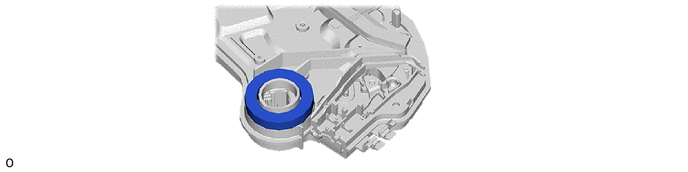
1.INSTALL DOOR LOCK WIRING HARNESS SEAL
|
|
|
69780E
2.INSTALL REAR DOOR INSIDE LOCK/UNLOCK KNOB LOCKING CABLE
69740E
3.INSTALL REAR DOOR LOCK OPEN LEVER REMOTE CONTROL CABLE
69038A
4.INSTALL REAR DOOR LOCK COVER SUB-ASSEMBLY
69060A
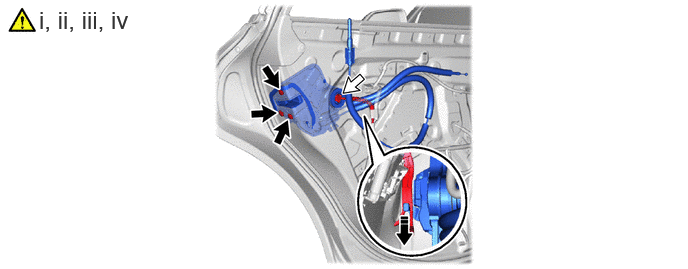
5.INSTALL REAR DOOR WITH MOTOR LOCK ASSEMBLY
|
|
TORX Screw | 
|
Connector |
Apply MP grease to the sliding parts of the rear door lock with motor assembly.
Connect the rear door lock with motor assembly to the release plate of the rear door outside handle frame sub-assembly as shown in the illustration, and set it to the rear door panel.
- HINT:
-
Make sure that the release plate of the rear door outside handle frame sub-assembly is securely connected to the rear door lock with motor assembly.
Using a T30 "TORX" socket wrench, install the rear door lock with motor assembly with the 3 TORX screws
- Torque:
- 5.5 N*m (56 kgf*cm, 49 in.*lbf)
Connect the connector.
69804
6.INSTALL REAR DOOR WINDOW REGULATOR SUB-ASSEMBLY
68104
7.INSTALL REAR DOOR GLASS SUB-ASSEMBLY
|
|
Click here()
|
68124B
8.INSTALL REAR DOOR QUARTER WINDOW GLASS
67408E
9.INSTALL REAR DOOR WINDOW DIVISION BAR SUB-ASSEMBLY
68152C
10.INSTALL REAR DOOR GLASS RUN
11.INSTALL HOLE PLUG
67842E
12.INSTALL REAR DOOR SERVICE HOLE COVER
67646A
13.INSTALL REAR DOOR ARMREST SET BRACKET
89225
14.INSTALL MULTIPLEX NETWORK DOOR ECU REAR (w/ Double Locking System)
86160B
15.INSTALL REAR SPEAKER ASSEMBLY
68199
16.INSTALL REAR DOOR BELT REAR SEAL
68197A
17.INSTALL REAR DOOR BELT FRONT SEAL
68174A
18.INSTALL REAR DOOR GLASS INNER WEATHERSTRIP
67604
19.INSTALL REAR DOOR TRIM BOARD SUB-ASSEMBLY
20.INSTALL REAR POWER WINDOW REGULATOR SWITCH ASSEMBLY WITH REAR DOOR ARMREST BASE PANEL
69284D
21.INSTALL REAR DOOR INSIDE HANDLE BEZEL PLUG
22.CONNECT CABLE TO NEGATIVE CONNECTOR AUXILIARY BATTERY TERMINAL
23. INITIALIZATION AFTER RECONNECTING AUXILIARY BATTERY TERMINAL
Click hereGeneral>SETUP>WHEN DISCONNECTING OR RECONNECTING BATTERY TERMINAL>WORK PROCEDURE
- HINT:
-
When disconnecting and reconnecting the auxiliary battery, there is an automatic learning function that completes learning when the respective system is used.
-
Click hereGeneral>SETUP>WHEN DISCONNECTING OR RECONNECTING BATTERY TERMINAL>AUTOMATIC LEARNING CHART
24. CHECK FOR SRS WARNING LIGHT
25. INITIALIZE POWER WINDOW SYSTEM
26. CHECK FOR POWER WINDOW OPERATION
27. CHECK FOR DOOR LOCK OPERATION