PARK ASSIST / MONITORING TELEVISION CAMERA(for Rear) INSTALLATION
CAUTION / NOTICE / HINT
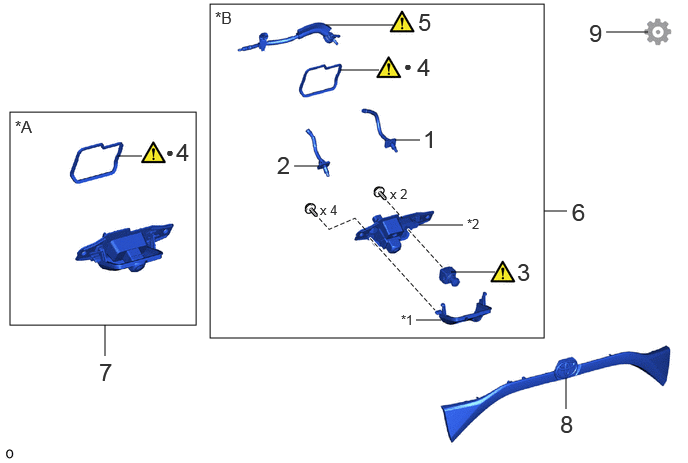
| Procedure | Part Name Code | 
|

|

|
|
|---|---|---|---|---|---|
| 1 | NO. 2 CAMERA CLEANER NOZZLE ASSEMBLY | 867F0B | - | - | - |
| 2 | NO. 1 CAMERA CLEANER NOZZLE ASSEMBLY | 867F0A | - | - | - |
| 3 | INNER MIRROR CAMERA ASSEMBLY | 867C0 | ( ) |
- | - |
| 4 | TELEVISION CAMERA SEAL | - | ()
|
- | - |
| 5 | REAR WASHER (FROM JOINT TO NOZZLE) HOSE | 85373R | ()
|
- | - |
| 6 | TELEVISION AND INNER REAR VIEW MIRROR CAMERA ASSEMBLY | 867A0 | - | - | - |
| 7 | REAR TELEVISION CAMERA ASSEMBLY | 86790D | - | - | - |
| 8 | LUGGAGE COMPARTMENT DOOR OUTSIDE GARNISH SUB-ASSEMBLY | 76801A | - | - | - |
| 9 | ADJUST TELEVISION CAMERA ASSEMBLY | - | - | - | ()
|
| *A | w/o Digital Inner Mirror | *B | w/ Digital Inner Mirror |
| *1 | TELEVISION CAMERA COVER | *2 | REAR TELEVISION CAMERA ASSEMBLY |
| ● | Non-reusable part | - | - |
PROCEDURE

 867F0B
1.INSTALL NO. 2 CAMERA CLEANER NOZZLE ASSEMBLY (w/ Digital Inner Mirror)
867F0A
2.INSTALL NO. 1 CAMERA CLEANER NOZZLE ASSEMBLY (w/ Digital Inner Mirror)
867C0
3.INSTALL INNER MIRROR CAMERA ASSEMBLY (w/ Digital Inner Mirror)
|
|
Click here()
|
4.INSTALL TELEVISION CAMERA SEAL
|
|
|
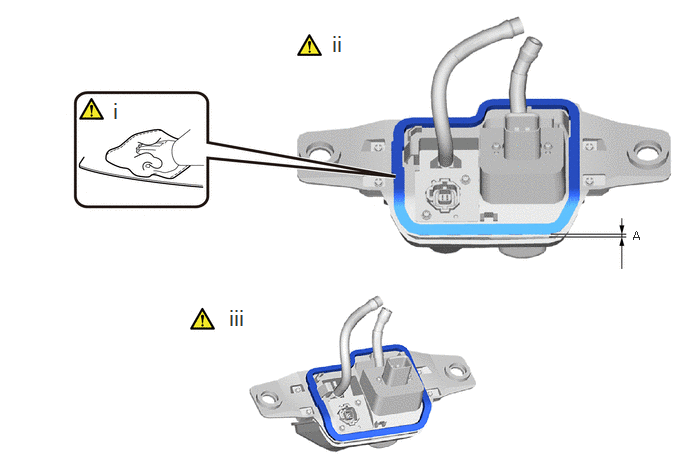
Clean the television camera seal installation surface with a non-residue solvent.
Remove the peeling paper of the television camera seal trying not to touch the adhesional surface.
- NOTICE:
-
Paste position to secure the lower edge 1 mm or more.
- Standard Measurement:
Area Measurement A 1 mm (0.0394 in.) or more.
Remove the release paper from the television camera seal.
- NOTICE:
-
After removing the peeling paper, do not touch the surface of the tape with your fingers or cotton work gloves.
85373R
5.INSTALL REAR WASHER (FROM JOINT TO NOZZLE) HOSE (w/ Digital Inner Mirror)
|
|
Click here()
|
867A0
6.INSTALL TELEVISION AND INNER REAR VIEW MIRROR CAMERA ASSEMBLY (w/ Digital Inner Mirror)
86790D
7.INSTALL REAR TELEVISION CAMERA ASSEMBLY (w/o Digital Inner Mirror)
76801A
8.INSTALL LUGGAGE COMPARTMENT DOOR OUTSIDE GARNISH SUB-ASSEMBLY
86790
9.ADJUST TELEVISION CAMERA ASSEMBLY
for Panoramic View Monitor System:
Click hereAudio / Visual / Telematics>PARK ASSIST / MONITORING>PANORAMIC VIEW MONITOR SYSTEM>CALIBRATION
for Parking Assist Monitor System:
Click hereAudio / Visual / Telematics>PARK ASSIST / MONITORING>PARKING ASSIST MONITOR SYSTEM>CALIBRATION