MAINTENANCE ION EXCHANGER ELEMENT INSTALLATION
CAUTION / NOTICE / HINT
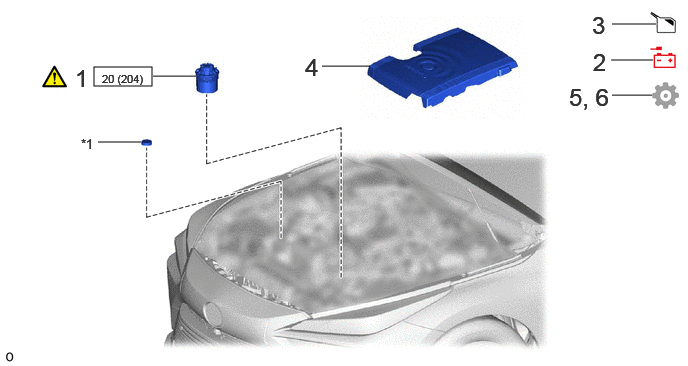
| Procedure | Part Name Code | 
|

|

|
|
|---|---|---|---|---|---|
| 1 | FC COOLING WATER ION EXCHANGER ELEMENT | 16A42 | ( ) |
- | - |
| 2 | NEGATIVE AUXILIARY BATTERY TERMINAL | - | - | - | - |
| 3 | ADD COOLANT (TOYOTA GENUINE FC STACK COOLANT (Pre-mixed)) | - | - | ()
|
- |
| 4 | FC STACK COVER SUB-ASSEMBLY | 1A906 | - | - | - |
| 5 | INITIALIZATION | - | - | - | ()
|
| 6 | INITIALIZATION AFTER RECONNECTING BATTERY TERMINAL | - | - | - | ()
|
| *1 | RESERVE TANK CAP | - | - |

|
N*m (kgf*cm, ft.*lbf): Specified torque | - | - |
PROCEDURE

 16A42
1.INSTALL FC COOLING WATER ION EXCHANGER ELEMENT
Check that there is no damage such as holes or foreign matter attached to the FC cooling water ion exchanger element. In particular, check that there is no damage to the filter mesh.
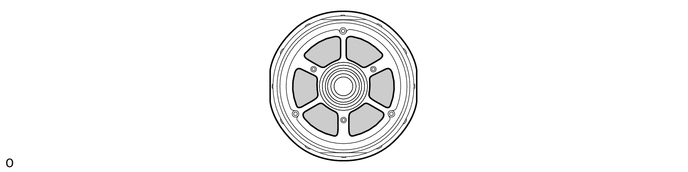

|
Filter Mesh | - | - |
- NOTICE:
-
If an FC cooling water ion exchanger with damage such as holes or the attached foreign matter is installed, the entire FC system may be damaged and cause the vehicle to stop.
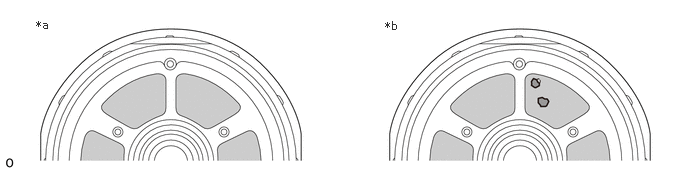 0.375,0.188 0.594,0.385 0.219,0.198 10 false *a 4.01,0.198 4.229,0.396 0.219,0.198 10 false *b
*a CORRECT *b INCORRECT (Such as Holes)
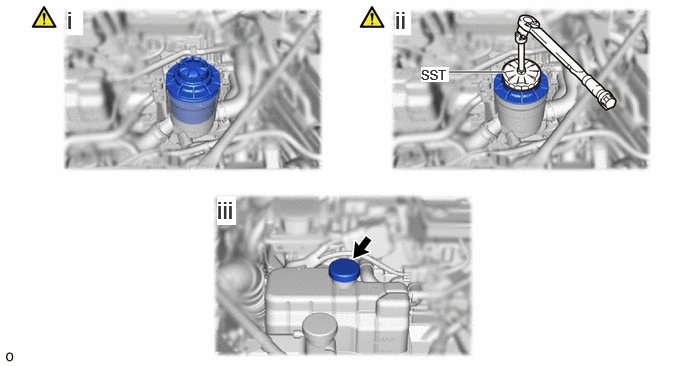
Slowly insert the FC cooling water ion exchanger element into the FC cooling water ion exchanger assembly.
- NOTICE:
-
When installing, if the FC cooling water ion exchanger element is not inserted slowly, the coolant (Toyota genuine FC stack coolant (Pre-mixed)) remaining inside the FC cooling water ion exchanger assembly will overflow.
Using SST, tighten the FC cooling water ion exchanger element.
- SST
- 09228-06502
- Torque:
- 20 N*m (204 kgf*cm, 15 ft.*lbf)
Install the reserve tank cap.
2.CONNECT CABLE TO NEGATIVE AUXILIARY BATTERY TERMINAL
3.ADD COOLANT (TOYOTA GENUINE FC STACK COOLANT (Pre-mixed))
|
|
|

Turn the ignition switch to ON.
Push the FC water release switch.
Turn the ignition switch on (READY).
- HINT:
-
Active drainage mode starts by procedure of (1) - (3).
Turn the ignition switch off.
- HINT:
-
Warm up begins by turning the ignition switch off.
Wait for 5 minutes.
Turn the ignition switch to ON.
Put the engine in inspection mode (maintenance mode).
Click hereGeneral>INTRODUCTION>REPAIR INSTRUCTION>INSPECTION MODE PROCEDURE
Wait for 12 minutes.
Turn the ignition switch off.
Add coolant (Toyota genuine FC stack coolant (Pre-mixed)) to the MAX line.
1A906
4.INSTALL FC STACK COVER SUB-ASSEMBLY
5. INITIALIZATION
|
|
|
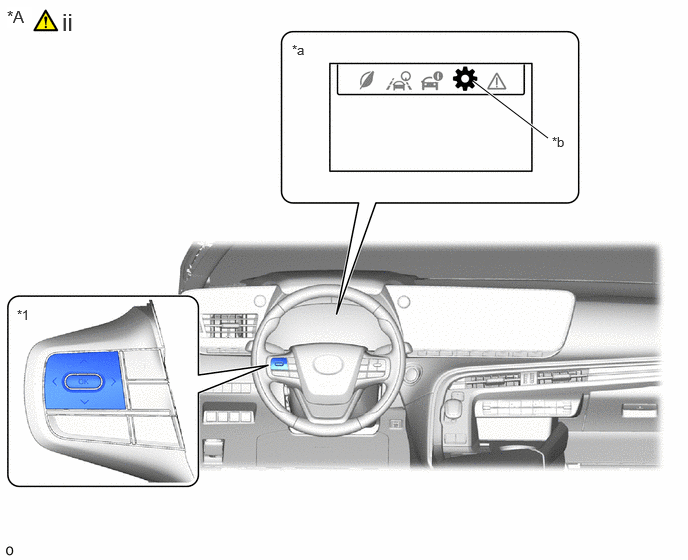
| *A | for LHD | - | - |
| *1 | Steering Pad Switch Assembly | - | - |
| *a | Multi-information Display | *b | Settings Tab |
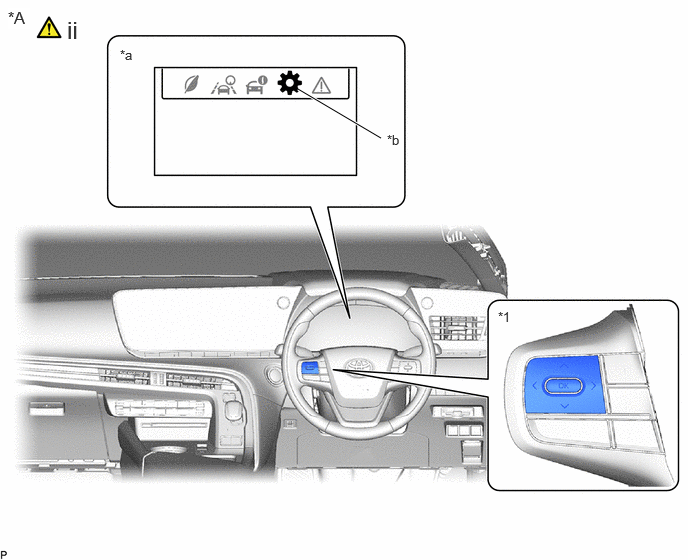
| *A | for RHD | - | - |
| *1 | Steering Pad Switch Assembly | - | - |
| *a | Multi-information Display | *b | Settings Tab |
Turn the ignition switch to ON.
Operate the steering pad switch assembly and select the settings tab on the multi-information display.
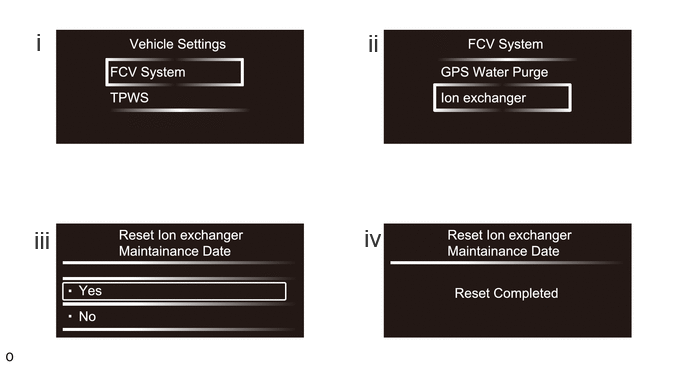
Select "FCV System".
Select "Ion exchanger".
When the "Reset Ion Exchanger Maintainance Date" screen is displayed, select "Yes" and proceed.
When the screen shown in the illustration is displayed, the initialization procedure is complete.
6. INITIALIZATION AFTER RECONNECTING BATTERY TERMINAL
Click hereGeneral>SETUP>WHEN DISCONNECTING OR RECONNECTING BATTERY TERMINAL>WORK PROCEDURE
- HINT:
-
When disconnecting and reconnecting the battery, there is an automatic learning function that completes learning when the respective system is used.
-
Click hereGeneral>SETUP>WHEN DISCONNECTING OR RECONNECTING BATTERY TERMINAL>AUTOMATIC LEARNING CHART