HYBRID / BATTERY CONTROL SERVICE PLUG GRIP INSTALLATION
CAUTION / NOTICE / HINT
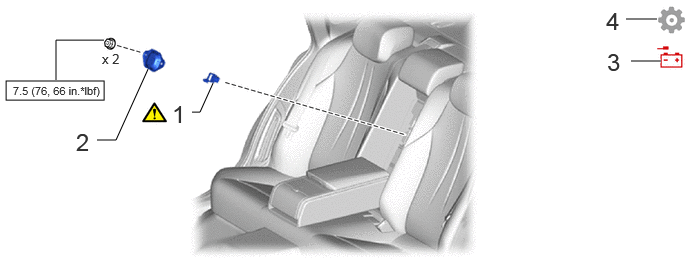
| Procedure | Part Name Code | 
|

|

|
|
|---|---|---|---|---|---|
| 1 | SERVICE PLUG GRIP | G3834 | ( ) |
- | - |
| 2 | NO. 8 EV BATTERY SHIELD PANEL | G92QAA | - | - | - |
| 3 | CONNECT CABLE TO NEGATIVE AUXILIARY BATTERY TERMINAL | - | - | - | - |
| 4 | INITIALIZATION AFTER RECONNECTING AUXILIARY BATTERY TERMINAL | - | - | - | ()
|
PROCEDURE

 G3834
1.INSTALL SERVICE PLUG GRIP
|
|
|
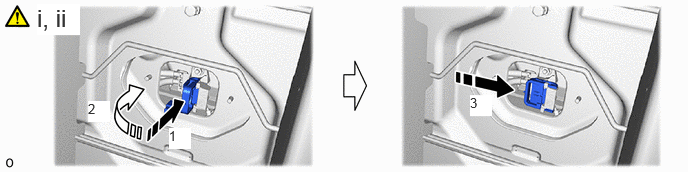
While wearing insulated gloves, and temporarily install the service plug grip as indicated by the arrow (1) shown in the illustration.
Rotate the handle of the service plug grip 90° toward the HV battery and slide it in the direction indicated by the arrow (3) shown in the illustration until a click sound is heard to install the service plug grip.
G92QAA
2.INSTALL NO. 8 EV BATTERY SHIELD PANEL
- Torque:
- 7.5 N*m (76 kgf*cm, 66 in.*lbf)
3.CONNECT CABLE TO NEGATIVE AUXILIARY BATTERY TERMINAL
4. INITIALIZATION AFTER RECONNECTING AUXILIARY BATTERY TERMINAL
Click hereGeneral>SETUP>WHEN DISCONNECTING OR RECONNECTING BATTERY TERMINAL>WORK PROCEDURE
- HINT:
-
When disconnecting and reconnecting the auxiliary battery, there is an automatic learning function that completes learning when the respective system is used.
-
Click hereGeneral>SETUP>WHEN DISCONNECTING OR RECONNECTING BATTERY TERMINAL>AUTOMATIC LEARNING CHART